Skip to content
  • Categories
  • Recent
  • Tags
  • Popular
Skins
  • Light
  • Brite
  • Cerulean
  • Cosmo
  • Flatly
  • Journal
  • Litera
  • Lumen
  • Lux
  • Materia
  • Minty
  • Morph
  • Pulse
  • Sandstone
  • Simplex
  • Sketchy
  • Spacelab
  • United
  • Yeti
  • Zephyr
  • Dark
  • Cyborg
  • Darkly
  • Quartz
  • Slate
  • Solar
  • Superhero
  • Vapor

  • Default (Zephyr)
  • No Skin
Collapse
RipperStore Logo
  1. Home
  2. Assets
  3. Looking for...
  4. Furry Avatars
  5. lf Beaniebaby EDIT Kroxigor

lf Beaniebaby EDIT Kroxigor

Scheduled Pinned Locked Moved Unsolved Furry Avatars
lookingforeditfurry
212 Posts 76 Posters 32.2k Views 117 Watching
  • Oldest to Newest
  • Newest to Oldest
  • Most Votes
Reply
  • Reply as topic
Log in to reply
This topic has been deleted. Only users with topic management privileges can see it.
  • Rocky5R
    Rocky5R
    Rocky5
    wrote on last edited by
    #189

    bump FT

    1 Reply Last reply
    0
    • JayyingJ
      JayyingJ
      Jayying
      wrote on last edited by Jayying
      #190

      Can anyone help with how to do this? I put in Poiyomi,VRCF, and other "common stuff" that most avis use, i put in Kroxigor from VulgaVictor, i then drag in the "Krox Variant" Prefab on top of the Kroxigor Root and it then makes a 2nd avatar rather than re-texturing the main one and it does not look the way it does in the picture. Any help please?
      Tried uploading, gesture managing and getting errors that delete the avatar/prefab from the project.

      JayyingJ Rocky5R 2 Replies Last reply
      0
      • JayyingJ Jayying

        Can anyone help with how to do this? I put in Poiyomi,VRCF, and other "common stuff" that most avis use, i put in Kroxigor from VulgaVictor, i then drag in the "Krox Variant" Prefab on top of the Kroxigor Root and it then makes a 2nd avatar rather than re-texturing the main one and it does not look the way it does in the picture. Any help please?
        Tried uploading, gesture managing and getting errors that delete the avatar/prefab from the project.

        JayyingJ
        JayyingJ
        Jayying
        wrote on last edited by
        #191

        I cant figure out how to make this work, please send me a Chat or add me on Discord if you can help me ❤ Discord: JayyingJenn

        1 Reply Last reply
        0
        • JayyingJ Jayying

          Can anyone help with how to do this? I put in Poiyomi,VRCF, and other "common stuff" that most avis use, i put in Kroxigor from VulgaVictor, i then drag in the "Krox Variant" Prefab on top of the Kroxigor Root and it then makes a 2nd avatar rather than re-texturing the main one and it does not look the way it does in the picture. Any help please?
          Tried uploading, gesture managing and getting errors that delete the avatar/prefab from the project.

          Rocky5R
          Rocky5R
          Rocky5
          wrote on last edited by
          #192

          @Jayying You don't need to put in the original Kroxigor. The version of Beanie's Krox posted here is it's own contained package. Below is a screenshot of the only ones you need for this.
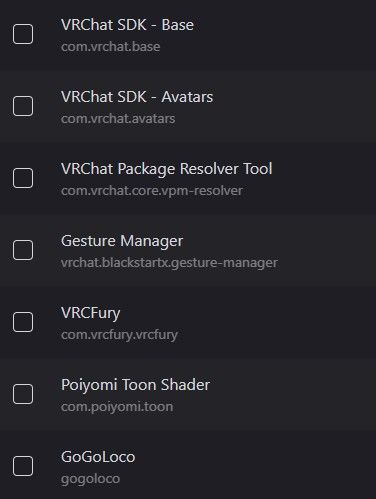
          4f5ca2df-2281-4044-ad5a-65f5f60053ed-image.jpeg

          JayyingJ 1 Reply Last reply
          0
          • Rocky5R
            Rocky5R
            Rocky5
            wrote on last edited by
            #193

            Bump for FT version

            1 Reply Last reply
            0
            • Rocky5R Rocky5

              @Jayying You don't need to put in the original Kroxigor. The version of Beanie's Krox posted here is it's own contained package. Below is a screenshot of the only ones you need for this.

              4f5ca2df-2281-4044-ad5a-65f5f60053ed-image.jpeg

              JayyingJ
              JayyingJ
              Jayying
              wrote on last edited by
              #194

              @Rocky5 Ohh okay! Sorry im new to how edits work, i managed to find 2 fbx's soo far, one in !Kroxigor named "Krox" and one in the folder called "Krox Variant", but these are just FBX's dont i need a avatar to open/double click like i would do to other avatars ive uploaded?

              JayyingJ 1 Reply Last reply
              0
              • JayyingJ Jayying

                @Rocky5 Ohh okay! Sorry im new to how edits work, i managed to find 2 fbx's soo far, one in !Kroxigor named "Krox" and one in the folder called "Krox Variant", but these are just FBX's dont i need a avatar to open/double click like i would do to other avatars ive uploaded?

                JayyingJ
                JayyingJ
                Jayying
                wrote on last edited by
                #195

                I figured out how to do it yay! Thanks ❤

                1 Reply Last reply
                👍
                1
                • W
                  W
                  woowoo
                  wrote on last edited by
                  #196

                  ft bump

                  1 Reply Last reply
                  0
                  • Rocky5R
                    Rocky5R
                    Rocky5
                    wrote on last edited by
                    #197

                    bump FT

                    1 Reply Last reply
                    0
                    • P
                      P
                      Poggsies
                      wrote on last edited by
                      #198

                      Bump for ft!

                      1 Reply Last reply
                      0
                      • lovenightskyL
                        lovenightskyL
                        lovenightsky
                        wrote on last edited by
                        #199

                        bump fttt

                        1 Reply Last reply
                        0
                        • lovenightskyL
                          lovenightskyL
                          lovenightsky
                          wrote on last edited by
                          #200

                          bump fttt

                          1 Reply Last reply
                          0
                          • Rocky5R
                            Rocky5R
                            Rocky5
                            wrote on last edited by
                            #201

                            Bump FT

                            1 Reply Last reply
                            0
                            • lovenightskyL
                              lovenightskyL
                              lovenightsky
                              wrote on last edited by
                              #202

                              bump ftt!!!

                              1 Reply Last reply
                              0
                              • LimeGlassL
                                LimeGlassL
                                LimeGlass
                                wrote on last edited by
                                #203

                                Bump for FT

                                1 Reply Last reply
                                0
                                • XSamX
                                  XSamX
                                  XSam
                                  wrote on last edited by
                                  #204

                                  Bump FT

                                  1 Reply Last reply
                                  0
                                  • C
                                    C
                                    Cherry.Peaches69
                                    wrote on last edited by
                                    #205

                                    Too add an extra note if u stumble accross a vrc fury error remove the gogoloco beyond then go into tools (at the top), gogoloco (click it) then drag the avi that u have in the hierarchy; then reimport the gogoloco beyond in the vrcfury option in the pop up! I hope that makes since if not just reply and I'll help!

                                    1 Reply Last reply
                                    0
                                    • W
                                      W
                                      woowoo
                                      wrote on last edited by
                                      #206

                                      ft bump

                                      1 Reply Last reply
                                      0
                                      • WinChester44W
                                        WinChester44W
                                        WinChester44
                                        wrote on last edited by
                                        #207

                                        Bump FT

                                        1 Reply Last reply
                                        0
                                        • XSamX
                                          XSamX
                                          XSam
                                          wrote on last edited by
                                          #208

                                          Bump FT

                                          1 Reply Last reply
                                          0

                                          Hello! It looks like you're interested in this conversation, but you don't have an account yet.

                                          Getting fed up of having to scroll through the same posts each visit? When you register for an account, you'll always come back to exactly where you were before, and choose to be notified of new replies (either via email, or push notification). You'll also be able to save bookmarks and upvote posts to show your appreciation to other community members.

                                          With your input, this post could be even better 💗

                                          Register Login
                                          Reply
                                          • Reply as topic
                                          Log in to reply
                                          • Oldest to Newest
                                          • Newest to Oldest
                                          • Most Votes


                                          • Login

                                          • Login or register to search.
                                          • First post
                                            Last post
                                          0
                                          • Categories
                                          • Recent
                                          • Tags
                                          • Popular