Skip to content
  • Categories
  • Recent
  • Tags
  • Popular
Skins
  • Light
  • Brite
  • Cerulean
  • Cosmo
  • Flatly
  • Journal
  • Litera
  • Lumen
  • Lux
  • Materia
  • Minty
  • Morph
  • Pulse
  • Sandstone
  • Simplex
  • Sketchy
  • Spacelab
  • United
  • Yeti
  • Zephyr
  • Dark
  • Cyborg
  • Darkly
  • Quartz
  • Slate
  • Solar
  • Superhero
  • Vapor

  • Default (Zephyr)
  • No Skin
Collapse
RipperStore Logo
  1. Home
  2. Assets
  3. Looking for...
  4. Furry Avatars
  5. LF: "Smiler Bunny"

LF: "Smiler Bunny"

Scheduled Pinned Locked Moved Unsolved Furry Avatars
furrylooking foravatarnsfw
8 Posts 4 Posters 709 Views 5 Watching
  • Oldest to Newest
  • Newest to Oldest
  • Most Votes
Reply
  • Reply as topic
Log in to reply
This topic has been deleted. Only users with topic management privileges can see it.
  • mochi_yipieM
    mochi_yipieM
    mochi_yipie
    wrote on last edited by
    #1

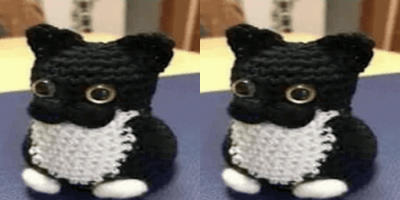
    it was my main avi for a long time until it got banned (bc i was using from someone who posted it so it was public)
    i searched here and even found some files with the model, but for some reason the upload freezes when its compiling the shaders, and honestly i dont understand anything about making/editing/fixing avatars, i only know how to upload 😭
    someone pleaseee help me, i really want this avatar back!
    this post has the files of the avatar: https://forum.ripper.store/post/530160
    5a2f6e49-6895-4900-8a1f-01b1cbb3d917-image.jpeg

    BunnyyyyyyyyyyB 1 Reply Last reply
    0
    • ResuR
      ResuR
      Resu
      wrote on last edited by
      #2

      bump

      Need helping handz!!! :33

      1 Reply Last reply
      0
      • mochi_yipieM mochi_yipie

        it was my main avi for a long time until it got banned (bc i was using from someone who posted it so it was public)
        i searched here and even found some files with the model, but for some reason the upload freezes when its compiling the shaders, and honestly i dont understand anything about making/editing/fixing avatars, i only know how to upload 😭
        someone pleaseee help me, i really want this avatar back!
        this post has the files of the avatar: https://forum.ripper.store/post/530160
        5a2f6e49-6895-4900-8a1f-01b1cbb3d917-image.jpeg

        BunnyyyyyyyyyyB
        BunnyyyyyyyyyyB
        Bunnyyyyyyyyyy
        wrote on last edited by
        #3

        @mochi_yipie are you just wanting someone to upload it for you?

        mochi_yipieM 1 Reply Last reply
        0
        • shark boiS
          shark boiS
          shark boi
          wrote on last edited by
          #4

          [register or login to view this hidden content]

          you need to remove the gogoloco in the Parameters and FX

          mochi_yipieM 1 Reply Last reply
          1
          • BunnyyyyyyyyyyB Bunnyyyyyyyyyy

            @mochi_yipie are you just wanting someone to upload it for you?

            mochi_yipieM
            mochi_yipieM
            mochi_yipie
            wrote on last edited by mochi_yipie
            #5

            @Bunnyyyyyyyyyy actually i want someone to fix the files or explain me how to, since the upload freezes when it starts importing assets*, but that would work too
            (misstyped "compiling shaders" instead of "importing assets" mb)

            1 Reply Last reply
            0
            • shark boiS shark boi

              [register or login to view this hidden content]

              you need to remove the gogoloco in the Parameters and FX

              mochi_yipieM
              mochi_yipieM
              mochi_yipie
              wrote on last edited by
              #6

              @shark-boi these?
              8007944f-be17-4af4-a707-9a3591c7dfdc-image.jpeg 07a87cbe-c5c1-4bc7-8c84-79f16752e7ae-image.jpeg

              1 Reply Last reply
              0
              • mochi_yipieM
                mochi_yipieM
                mochi_yipie
                wrote on last edited by
                #7

                bump

                1 Reply Last reply
                0
                • shark boiS
                  shark boiS
                  shark boi
                  wrote on last edited by
                  #8

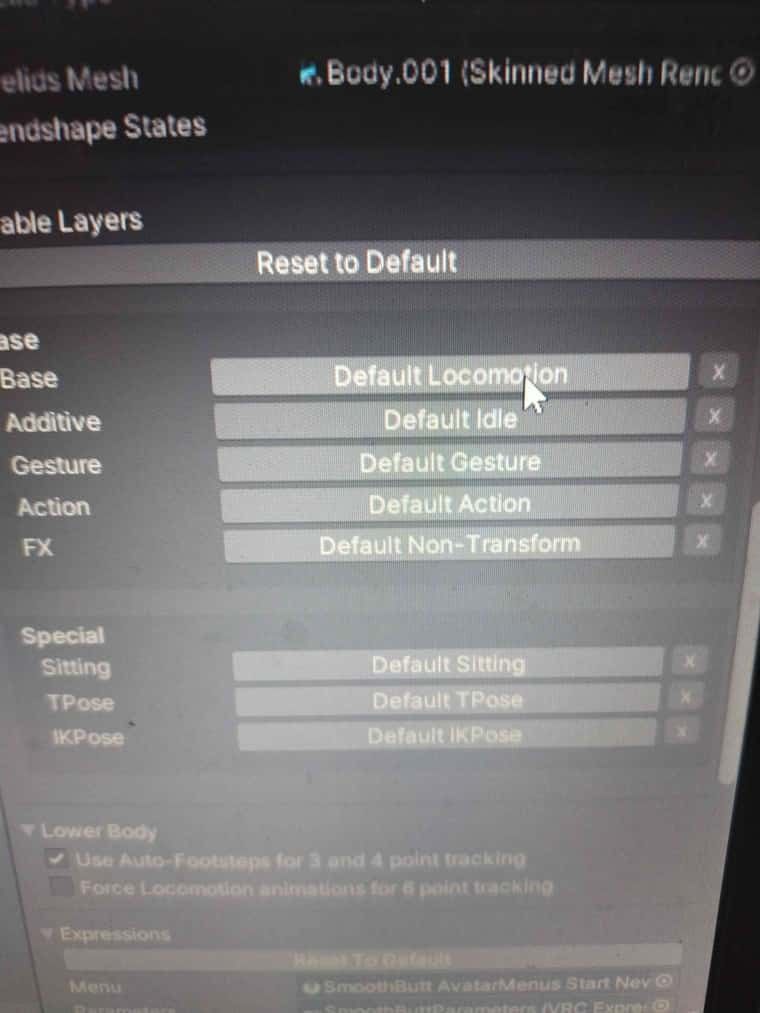
                  you'll need to go into the inspector and scroll down to playable layers there, it as preset gogo even though the model doesn't have gogo
                  Get rid of all of them

                  479c661b-3e80-4834-9104-48e86205c181-image.jpeg

                  1 Reply Last reply
                  0

                  Hello! It looks like you're interested in this conversation, but you don't have an account yet.

                  Getting fed up of having to scroll through the same posts each visit? When you register for an account, you'll always come back to exactly where you were before, and choose to be notified of new replies (either via email, or push notification). You'll also be able to save bookmarks and upvote posts to show your appreciation to other community members.

                  With your input, this post could be even better 💗

                  Register Login
                  Reply
                  • Reply as topic
                  Log in to reply
                  • Oldest to Newest
                  • Newest to Oldest
                  • Most Votes


                  • Login

                  • Login or register to search.
                  • First post
                    Last post
                  0
                  • Categories
                  • Recent
                  • Tags
                  • Popular