Skip to content
  • Categories
  • Recent
  • Tags
  • Popular
Skins
  • Light
  • Brite
  • Cerulean
  • Cosmo
  • Flatly
  • Journal
  • Litera
  • Lumen
  • Lux
  • Materia
  • Minty
  • Morph
  • Pulse
  • Sandstone
  • Simplex
  • Sketchy
  • Spacelab
  • United
  • Yeti
  • Zephyr
  • Dark
  • Cyborg
  • Darkly
  • Quartz
  • Slate
  • Solar
  • Superhero
  • Vapor

  • Default (Zephyr)
  • No Skin
Collapse
RipperStore Logo
  1. Home
  2. Assets
  3. Gifts / Downloads
  4. Gift: ソフトレイヤーヘア & Misty Bloom Makeup

Gift: ソフトレイヤーヘア & Misty Bloom Makeup

Scheduled Pinned Locked Moved Gifts / Downloads
luminaboothassestmakeup texturegift-booth
9 Posts 7 Posters 6.7k Views 7 Watching
  • Oldest to Newest
  • Newest to Oldest
  • Most Votes
Reply
  • Reply as topic
Log in to reply
This topic has been deleted. Only users with topic management privileges can see it.
  • PlaugeDP
    PlaugeDP
    PlaugeD
    wrote on last edited by
    #1

    https://0sheep0.booth.pm/items/7927633

    https://peachedge.booth.pm/items/7928538

    [register or login to view this hidden content]

    It's always a thank you or calling me the best, legend, cool, awesome

    No more Sharing

    1 Reply Last reply
    20
    • IiueI
      IiueI
      Iiue
      wrote on last edited by
      #2

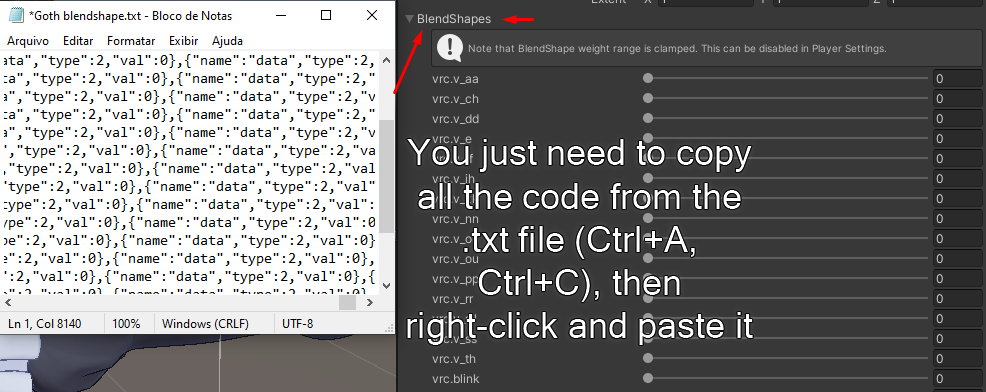
      How do you get the blendshapes from the txt file?

      IŪI GuppG 2 Replies Last reply
      0
      • IiueI Iiue

        How do you get the blendshapes from the txt file?

        IŪI
        IŪI
        IŪ
        wrote on last edited by
        #3

        @Rueii It's probably a copy and paste on the blendshape section

        -Coming back temporarily-

        PLEASE READ
        Leaving the community, some people in here really make staying here exhausting, don't ask for any future updates

        For file issues, I recommend @OneShotaVRC 's “Corrupted File After Extraction? Virus Detected? Check this before asking your benefactor” thread , worth a read!

        1 Reply Last reply
        0
        • S sss190 referenced this topic on
        • IiueI Iiue

          How do you get the blendshapes from the txt file?

          GuppG
          GuppG
          Gupp
          wrote on last edited by
          #4

          @Rueii this is a photo of how to do it. 5021e017-f3a0-41c6-8898-7d713d61c580-EasyBlendshapeTutorial.png

          🐟🐟🐟🐟🐟🐟🐟🐟🐟🐟🐟
          upvotes are always appreciated
          🐟🐟🐟🐟🐟🐟🐟🐟🐟🐟🐟

          seiS B 2 Replies Last reply
          2
          • GuppG Gupp

            @Rueii this is a photo of how to do it. 5021e017-f3a0-41c6-8898-7d713d61c580-EasyBlendshapeTutorial.png

            seiS
            seiS
            sei
            wrote on last edited by sei
            #5
            This post is deleted!
            1 Reply Last reply
            0
            • B
              B
              BebeBlossom
              wrote on last edited by
              #6

              Thank you!

              1 Reply Last reply
              0
              • GuppG Gupp

                @Rueii this is a photo of how to do it. 5021e017-f3a0-41c6-8898-7d713d61c580-EasyBlendshapeTutorial.png

                B
                B
                BebeBlossom
                wrote on last edited by
                #7

                @Gupp Image is not loading for me, can you give a link for it pls?

                GuppG 1 Reply Last reply
                0
                • B BebeBlossom

                  @Gupp Image is not loading for me, can you give a link for it pls?

                  GuppG
                  GuppG
                  Gupp
                  wrote on last edited by
                  #8

                  @BebeBlossom seems posting a png of it isnt allowed. But you can right click on the blendshapes dropdown menu, under the skin mesh renderer and paste them that way. With the text file, select all then copy it, under the blendshape dropdown right click it and press paste. it should set them correctly

                  🐟🐟🐟🐟🐟🐟🐟🐟🐟🐟🐟
                  upvotes are always appreciated
                  🐟🐟🐟🐟🐟🐟🐟🐟🐟🐟🐟

                  1 Reply Last reply
                  0
                  • ineviTabLeI
                    ineviTabLeI
                    ineviTabLe
                    wrote on last edited by
                    #9

                    thanks for the beautiful makeup, it's much appreciated ❤

                    please don't request on non-fullset gifts, just make an LF post! and make sure to thank people for their gifts <3
                    if any of my links go down please @mention me!

                    Looking for Mayo assets? I got you covered! #1 cutie collector at your service
                    LF:
                    pretty boy supremacy

                    1 Reply Last reply
                    0

                    Hello! It looks like you're interested in this conversation, but you don't have an account yet.

                    Getting fed up of having to scroll through the same posts each visit? When you register for an account, you'll always come back to exactly where you were before, and choose to be notified of new replies (either via email, or push notification). You'll also be able to save bookmarks and upvote posts to show your appreciation to other community members.

                    With your input, this post could be even better 💗

                    Register Login
                    Reply
                    • Reply as topic
                    Log in to reply
                    • Oldest to Newest
                    • Newest to Oldest
                    • Most Votes


                    • Login

                    • Login or register to search.
                    • First post
                      Last post
                    0
                    • Categories
                    • Recent
                    • Tags
                    • Popular