
(RIP REQUEST) POSH
-
@whiski I have the same problem. Unfortunately, this method does not work on new content

@dyavolist is it from a vrca i gave out youre trying it on or a different one?
-
@dyavolist is it from a vrca i gave out youre trying it on or a different one?
-
@whiski Nope, I tried it on an avatar that was published after the file encryption update
@dyavolist is it a public?
if youre doing the method to get the avatar from the cache, that hasnt worked for a while. ripping is still entirely possible right now on publics
-
@dyavolist is it a public?
if youre doing the method to get the avatar from the cache, that hasnt worked for a while. ripping is still entirely possible right now on publics
-
@dyavolist what way are you trying to rip it? have you got an avatar id i can give a go on?
-
@dyavolist what way are you trying to rip it? have you got an avatar id i can give a go on?
-
@dyavolist yeah that hasnt worked for a while, since like last year october time (?) i cant remember when the encryption update came out. there are still ways to get vrcas even with the encryption update though, either clients or bots
-
@dyavolist yeah that hasnt worked for a while, since like last year october time (?) i cant remember when the encryption update came out. there are still ways to get vrcas even with the encryption update though, either clients or bots
-
@whiski
Could you tell me more about the bots? Are they public, or do I need an invite to access them? -
@dyavolist yeah that hasnt worked for a while, since like last year october time (?) i cant remember when the encryption update came out. there are still ways to get vrcas even with the encryption update though, either clients or bots
-
-
@whiski Honestly I am super new to this unity shit and I have no idea if theres anything im supposed to drag in before clicking on the repair project buttons
@TycoonMaster6282 if you have the project folder with all the stuff extracted from the vrca (and the . added in front of the folders), and you have FACs, then thats really all you need. if you need any help you can add my discord in my bio and i can try my best
-
@wachi I'm writing this response while I'm doing a vrca to unity, so it should work fine. (Images have been removed for some reason, though this guide still should be simple enough to follow. if you need any clarification then my discord is in my bio)
Just to specify, this works fine on .vrca files. if you got a __data file, it wont work as that method was patched ages ago with the cache encryption update
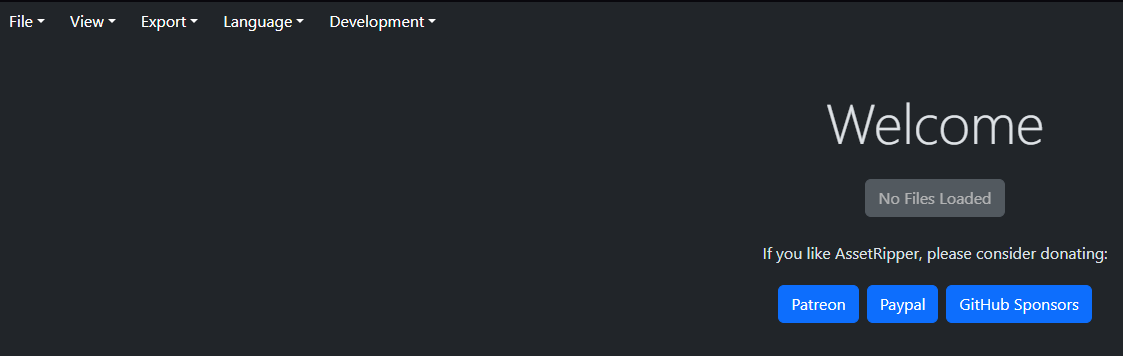
when you run asset ripper (https://github.com/AssetRipper/AssetRipper), you should see a page like this open. top left, click "File", then "Open File". Select the vrca you have. once its done what it has to, click "Export". select an empty folder and click "Export Unity Project".
Once you've exported, you should see this in the folder you selected to export to:
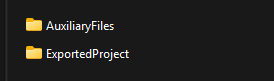
- I've been told the images dont load, so "this" refers to AuxiliaryFiles and ExportedProject in the folder you decided to export to
get rid of "AuxiliaryFiles" as it's unimportant, and in "ExportedProject" delete the "Packages" and "ProjectSettings" folder. In the "Assets" folder, rename "Scripts" to ".Scripts".
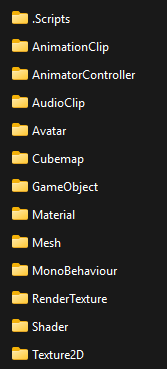
Then in unity, you'll need FACS Utils in your unity project. when you have that, just drag in the "Assets" folder to your unity project. From then on, you'll just need to use FACS Utils to fix the avatar to get it working normally.
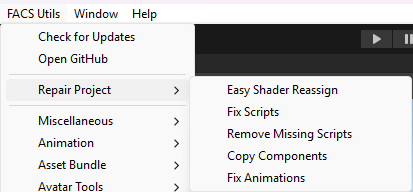
Just use each of the buttons under the "Repair Project" tab, from top to bottom, and it should work just fine. If you need anything more explained, I can try my best!
Hope it works for you!@whiski does this still work? i click open file and it just loads forever


Hello! It looks like you're interested in this conversation, but you don't have an account yet.
Getting fed up of having to scroll through the same posts each visit? When you register for an account, you'll always come back to exactly where you were before, and choose to be notified of new replies (either via email, or push notification). You'll also be able to save bookmarks and upvote posts to show your appreciation to other community members.
With your input, this post could be even better 💗
Register Login