Skip to content
  • Categories
  • Recent
  • Tags
  • Popular
Skins
  • Light
  • Brite
  • Cerulean
  • Cosmo
  • Flatly
  • Journal
  • Litera
  • Lumen
  • Lux
  • Materia
  • Minty
  • Morph
  • Pulse
  • Sandstone
  • Simplex
  • Sketchy
  • Spacelab
  • United
  • Yeti
  • Zephyr
  • Dark
  • Cyborg
  • Darkly
  • Quartz
  • Slate
  • Solar
  • Superhero
  • Vapor

  • Default (Zephyr)
  • No Skin
Collapse
RipperStore Logo
  1. Home
  2. Assets
  3. Looking for...
  4. Furry Avatars
  5. LF: Ghostly Honey bee model by ~Ghostly~

LF: Ghostly Honey bee model by ~Ghostly~

Scheduled Pinned Locked Moved Furry Avatars
looking forfurryavatarghostly
44 Posts 19 Posters 5.8k Views 40 Watching
  • Oldest to Newest
  • Newest to Oldest
  • Most Votes
Reply
  • Reply as topic
Log in to reply
This topic has been deleted. Only users with topic management privileges can see it.
  • Katie_foxK Katie_fox

    Bump for anthro beees~!

    L
    L
    lafurry
    wrote on last edited by
    #32

    @Katie_fox

    1 Reply Last reply
    0
    • Rocky5R Rocky5

      @crimsonxhowl Link is still good from @nonohun above

      🔗 Download Link (drive.google.com)

      exE
      exE
      ex
      wrote on last edited by
      #33

      @Rocky5 tysm

      shhh

      plz bmp!

      1 Reply Last reply
      0
      • Rocky5R Rocky5

        @crimsonxhowl Link is still good from @nonohun above

        🔗 Download Link (drive.google.com)

        PumpkinSpicedP
        PumpkinSpicedP
        PumpkinSpiced
        wrote on last edited by
        #34

        @Rocky5 The bottom is gone.... So I cant put a skirt on her ;w;

        ~Milltina hoarder~

        Rocky5R 1 Reply Last reply
        0
        • PumpkinSpicedP PumpkinSpiced

          @Rocky5 The bottom is gone.... So I cant put a skirt on her ;w;

          Rocky5R
          Rocky5R
          Rocky5
          wrote on last edited by
          #35

          @PumpkinSpiced What do you mean by bottom? It looked complete to me.

          1 Reply Last reply
          0
          • G
            G
            gamer2354
            wrote on last edited by
            #36

            Can't seem to upload it, having issues, anyone else dealing with it?

            Rocky5R 1 Reply Last reply
            0
            • G gamer2354

              Can't seem to upload it, having issues, anyone else dealing with it?

              Rocky5R
              Rocky5R
              Rocky5
              wrote on last edited by
              #37

              @gamer2354 Uploaded just fine for me.
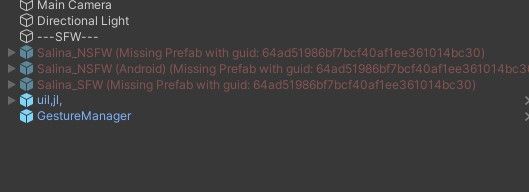
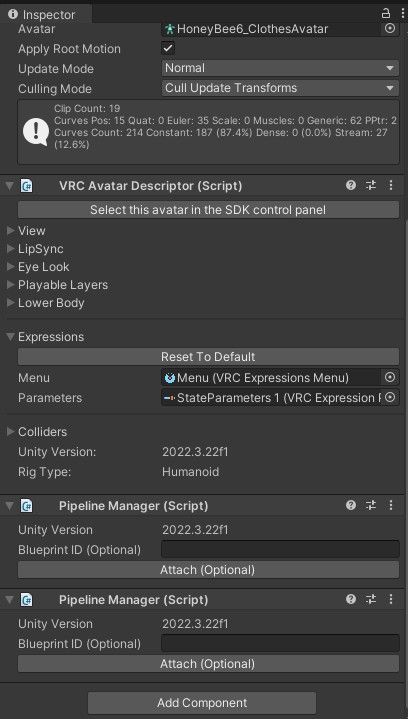
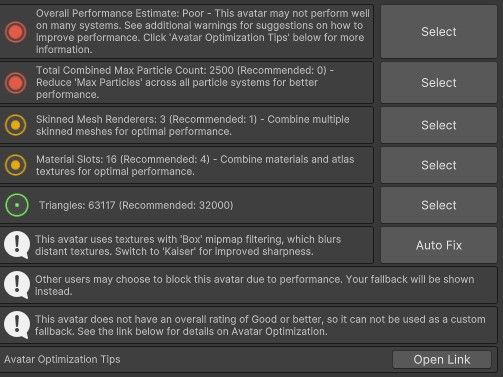
              Are you getting an error message? If you are, clear your console, try and upload it again, then screenshot the top few red lines from the console. That'll help identify what the cause is.

              1 Reply Last reply
              0
              • G
                G
                gamer2354
                wrote on last edited by gamer2354
                #38

                @rocky5

                image_2026-03-17_104034525.png

                1a75d4ec-819d-4c33-b001-80d465549e6d-image.jpeg

                d3d2964c-8377-4434-b2c2-2c9e0bc349fc-image.jpeg

                9a2f026e-9d15-4823-bd9b-5451ff42f3a8-image.jpeg

                1 Reply Last reply
                0
                • G
                  G
                  gamer2354
                  wrote on last edited by
                  #39

                  I don't know if the file is like corrupt or something, I'm still fairly new to unity

                  Rocky5R 1 Reply Last reply
                  0
                  • G gamer2354

                    I don't know if the file is like corrupt or something, I'm still fairly new to unity

                    Rocky5R
                    Rocky5R
                    Rocky5
                    wrote on last edited by
                    #40

                    @gamer2354 Ok, I cleaned it up a little and re-exported the package.

                    You're best starting with a black project, but if you import this over the top of your project, it should prompt you to reload the scene which will add in the corrections.

                    Needs Poiyomi.
                    Gesture Manager is used to test the avatar in Unity.

                    [register or login to view this hidden content]

                    G 1 Reply Last reply
                    2
                    • G
                      G
                      gamer2354
                      wrote on last edited by
                      #41

                      thanks!

                      1 Reply Last reply
                      0
                      • Rocky5R Rocky5

                        @gamer2354 Ok, I cleaned it up a little and re-exported the package.

                        You're best starting with a black project, but if you import this over the top of your project, it should prompt you to reload the scene which will add in the corrections.

                        Needs Poiyomi.
                        Gesture Manager is used to test the avatar in Unity.

                        [register or login to view this hidden content]

                        G
                        G
                        gamer2354
                        wrote on last edited by
                        #42

                        @Rocky5 The Bee still does not work :C

                        cfca7445-c282-4ed0-90c1-7142731d8a60-image.jpeg

                        NyaKitN 1 Reply Last reply
                        0
                        • G
                          G
                          gamer2354
                          wrote on last edited by
                          #43

                          bump

                          1 Reply Last reply
                          0
                          • G gamer2354

                            @Rocky5 The Bee still does not work :C

                            cfca7445-c282-4ed0-90c1-7142731d8a60-image.jpeg

                            NyaKitN
                            NyaKitN
                            NyaKit
                            wrote on last edited by
                            #44

                            @gamer2354 It requires a little cleanup, Those Errors show you where the broken scripts are. Find each one on the armature and remove the Script that says Missing, It'll will have a warning symbol. Once ALL Missing scripts are gone it will upload, I may actually play with this and drop a working version.


                            1 Reply Last reply
                            1

                            Hello! It looks like you're interested in this conversation, but you don't have an account yet.

                            Getting fed up of having to scroll through the same posts each visit? When you register for an account, you'll always come back to exactly where you were before, and choose to be notified of new replies (either via email, or push notification). You'll also be able to save bookmarks and upvote posts to show your appreciation to other community members.

                            With your input, this post could be even better 💗

                            Register Login
                            Reply
                            • Reply as topic
                            Log in to reply
                            • Oldest to Newest
                            • Newest to Oldest
                            • Most Votes


                            • Login

                            • Login or register to search.
                            • First post
                              Last post
                            0
                            • Categories
                            • Recent
                            • Tags
                            • Popular