
梅 | Ume
-
-
-

Keeps giving me this error even after making a new project I followed everything correctly
@sunnysett sameee :<
-
Keeps giving me this error even after making a new project I followed everything correctly
-
I got it to upload, I just went to Poi>Tools>ThirdPartyIncluder>Refresh and tried again !
-
@sunnysett did you make sure to import everything?
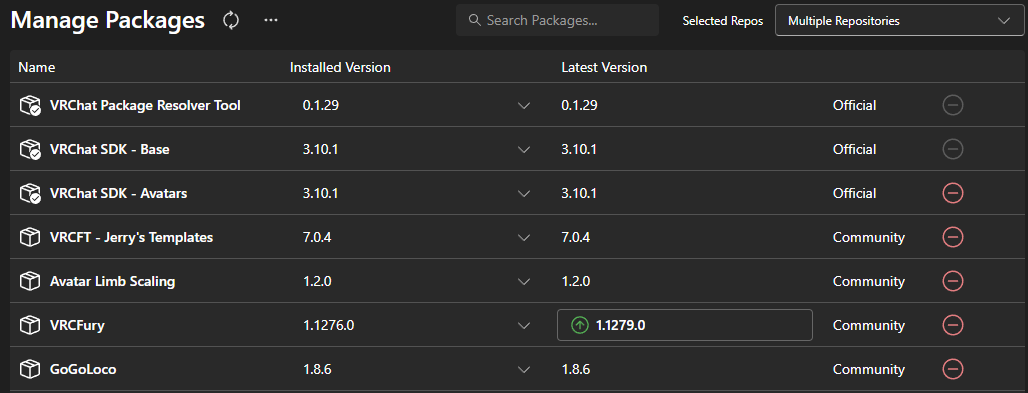
-
-
@sunnysett can i see the alerts in your sdk builder? like where you go to click upload
ᶻ 𝗓 𐰁
𝙍𝙚𝙢𝙚𝙢𝙗𝙚𝙧 𝙩𝙤 𝙗𝙚 𝙠𝙞𝙣𝙙
Remember to upvote those who share! -
@sunnysett can i see the alerts in your sdk builder? like where you go to click upload
-
@cybergothh


I think I found the problem... it might be the texture memory usage..damn, shes too pretty for me to downgrade the quality@sunnysett maybe try lowering the hair textures ect and see if it helps a little? idk i ran into no issues uploading her
-
good
-
This post is deleted!
-
@sunnysett not sure if you're still having trouble uploading, but I noticed that you have the 3.10.2 versions of these. I had no problem on first upload by making sure it looked exactly like how @cybergothh did theirs. basically did the same creator companion set up, opened project, added avatar limb scaling package (because I don't have it added in CC) then the shader included in the package, then the avatar. I made sure to detach it from the blueprint ID and didn't set a FX controller. you can also go to console there is a button for error pause, i do that before clicking upload every time.

-
-
@sunnysett not sure if you're still having trouble uploading, but I noticed that you have the 3.10.2 versions of these. I had no problem on first upload by making sure it looked exactly like how @cybergothh did theirs. basically did the same creator companion set up, opened project, added avatar limb scaling package (because I don't have it added in CC) then the shader included in the package, then the avatar. I made sure to detach it from the blueprint ID and didn't set a FX controller. you can also go to console there is a button for error pause, i do that before clicking upload every time.
-
-
-
-
-
@AvtorNtet no but you should be able to add it with the sps plug in











 ꒱ ⏔⏔⏔⏔⏔⏔⏔






Hello! It looks like you're interested in this conversation, but you don't have an account yet.
Getting fed up of having to scroll through the same posts each visit? When you register for an account, you'll always come back to exactly where you were before, and choose to be notified of new replies (either via email, or push notification). You'll also be able to save bookmarks and upvote posts to show your appreciation to other community members.
With your input, this post could be even better 💗
Register Login