Skip to content
  • Categories
  • Recent
  • Tags
  • Popular
Skins
  • Light
  • Brite
  • Cerulean
  • Cosmo
  • Flatly
  • Journal
  • Litera
  • Lumen
  • Lux
  • Materia
  • Minty
  • Morph
  • Pulse
  • Sandstone
  • Simplex
  • Sketchy
  • Spacelab
  • United
  • Yeti
  • Zephyr
  • Dark
  • Cyborg
  • Darkly
  • Quartz
  • Slate
  • Solar
  • Superhero
  • Vapor

  • Default (Zephyr)
  • No Skin
Collapse
RipperStore Logo
  1. Home
  2. Assets
  3. Gifts / Downloads
  4. 🐶セール中🐶 オリジナル 3Dモデル『ひかるん - Hikarun -』

🐶セール中🐶 オリジナル 3Dモデル『ひかるん - Hikarun -』

Scheduled Pinned Locked Moved Gifts / Downloads
hikarunboothgiftavatargift-booth
60 Posts 35 Posters 16.2k Views 36 Watching
  • Oldest to Newest
  • Newest to Oldest
  • Most Votes
Reply
  • Reply as topic
Log in to reply
This topic has been deleted. Only users with topic management privileges can see it.
  • mui0.32M mui0.32

    v1.1
    🔗 Download Link (workupload.com)
    password mumu
    enjoy!
    Don't forget to react!

    hidingfromH
    hidingfromH
    hidingfrom
    wrote on last edited by
    #24

    @mui0.32 hi!! sorry to bother if im just not seeing it in the package, but seems like theres a mochifitter profile that was added with her in the official release! would it be possible to add that if its available? thank you!

    1 Reply Last reply
    0
    • tsubakixiaT tsubakixia

      @Yukino-Chan Oh right, I should have explained better! I'm talking about the Mochi Fitter (もちふぃった~) tool for VRChat. A "Mochi Fitta profile" is the conversion data file that lets the tool adapt clothes to this avatar. I need someone to make that profile file for me.

      Yukino ChanY
      Yukino ChanY
      Yukino Chan
      wrote on last edited by
      #25

      ohh I see oki

      1 Reply Last reply
      0
      • mui0.32M
        mui0.32M
        mui0.32
        wrote on last edited by
        #26

        This includes the Mochi Fitter profile made by the creator, Hikaru, along with the Hikaru Tool and some bonus items. The profile doesn’t seem to be complete yet.

        [register or login to view this hidden content]
        password mumu
        enjoy!
        Don't forget to react!

        hidingfromH M 2 Replies Last reply
        ♥
        4
        • mui0.32M
          mui0.32M
          mui0.32
          wrote on last edited by
          #27

          What is HikaTools?
          HikaTools is a Unity tool designed to make customizing Hikaru-chan easier.

          This tool was created for users who aren’t familiar with editing animations in Unity or working with Blender. Without directly modifying animation files, it lets you easily adjust the following settings within Unity:

          ・Removing pupils and eyelashes
          ・Changing the shape of highlights
          ・Adjusting the default shape of the eyes and mouth
          ・And more

          1 Reply Last reply
          💕 👏
          1
          • mui0.32M mui0.32

            This includes the Mochi Fitter profile made by the creator, Hikaru, along with the Hikaru Tool and some bonus items. The profile doesn’t seem to be complete yet.

            [register or login to view this hidden content]
            password mumu
            enjoy!
            Don't forget to react!

            hidingfromH
            hidingfromH
            hidingfrom
            wrote on last edited by
            #28

            @mui0.32 thank you sm!!

            1 Reply Last reply
            0
            • A
              A
              asukiro
              wrote on last edited by
              #29

              thanks bro!

              1 Reply Last reply
              0
              • Catmanis 56C
                Catmanis 56C
                Catmanis 56
                wrote on last edited by
                #30

                💓 💓 💓 💓 💗

                1 Reply Last reply
                0
                • mui0.32M mui0.32

                  v1.1
                  🔗 Download Link (workupload.com)
                  password mumu
                  enjoy!
                  Don't forget to react!

                  shi_yinS
                  shi_yinS
                  shi_yin
                  wrote on last edited by
                  #31

                  @mui0.32 bump1.2

                  1 Reply Last reply
                  0
                  • Canadadry2C
                    Canadadry2C
                    Canadadry2
                    wrote on last edited by
                    #32

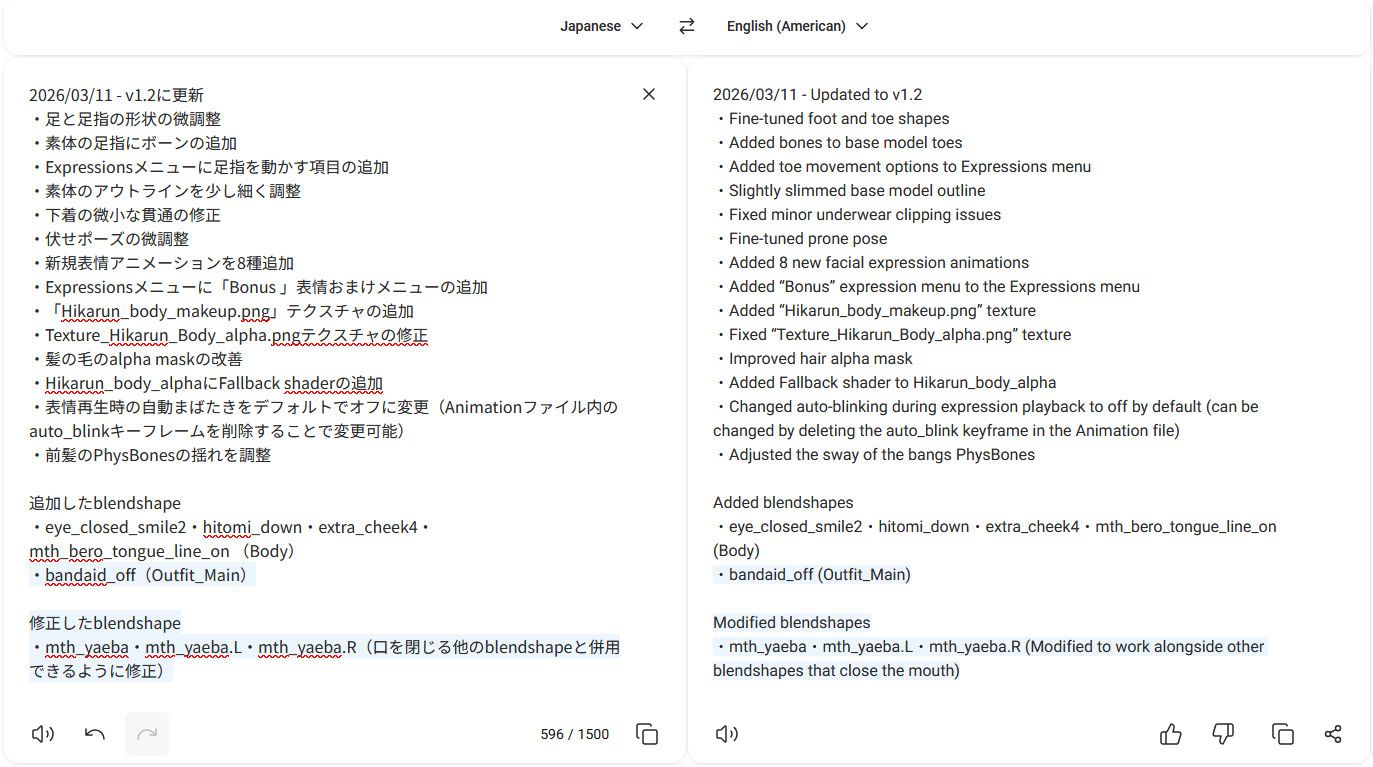
                    Bump ver1.2 (2026/03/11)
                    5f12c068-ec3c-47d7-b6d7-06ada4c362f2-image.jpeg

                    1 Reply Last reply
                    0
                    • idkpizza124I
                      idkpizza124I
                      idkpizza124
                      wrote on last edited by
                      #33

                      bump

                      1 Reply Last reply
                      0
                      • shi_yinS
                        shi_yinS
                        shi_yin
                        wrote on last edited by shi_yin
                        #34

                        I got this,v1.2
                        [register or login to view this hidden content]
                        password sy
                        enjoy!

                        M KiriMoeK 2 Replies Last reply
                        🙇
                        5
                        • mui0.32M mui0.32

                          This includes the Mochi Fitter profile made by the creator, Hikaru, along with the Hikaru Tool and some bonus items. The profile doesn’t seem to be complete yet.

                          [register or login to view this hidden content]
                          password mumu
                          enjoy!
                          Don't forget to react!

                          M
                          M
                          MrsBean94
                          wrote on last edited by
                          #35

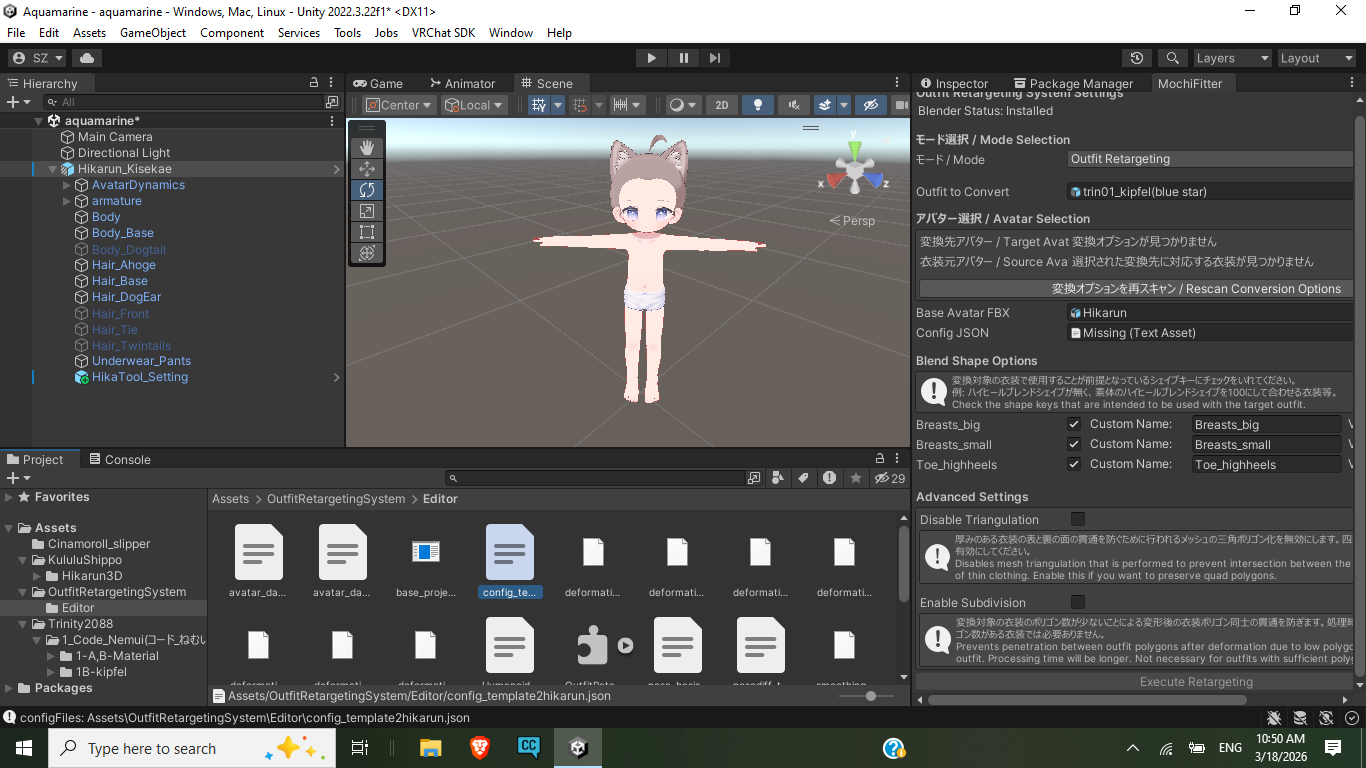
                          @mui0.32 Screenshot (4).png

                          Can't seem to add hikarun file(highlighted in assets) to the config json section on the right. Tried clicking the dot next it, and select it that way, but doesn't seem to work either. I am new to this, so I don't know if its something I'm doing wrong, or the hikarun profile for mochifitter isn't updated. I have hikarun v 1.2 and everything else is updated on my end. I'm trying to get the kipfel clothes to become compatible clothes for hikarun.

                          LiliainaL 1 Reply Last reply
                          0
                          • M MrsBean94

                            @mui0.32 Screenshot (4).png

                            Can't seem to add hikarun file(highlighted in assets) to the config json section on the right. Tried clicking the dot next it, and select it that way, but doesn't seem to work either. I am new to this, so I don't know if its something I'm doing wrong, or the hikarun profile for mochifitter isn't updated. I have hikarun v 1.2 and everything else is updated on my end. I'm trying to get the kipfel clothes to become compatible clothes for hikarun.

                            LiliainaL
                            LiliainaL
                            Liliaina
                            wrote on last edited by
                            #36

                            @MrsBean94 I tried looking through my Mochifitter folder and only found a beta forward profile for Hikarun.. I'm not sure if it helps you at all (I can't tell the difference between forward and reverse off the top of my head lol)
                            I'll include a link to it anyway though [register or login to view this hidden content]

                            On that rep grind.

                            M 1 Reply Last reply
                            0
                            • LiliainaL Liliaina

                              @MrsBean94 I tried looking through my Mochifitter folder and only found a beta forward profile for Hikarun.. I'm not sure if it helps you at all (I can't tell the difference between forward and reverse off the top of my head lol)
                              I'll include a link to it anyway though [register or login to view this hidden content]

                              M
                              M
                              MrsBean94
                              wrote on last edited by MrsBean94
                              #37

                              @Liliaina thanks 🐶
                              I have the file, and only seems like it went to an avatar that clothes are alot smaller. My guess is forward mean one to another (hikarun->Manuka) and backward is (Manuka<- Hikarun) deciding to go back to previous choice in this example hikarun.

                              This is from the Q/A of the Mochi Fitter that i found on Booth...

                              Please read through this section first. If you cannot find a relevant entry or are unsure how to resolve an issue, please post the following information in the "Questions" channel on our Discord server:
                              ・The specific error message
                              ・Information (URL) regarding the outfit you attempted to convert
                              ・Information (URL) regarding the conversion profile you used
                              ・The log file located within the BlenderLogs folder at the root of your Unity project

                              Q. What do I need?
                              To fit an outfit designed for Avatar A onto Avatar B, you will need the following items:
                              ・The Reverse Conversion Profile for Avatar A (Profiles for Shinano, Kikyo, Manuka, and Beryl are included with the main package)
                              ・The Conversion Profile for Avatar B
                              ・The Avatar B model itself

                              Q. Is it safe to update by overwriting the existing files?
                              Yes, overwriting the existing files is perfectly fine.

                              Q. Are the "Standalone Version" and the "Beryl-Bundled Version" different products?
                              They are the exact same product; the bundled version receives updates in the same manner as the standalone version.

                              Q. What are "Forward Conversion" and "Reverse Conversion"? "Forward Conversion" refers to the process of adapting an outfit from one avatar to fit another specific avatar.
                              "Reverse Conversion" refers to the process of adapting an outfit from a specific avatar to fit another avatar.

                              Q. I cannot select the "Base Avatar FBX."
                              In versions of "Mochifitta" prior to v0.27, the FBX file for the target avatar (the avatar receiving the outfit) was required to be located in its default directory.
                              If you have moved the folder or renamed the file, the system will be unable to locate the FBX.
                              Please update "Mochifitta" to the latest version first.

                              Q. I have placed the conversion profile file in the correct location, but the avatar's name does not appear in the list of target avatars.
                              The conversion profile file must be located specifically within the Assets/OutfitRetargetingSystem/Editor directory.
                              Please verify that all the necessary files are placed directly within this folder, rather than inside any subfolders.

                              Q. Q. I installed a conversion profile, but its name doesn't appear in the list of source avatars.
                              To use a profile as a conversion source, it must support "reverse conversion."
                              Please check the product page provided by the distributor to confirm whether reverse conversion is supported.
                              If there is no specific mention of it, you should assume that reverse conversion is not supported.

                              Q. A message box appears indicating an error, such as "Failed to load generated FBX."
                              An error occurred during the conversion process, causing it to halt.
                              First, please verify that "Mochifitta" is up to date; if it is not the latest version, please update it.
                              If you have renamed the tool's folder, try reverting it to its original name.
                              If the issue persists, please post the following information in the support/questions channel:

                              • Details regarding the outfit you attempted to convert.
                              • The log files located in the BlenderLogs folder, found directly within your Unity project directory.

                              Q. I am encountering the error: TBBmalloc: skip allocation functions replacement in ucrtbase.dll: unknown prologue for function _msize.
                              This error does not affect the operation of the tool.
                              If you are experiencing issues with the final result, the problem likely stems from a different cause; please check to see if any other error messages have appeared.

                              Q. The overall size of the generated Prefab appears incorrect or distorted.
                              It is highly likely that an error occurred—causing the process to halt—during the second stage of the conversion (the transfer from the intermediate base body to the target avatar).
                              Please post the following information in the support/questions channel:

                              • Details regarding the outfit you attempted to convert.
                              • The log files located in the BlenderLogs folder, found directly within your Unity project directory.

                              Q. The materials on the generated Prefab are partially unassigned.
                              It is highly likely that the process halted due to an error during the Prefab reconstruction phase.
                              Please check to see if any components are displaying as "Missing Script."
                              Importing or updating the necessary packages may resolve this issue.

                              Q. The feet do not align correctly with the footwear (e.g., high heels).
                              The converted outfit may be designed with the assumption that the base body (of the target avatar) will be adjusted to fit the outfit—typically by utilizing the base body's own shape keys (such as a "High Heel" shape key).
                              When configuring the conversion settings, please ensure you check the box for the relevant blend shapes before executing the conversion.
                              If these settings are already specified within the Modular Avatar components, they will be configured automatically; otherwise, you will need to set them manually.
                              Information regarding blend shape configuration can often be found on the outfit's product page or within its accompanying manual, so please check those resources.

                              Q. The shape keys from the target avatar's base body are not being generated on the converted outfit.
                              To generate the shape keys from the target avatar's base body:
                              The specific conversion profile you are using must support shape key generation.
                              Please check the product page (or similar documentation) provided by the asset's distributor to confirm whether this feature is supported.

                              Q. The conversion process is taking too long.
                              Typically, the process takes about 5 to 15 minutes.
                              However, if the polygon count exceeds 300,000, or if you attempt to convert an entire avatar that possesses an extremely large number of shape keys, the conversion time may increase significantly.
                              If you only wish to convert specific parts of the avatar, you can speed up the process by creating a copy of the Prefab, deleting any unnecessary meshes, and then performing the conversion on that modified copy.

                              Q. After importing a package mid-conversion, the elapsed time display became glitched, and the process stalled.
                              If a project rebuild is triggered (e.g., by importing a package) while the tool is actively running, the conversion process will halt.
                              Please refrain from importing packages while a conversion is in progress.

                              Q. Do I need to install Blender separately for every new project?
                              No; you can skip the installation step by simply copying the "BlenderTools" folder—located directly within your Unity project's root directory—into your new project.

                              Q. The gimmicks/features included with the outfit are not working.
                              Certain gimmicks or animations may cease to function correctly after conversion.
                              We may address compatibility for these features in future updates.

                              Q. Am I permitted to sell outfits that have been adjusted using MochiFitter?
                              We do not prohibit the use of this tool to adapt outfits for commercial sale.

                              1 Reply Last reply
                              😊
                              0
                              • iLikePinkI
                                iLikePinkI
                                iLikePink
                                wrote on last edited by
                                #38

                                bump ver 1.3~

                                1 Reply Last reply
                                0
                                • L
                                  L
                                  love8bit
                                  wrote on last edited by
                                  #39

                                  update bump plz

                                  1 Reply Last reply
                                  0
                                  • LURK3RL
                                    LURK3RL
                                    LURK3R
                                    wrote on last edited by
                                    #40

                                    bummp

                                    1 Reply Last reply
                                    0
                                    • shi_yinS shi_yin

                                      I got this,v1.2
                                      [register or login to view this hidden content]
                                      password sy
                                      enjoy!

                                      M
                                      M
                                      mel1242
                                      wrote on last edited by
                                      #41

                                      @mui0.32 @yukino-chan
                                      Update bump 1.3

                                      In Japan, users and creators tend to place strong importance on manners and community norms, and they often try to encourage people to legitimately purchase avatars, outfits, and other items on BOOTH. When they learn that assets are being shared illegally, they tend to form a common enemy and attempt to impose social sanctions.

                                      Because of that, sites that distribute assets like the ones here are extremely valuable to me, and the idea of going out of my way to purchase them feels completely ridiculous.

                                      Just like in Grand Theft Auto V, let’s steal the assets, throw them into a duffel bag, and share them with the people who want them.

                                      In particular, when playing VRC, you should be careful about entering worlds that have a large number of Japanese users.

                                      1 Reply Last reply
                                      0
                                      • shi_yinS shi_yin

                                        I got this,v1.2
                                        [register or login to view this hidden content]
                                        password sy
                                        enjoy!

                                        KiriMoeK
                                        KiriMoeK
                                        KiriMoe
                                        wrote on last edited by
                                        #42

                                        @shi_yin
                                        @Yukino-Chan Update bump 1.3

                                        shi_yinS 1 Reply Last reply
                                        0
                                        • Canadadry2C
                                          Canadadry2C
                                          Canadadry2
                                          wrote on last edited by
                                          #43

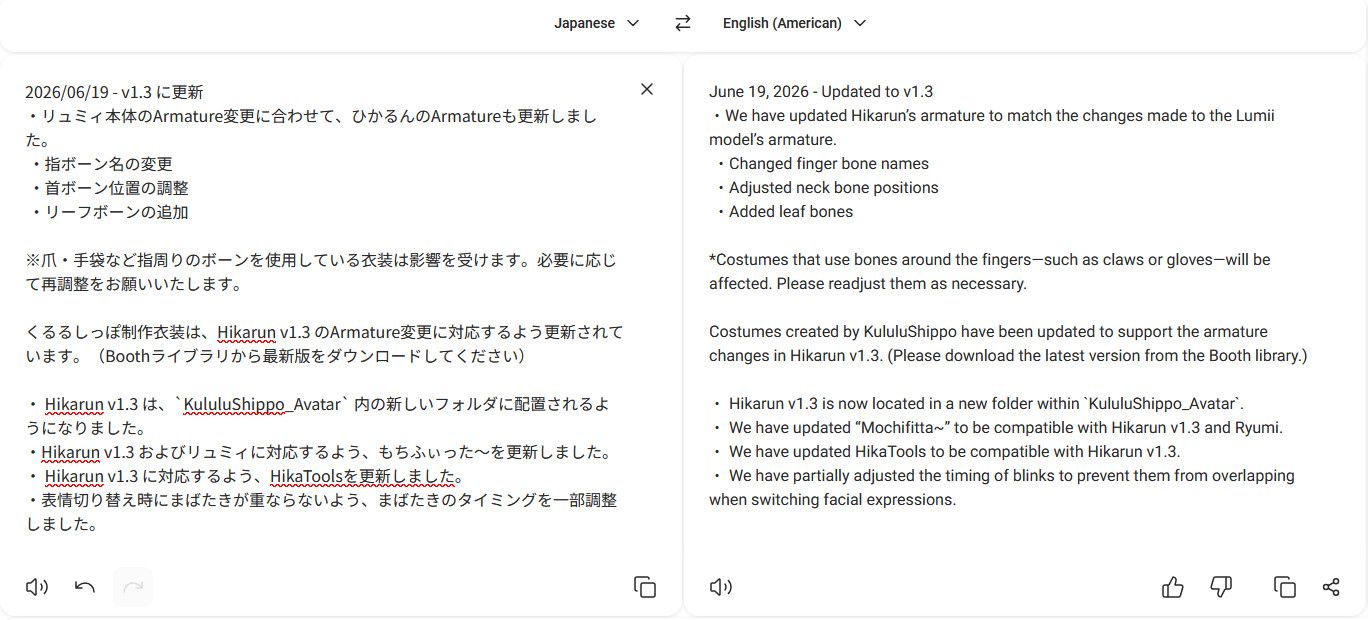
                                          Pretty big changes overall:
                                          4b98d4bd-0821-4571-80f0-51b197977114-image.jpeg

                                          1 Reply Last reply
                                          0

                                          Hello! It looks like you're interested in this conversation, but you don't have an account yet.

                                          Getting fed up of having to scroll through the same posts each visit? When you register for an account, you'll always come back to exactly where you were before, and choose to be notified of new replies (either via email, or push notification). You'll also be able to save bookmarks and upvote posts to show your appreciation to other community members.

                                          With your input, this post could be even better 💗

                                          Register Login
                                          Reply
                                          • Reply as topic
                                          Log in to reply
                                          • Oldest to Newest
                                          • Newest to Oldest
                                          • Most Votes


                                          • Login

                                          • Login or register to search.
                                          • First post
                                            Last post
                                          0
                                          • Categories
                                          • Recent
                                          • Tags
                                          • Popular