Skip to content
  • Categories
  • Recent
  • Tags
  • Popular
Skins
  • Light
  • Brite
  • Cerulean
  • Cosmo
  • Flatly
  • Journal
  • Litera
  • Lumen
  • Lux
  • Materia
  • Minty
  • Morph
  • Pulse
  • Sandstone
  • Simplex
  • Sketchy
  • Spacelab
  • United
  • Yeti
  • Zephyr
  • Dark
  • Cyborg
  • Darkly
  • Quartz
  • Slate
  • Solar
  • Superhero
  • Vapor

  • Default (Zephyr)
  • No Skin
Collapse
RipperStore Logo
  1. Home
  2. Assets
  3. Gifts / Downloads
  4. Gift: Aiko by aii0 (Fixed!)

Gift: Aiko by aii0 (Fixed!)

Scheduled Pinned Locked Moved Gifts / Downloads
femaleavatargift-payhip
38 Posts 21 Posters 7.0k Views 13 Watching
  • Oldest to Newest
  • Newest to Oldest
  • Most Votes
Reply
  • Reply as topic
Log in to reply
This topic has been deleted. Only users with topic management privileges can see it.
  • W
    W
    Wolfdog27
    wrote on last edited by Wolfdog27
    #23

    I can't seem to upload the quest version. It took an arm and a leg to upload the PC version. The avatar completely breaks SDK, and I'm not even sure how I managed to get the PC working. Now, as I'm trying to upload the quest version, I seem to be completely unable to. I tried using the PC blueprint and adding it to the quest avatar, but ultimately, it does not allow me to check off the box, agreeing to VRchats' terms. When adding the blueprint to the avatar, it doesn't change the name nor use the picture of the PC version, as though no blueprint was added at all. What's more, I cannot view any alerts in SDK, it's just blank. I also found, on their Discord server, what the creator used to upload the avi without PCSS.
    Screenshot 2025-07-27 142047.png

    W 1 Reply Last reply
    0
    • W Wolfdog27

      I can't seem to upload the quest version. It took an arm and a leg to upload the PC version. The avatar completely breaks SDK, and I'm not even sure how I managed to get the PC working. Now, as I'm trying to upload the quest version, I seem to be completely unable to. I tried using the PC blueprint and adding it to the quest avatar, but ultimately, it does not allow me to check off the box, agreeing to VRchats' terms. When adding the blueprint to the avatar, it doesn't change the name nor use the picture of the PC version, as though no blueprint was added at all. What's more, I cannot view any alerts in SDK, it's just blank. I also found, on their Discord server, what the creator used to upload the avi without PCSS.
      Screenshot 2025-07-27 142047.png

      W
      W
      Wolfdog27
      wrote on last edited by
      #24

      All in all, even following the creator's instructions, the avatar is completely broken and hard to upload. I used everything they did in hopes of getting a successful result, and it didn't work. My SDK is the latest version, and I have no issues uploading any other avatars. Just this one. It's a shame because it's a very cute avatar, and I would've loved to have the quest version attached to the PC one. From what I understand, these files also don't require PCSS.

      Did anyone successfully upload both the quest and PC side of this avatar, and if so, how?

      1 Reply Last reply
      0
      • N npnsd

        in the payhip page: Detailed How-To Import/Upload Instructions Provided, mind share it?

        potatobunnyP
        potatobunnyP
        potatobunny
        wrote on last edited by
        #25

        @npnsd i dont have it, i just added the basics and it uploaded fine

        Big Asset Collector

        N 1 Reply Last reply
        0
        • potatobunnyP potatobunny

          @npnsd i dont have it, i just added the basics and it uploaded fine

          N
          N
          npnsd
          wrote on last edited by
          #26

          @potatobunny I will see if i can upload it.

          1 Reply Last reply
          0
          • syzyg13sS
            syzyg13sS
            syzyg13s
            wrote on last edited by
            #27

            im sad cuz she doesnt have gesture :,<

            Check out my bio!! <3
            ty to all who share on here!!

            1 Reply Last reply
            0
            • eekyE
              eekyE
              eeky
              wrote on last edited by
              #28

              any help to how to upload her?

              Semi-Active

              1 Reply Last reply
              0
              • N
                N
                Nicocoa
                wrote on last edited by
                #29

                any fix ?

                1 Reply Last reply
                0
                • AntiiA
                  AntiiA
                  Antii
                  wrote on last edited by
                  #30

                  bump for Quest :3

                  1 Reply Last reply
                  0
                  • X
                    X
                    Xhelvandowayne
                    wrote on last edited by
                    #31

                    bump Q

                    1 Reply Last reply
                    0
                    • S
                      S
                      san12002
                      wrote on last edited by san12002
                      #32

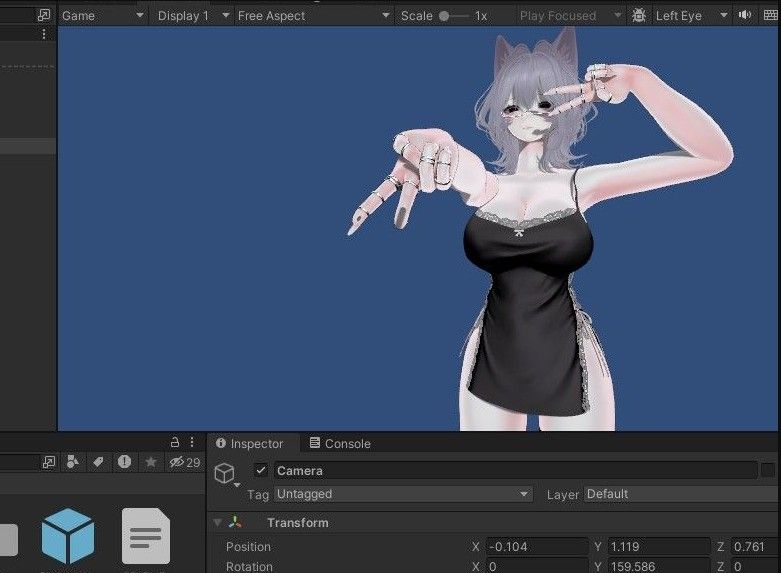
                      so, im new editing in unity but there's possible solutions on the pc version
                      if the manager dont let upload cause have "ID" issues just detach from the model in "pipeline Manager" And let it empty
                      Screenshot_1993.png
                      i had many issues to build this avi, just made a new controler and Copied all layers by hand from the gogoloco, cause theres many empty layers
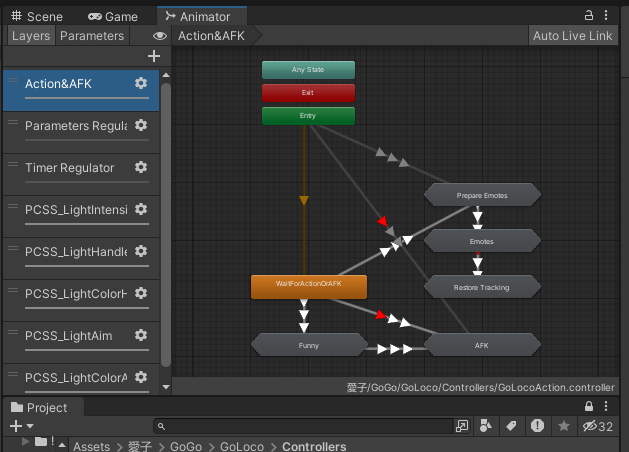
                      Screenshot_1997.png
                      Screenshot_1996.png
                      Screenshot_1994.png
                      Please upvote it cost to me 1 day, apreciate if someone teach me how to add a bunch of custom animations into 1 avi
                      and there's the result Screenshot_1998.png

                      EsdessE 1 Reply Last reply
                      1
                      • ReddieBerrieR
                        ReddieBerrieR
                        ReddieBerrie
                        wrote on last edited by
                        #33

                        bump 4 quezt

                        1 Reply Last reply
                        0
                        • S san12002

                          so, im new editing in unity but there's possible solutions on the pc version
                          if the manager dont let upload cause have "ID" issues just detach from the model in "pipeline Manager" And let it empty
                          Screenshot_1993.png
                          i had many issues to build this avi, just made a new controler and Copied all layers by hand from the gogoloco, cause theres many empty layers
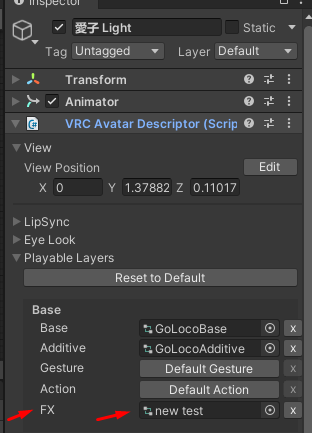
                          Screenshot_1997.png
                          Screenshot_1996.png
                          Screenshot_1994.png
                          Please upvote it cost to me 1 day, apreciate if someone teach me how to add a bunch of custom animations into 1 avi
                          and there's the result Screenshot_1998.png

                          EsdessE
                          EsdessE
                          Esdess
                          Banned
                          wrote on last edited by
                          #34

                          @san12002 linkk ?

                          S 1 Reply Last reply
                          0
                          • EsdessE Esdess

                            @san12002 linkk ?

                            S
                            S
                            san12002
                            wrote on last edited by
                            #35

                            @PerleVRC haii srry if im too late but found the solution, everything you need is add the pcss4 provided in this forum https://forum.ripper.store/topic/97790/gift-anwar2-stuff-gimmicks-pcss/2 in setup "POYOMI VERSION" on the avatar and i think the quest version is same, if u want add a no clothes toggle for easy setup add these two togles 52a2c986-e8fc-4c58-a98b-a7121f294d24-image.jpeg
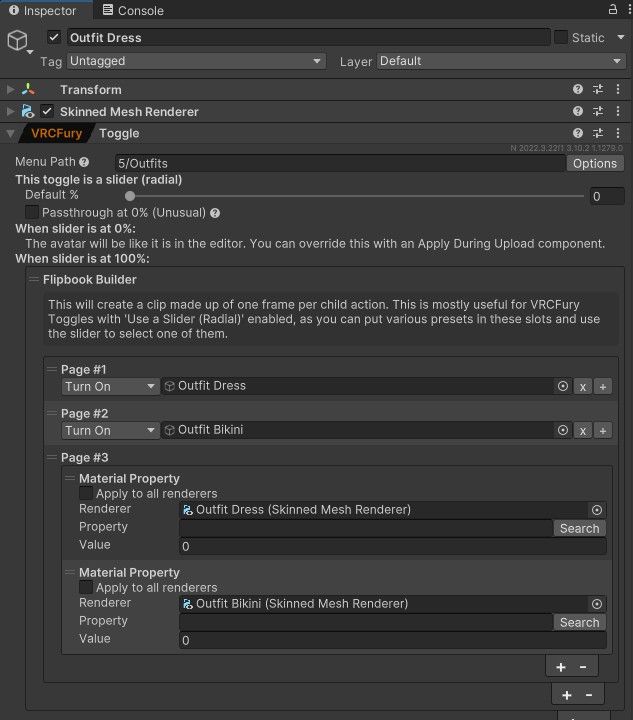
                            and boila, just in case detach the pipeliner im doing this cause dont know how to export/import packages correctly 😕 😥
                            1c0ad6cf-a377-4050-bba9-a3ac81de0ec8-image.jpeg

                            EsdessE 1 Reply Last reply
                            0
                            • S san12002

                              @PerleVRC haii srry if im too late but found the solution, everything you need is add the pcss4 provided in this forum https://forum.ripper.store/topic/97790/gift-anwar2-stuff-gimmicks-pcss/2 in setup "POYOMI VERSION" on the avatar and i think the quest version is same, if u want add a no clothes toggle for easy setup add these two togles 52a2c986-e8fc-4c58-a98b-a7121f294d24-image.jpeg

                              and boila, just in case detach the pipeliner im doing this cause dont know how to export/import packages correctly 😕 😥
                              1c0ad6cf-a377-4050-bba9-a3ac81de0ec8-image.jpeg

                              EsdessE
                              EsdessE
                              Esdess
                              Banned
                              wrote on last edited by
                              #36

                              @san12002 Oh yeah, I already fixed that problem. The only thing I don't understand is that I have a very empty version with just a hairstyle, horns, a dress, and a bikini; I don't have those hairstyles or cat ears so idk but thanks

                              1 Reply Last reply
                              0
                              • D
                                D
                                DJ DARKSMOKE
                                wrote on last edited by
                                #37

                                new quest link plz
                                bump

                                1 Reply Last reply
                                0
                                • R
                                  R
                                  RawrBaby
                                  wrote last edited by
                                  #38

                                  pc link please

                                  1 Reply Last reply
                                  0

                                  Hello! It looks like you're interested in this conversation, but you don't have an account yet.

                                  Getting fed up of having to scroll through the same posts each visit? When you register for an account, you'll always come back to exactly where you were before, and choose to be notified of new replies (either via email, or push notification). You'll also be able to save bookmarks and upvote posts to show your appreciation to other community members.

                                  With your input, this post could be even better 💗

                                  Register Login
                                  Reply
                                  • Reply as topic
                                  Log in to reply
                                  • Oldest to Newest
                                  • Newest to Oldest
                                  • Most Votes


                                  • Login

                                  • Login or register to search.
                                  • First post
                                    Last post
                                  0
                                  • Categories
                                  • Recent
                                  • Tags
                                  • Popular