Skip to content
  • Categories
  • Recent
  • Tags
  • Popular
Skins
  • Light
  • Brite
  • Cerulean
  • Cosmo
  • Flatly
  • Journal
  • Litera
  • Lumen
  • Lux
  • Materia
  • Minty
  • Morph
  • Pulse
  • Sandstone
  • Simplex
  • Sketchy
  • Spacelab
  • United
  • Yeti
  • Zephyr
  • Dark
  • Cyborg
  • Darkly
  • Quartz
  • Slate
  • Solar
  • Superhero
  • Vapor

  • Default (Zephyr)
  • No Skin
Collapse
RipperStore Logo
  1. Home
  2. Assets
  3. Looking for...
  4. Uncategorized
  5. LF: PRISM Customizable Vtuber Model (FOUND)

LF: PRISM Customizable Vtuber Model (FOUND)

Scheduled Pinned Locked Moved Unsolved Uncategorized
live 2dvtubervtuber assetsvtuber modelvtubers
332 Posts 146 Posters 75.5k Views 157 Watching
  • Oldest to Newest
  • Newest to Oldest
  • Most Votes
Reply
  • Reply as topic
Log in to reply
This topic has been deleted. Only users with topic management privileges can see it.
  • I
    I
    Inuyasha4Ever
    wrote on last edited by
    #254

    @0xilena appreciate you so much! Thank you!!

    1 Reply Last reply
    ❤
    0
    • PlainYogurt1P
      PlainYogurt1P
      PlainYogurt1
      wrote on last edited by
      #255

      Does anyone have the backgrounds that were included for valentines? They werent in the file above

      U L 0 3 Replies Last reply
      0
      • PlainYogurt1P PlainYogurt1

        Does anyone have the backgrounds that were included for valentines? They werent in the file above

        U
        U
        user0128310283
        wrote on last edited by
        #256

        @PlainYogurt1 they forgot to add them in! it should be in the next update with all the bug fixes.

        1 Reply Last reply
        0
        • PlainYogurt1P PlainYogurt1

          Does anyone have the backgrounds that were included for valentines? They werent in the file above

          L
          L
          Lemuria999
          wrote on last edited by Lemuria999
          #257
          This post is deleted!
          1 Reply Last reply
          0
          • PlainYogurt1P PlainYogurt1

            Does anyone have the backgrounds that were included for valentines? They werent in the file above

            0
            0
            0xilena
            wrote on last edited by
            #258

            @PlainYogurt1

            They are not included in this file update despite the image showcasing it! It'll appear on next update! 🙂

            1 Reply Last reply
            ❤
            1
            • orihimeO
              orihimeO
              orihime
              wrote on last edited by
              #259

              Bump for patch ✨️

              1 Reply Last reply
              0
              • 0
                0
                0xilena
                wrote on last edited by
                #260

                PRISM Customizable Vtuber V3.1-1:

                • Remember, it'll be a google drive link inside the text file.

                [register or login to view this hidden content]


                ⚠ PATCH/BUG FIXES UPDATES: ⚠

                • Fixed majority of reported bugs
                • ✨ Added backgrounds in! ✨
                • Fixed layer pinning issue with elven crown and earrings
                • Fixed Head wobbly bug completely, if head is still wobbly, make main model match fps to app

                Key reminders:

                • Main file only contains HEAD, in order to add body/accessories/etc., you have to put the outfits in the ITEMS folder.
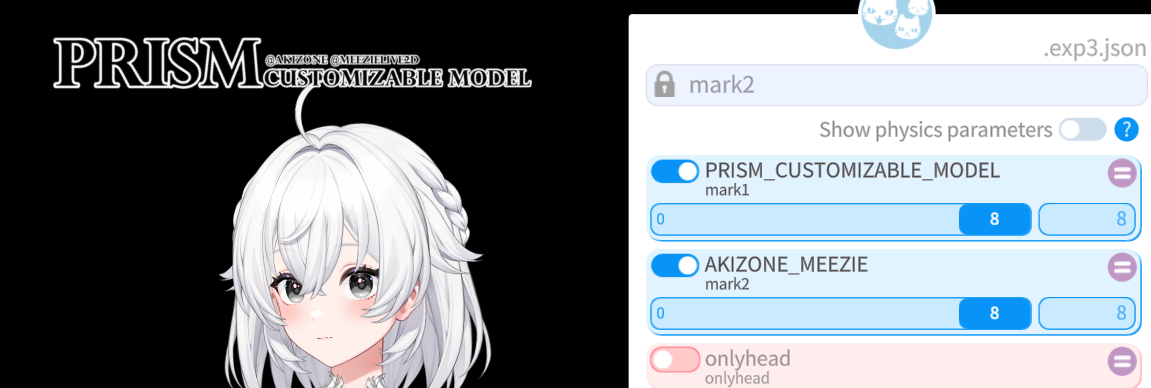
                • If some parts aren't loading in correctly, go to 2ND TAB in settings, scroll down to LIVE2D MASK CONFIG and increase your MASK LIMIT.
                • To remove any watermarks, it will always be the FIRST 2 SLIDERS in expression editor.
                • Prism Closet is an .exe/application file, no installation required.
                • Backgrounds can be found in the DOCUMENTS folder.

                Enjoy and have fun! ❤

                E LycorislilyL 2 Replies Last reply
                👍 ❤
                8
                • E
                  E
                  EmilyNeedsHelp
                  wrote on last edited by
                  #261

                  thank you!!

                  1 Reply Last reply
                  ❤
                  0
                  • P
                    P
                    PolarBlobBwear
                    wrote on last edited by
                    #262

                    image.png
                    Can someone help me remove this part of the watermark, I used both sliders but the one on the head doesnt come off

                    orihimeO 1 Reply Last reply
                    0
                    • P PolarBlobBwear

                      image.png
                      Can someone help me remove this part of the watermark, I used both sliders but the one on the head doesnt come off

                      orihimeO
                      orihimeO
                      orihime
                      wrote on last edited by
                      #263

                      @PolarBlobBwear if you have an outfit on, create a new expression and slide those sliders. Every outfit/accessory has a water mark too

                      K 1 Reply Last reply
                      0
                      • 0
                        0
                        0xilena
                        wrote on last edited by
                        #264

                        PRISM Customizable Vtuber V3.2:

                        • Remember, it'll be a google drive link inside the text file.

                        [register or login to view this hidden content]


                        ⚠ PATCH/BUG FIXES UPDATES: ⚠

                        • Fixed clipping and coloring issues in Techwear, Witch, and Valentines outfit!

                        Key reminders:

                        • Main file only contains HEAD, in order to add body/accessories/etc., you have to put the outfits in the ITEMS folder.
                        • If some parts aren't loading in correctly, go to 2ND TAB in settings, scroll down to LIVE2D MASK CONFIG and increase your MASK LIMIT.
                        • To remove any watermarks, it will always be the FIRST 2 SLIDERS in expression editor for items and head.
                        • Prism Closet is an .exe/application file, no installation required.

                        Happy Valentines Day! ❤

                        0 rxspberry_R 3 Replies Last reply
                        ❤
                        6
                        • orihimeO orihime

                          @PolarBlobBwear if you have an outfit on, create a new expression and slide those sliders. Every outfit/accessory has a water mark too

                          K
                          K
                          kusha
                          wrote on last edited by
                          #265

                          @LollipopSweet6 i cant do it ((( i have only the settings of head. settings of body not working

                          0 1 Reply Last reply
                          0
                          • 0 0xilena

                            PRISM Customizable Vtuber V3.1-1:

                            • Remember, it'll be a google drive link inside the text file.

                            [register or login to view this hidden content]


                            ⚠ PATCH/BUG FIXES UPDATES: ⚠

                            • Fixed majority of reported bugs
                            • ✨ Added backgrounds in! ✨
                            • Fixed layer pinning issue with elven crown and earrings
                            • Fixed Head wobbly bug completely, if head is still wobbly, make main model match fps to app

                            Key reminders:

                            • Main file only contains HEAD, in order to add body/accessories/etc., you have to put the outfits in the ITEMS folder.
                            • If some parts aren't loading in correctly, go to 2ND TAB in settings, scroll down to LIVE2D MASK CONFIG and increase your MASK LIMIT.
                            • To remove any watermarks, it will always be the FIRST 2 SLIDERS in expression editor.
                            • Prism Closet is an .exe/application file, no installation required.
                            • Backgrounds can be found in the DOCUMENTS folder.

                            Enjoy and have fun! ❤

                            E
                            E
                            ebeebs10
                            wrote on last edited by
                            #266

                            @0xilena thank you!

                            1 Reply Last reply
                            ❤
                            0
                            • K kusha

                              @LollipopSweet6 i cant do it ((( i have only the settings of head. settings of body not working

                              0
                              0
                              0xilena
                              wrote on last edited by 0xilena
                              #267

                              @kusha

                              If you can please send a screenshot of your screen or what you see.

                              Otherwise, this is how it should look to remove watermark on body/accessories/wings/tails/clothing.

                              1. Load a outfit that you wish to use in either with the "items settings" (2nd green star icon) or use "Prism Closet" to load an outfit. I recommend using Prism Closet for easy outfit loading and auto layer detection.

                                447d9d63-0fbf-4dfc-b9ed-c4b5101fadfd-image.png

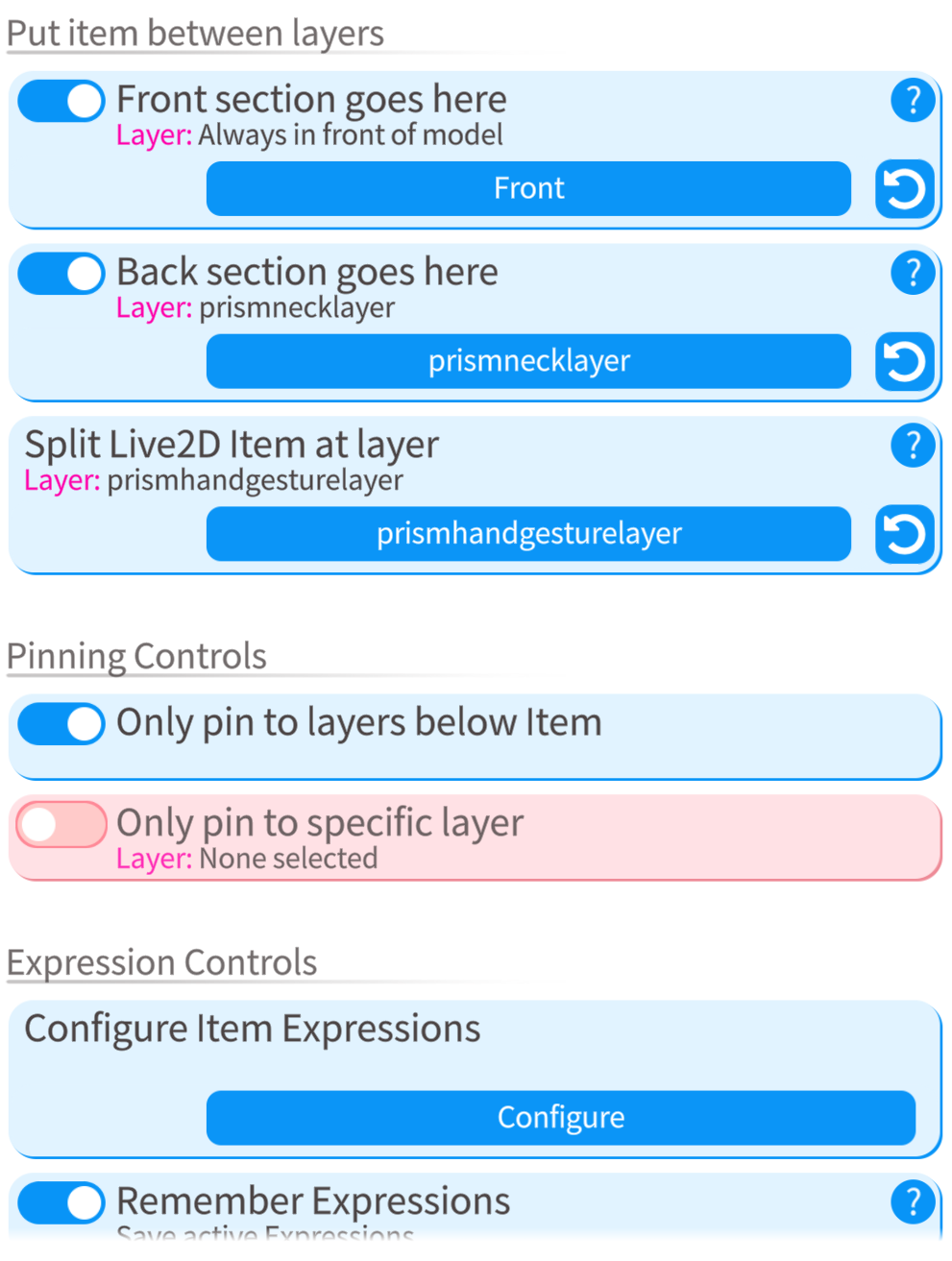
                              2. Click the 4th green star rotating cogwheel icon and select whichever outfit/asset you chose to load in. This is how the screen will look like when you select it. (refer to image below)
                                1d90c53b-ef92-4b2d-8b83-6c44ae906329-image.png

                              3. With the image above, do not change the "Put item between layers" and "Pinning Controls" settings if you used Prism Closet to load item. Otherwise, if you did everything manually, you want to set them up.

                              4. On the same image above, click configure on "Configure Item Expressions" and click "Create new Expression". (refer to image below)

                                3073b331-03d1-4a86-81d5-fd860dc0b1a1-image.png

                              5. Most times it will usually be the first one for logo that has to be enabled and second one for triangle corner alignment doesn't need to be enabled since by default it's off/doesn't show, but if you have to enable it, then do so accordingly. (refer to image below)
                                0cbd1617-cdf5-4e82-b7b3-c966831751cf-image.png

                              I hope this helps out. If it doesn't, you may want to join the Discord server for further help.

                              1 Reply Last reply
                              0
                              • 0 0xilena

                                PRISM Customizable Vtuber V3.1-1:

                                • Remember, it'll be a google drive link inside the text file.

                                [register or login to view this hidden content]


                                ⚠ PATCH/BUG FIXES UPDATES: ⚠

                                • Fixed majority of reported bugs
                                • ✨ Added backgrounds in! ✨
                                • Fixed layer pinning issue with elven crown and earrings
                                • Fixed Head wobbly bug completely, if head is still wobbly, make main model match fps to app

                                Key reminders:

                                • Main file only contains HEAD, in order to add body/accessories/etc., you have to put the outfits in the ITEMS folder.
                                • If some parts aren't loading in correctly, go to 2ND TAB in settings, scroll down to LIVE2D MASK CONFIG and increase your MASK LIMIT.
                                • To remove any watermarks, it will always be the FIRST 2 SLIDERS in expression editor.
                                • Prism Closet is an .exe/application file, no installation required.
                                • Backgrounds can be found in the DOCUMENTS folder.

                                Enjoy and have fun! ❤

                                LycorislilyL
                                LycorislilyL
                                Lycorislily
                                wrote on last edited by
                                #268

                                @0xilena Bump for V3.2!!!

                                1 Reply Last reply
                                0
                                • 0 0xilena

                                  PRISM Customizable Vtuber V3.2:

                                  • Remember, it'll be a google drive link inside the text file.

                                  [register or login to view this hidden content]


                                  ⚠ PATCH/BUG FIXES UPDATES: ⚠

                                  • Fixed clipping and coloring issues in Techwear, Witch, and Valentines outfit!

                                  Key reminders:

                                  • Main file only contains HEAD, in order to add body/accessories/etc., you have to put the outfits in the ITEMS folder.
                                  • If some parts aren't loading in correctly, go to 2ND TAB in settings, scroll down to LIVE2D MASK CONFIG and increase your MASK LIMIT.
                                  • To remove any watermarks, it will always be the FIRST 2 SLIDERS in expression editor for items and head.
                                  • Prism Closet is an .exe/application file, no installation required.

                                  Happy Valentines Day! ❤

                                  0
                                  0
                                  0xilena
                                  wrote on last edited by
                                  #269

                                  @lycorislily I've posted it already up above! 🙂

                                  LycorislilyL 1 Reply Last reply
                                  0
                                  • M Mysmileisweak referenced this topic on
                                  • 0 0xilena

                                    @lycorislily I've posted it already up above! 🙂

                                    LycorislilyL
                                    LycorislilyL
                                    Lycorislily
                                    wrote on last edited by
                                    #270

                                    @0xilena LMAO I'M BLIND thank youuu XD

                                    1 Reply Last reply
                                    ❤
                                    0
                                    • J
                                      J
                                      jasjuspopmie
                                      wrote on last edited by
                                      #271

                                      can someone bump me the tutorial video for version 3.0+?

                                      0 1 Reply Last reply
                                      0
                                      • cheesehampterC
                                        cheesehampterC
                                        cheesehampter
                                        wrote on last edited by
                                        #272

                                        excuse me, i have a small issue, idk if is only me but i dont see her teeth..
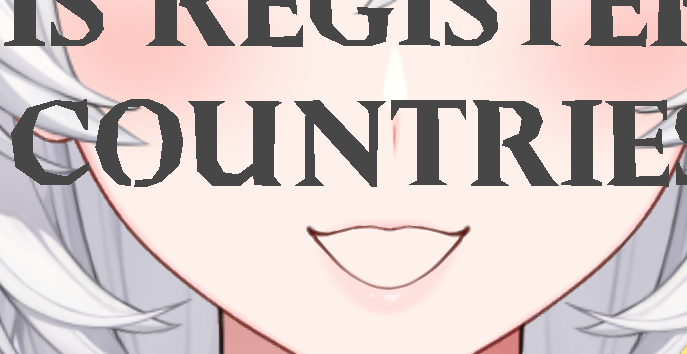
                                        image_2026-02-23_140033629.png

                                        hampter loves cheese

                                        0 1 Reply Last reply
                                        0
                                        • cheesehampterC cheesehampter

                                          excuse me, i have a small issue, idk if is only me but i dont see her teeth..
                                          image_2026-02-23_140033629.png

                                          0
                                          0
                                          0xilena
                                          wrote on last edited by
                                          #273

                                          @cheesehampter

                                          Have you done this? If yes and problem still persists, then you may want to join the Discord for further help since this is usually the way to solve the issue.

                                          Bumping from my last post:

                                          • If some parts aren't loading in correctly, go to 2ND TAB in settings, scroll down to LIVE2D MASK CONFIG and increase your MASK LIMIT.

                                          Keep in mind that you want to increase it accordingly to how much your PC can handle. (Refer to image for reference, you can also find this in the Documents folder)
                                          MASK LIMIT EXCEEDED.jpg

                                          1 Reply Last reply
                                          😊
                                          1

                                          Hello! It looks like you're interested in this conversation, but you don't have an account yet.

                                          Getting fed up of having to scroll through the same posts each visit? When you register for an account, you'll always come back to exactly where you were before, and choose to be notified of new replies (either via email, or push notification). You'll also be able to save bookmarks and upvote posts to show your appreciation to other community members.

                                          With your input, this post could be even better 💗

                                          Register Login
                                          Reply
                                          • Reply as topic
                                          Log in to reply
                                          • Oldest to Newest
                                          • Newest to Oldest
                                          • Most Votes


                                          • Login

                                          • Login or register to search.
                                          • First post
                                            Last post
                                          0
                                          • Categories
                                          • Recent
                                          • Tags
                                          • Popular