Skip to content
  • Categories
  • Recent
  • Tags
  • Popular
Skins
  • Light
  • Brite
  • Cerulean
  • Cosmo
  • Flatly
  • Journal
  • Litera
  • Lumen
  • Lux
  • Materia
  • Minty
  • Morph
  • Pulse
  • Sandstone
  • Simplex
  • Sketchy
  • Spacelab
  • United
  • Yeti
  • Zephyr
  • Dark
  • Cyborg
  • Darkly
  • Quartz
  • Slate
  • Solar
  • Superhero
  • Vapor

  • Default (Zephyr)
  • No Skin
Collapse
RipperStore Logo
  1. Home
  2. Assets
  3. Gifts / Downloads
  4. Gift: Christmas Maid by Kainet & Meowiie for Deira & Mayu

Gift: Christmas Maid by Kainet & Meowiie for Deira & Mayu

Scheduled Pinned Locked Moved Gifts / Downloads
clothesmaidchristmasdeiramayugift-gumroad
12 Posts 7 Posters 4.2k Views 11 Watching
  • Oldest to Newest
  • Newest to Oldest
  • Most Votes
Reply
  • Reply as topic
Log in to reply
This topic has been deleted. Only users with topic management privileges can see it.
  • W
    W
    whentheycry
    wrote on last edited by
    #2

    Does anyone know how to properly add this onto the avatar? my apologies, i genuinely don't know, i'm attempting to add it to Umbra but having trouble

    kh4m4riK 1 Reply Last reply
    0
    • W whentheycry referenced this topic on
    • wildbliss_nomnomW
      wildbliss_nomnomW
      wildbliss_nomnom
      wrote on last edited by wildbliss_nomnom
      #3

      Lmk if someone can make files of this onto the nsfw version of umbra so others don’t have to add the outfit

      1 Reply Last reply
      0
      • W whentheycry

        Does anyone know how to properly add this onto the avatar? my apologies, i genuinely don't know, i'm attempting to add it to Umbra but having trouble

        kh4m4riK
        kh4m4riK
        kh4m4ri
        wrote on last edited by
        #4

        @whentheycry They're .blend files. You're going to need to know how to use blender.

        1 Reply Last reply
        0
        • astralashesA
          astralashesA
          astralashes
          wrote on last edited by
          #5

          The unitypackage is prefit for all of Kai & Meowiie's avatars, the base deira, and the mayu. You dont need to fit it yourself for the umbra

          W 1 Reply Last reply
          0
          • astralashesA astralashes

            The unitypackage is prefit for all of Kai & Meowiie's avatars, the base deira, and the mayu. You dont need to fit it yourself for the umbra

            W
            W
            whentheycry
            wrote on last edited by whentheycry
            #6

            @astralashes Yeah, my issue is actually adding it through Vrcfury and having it as a toggle, the creator's page says to use vrcfury to add it but everytime i attempt to i'm always left with bbd806e8-41b0-4730-a630-166bed01b41f-image.png
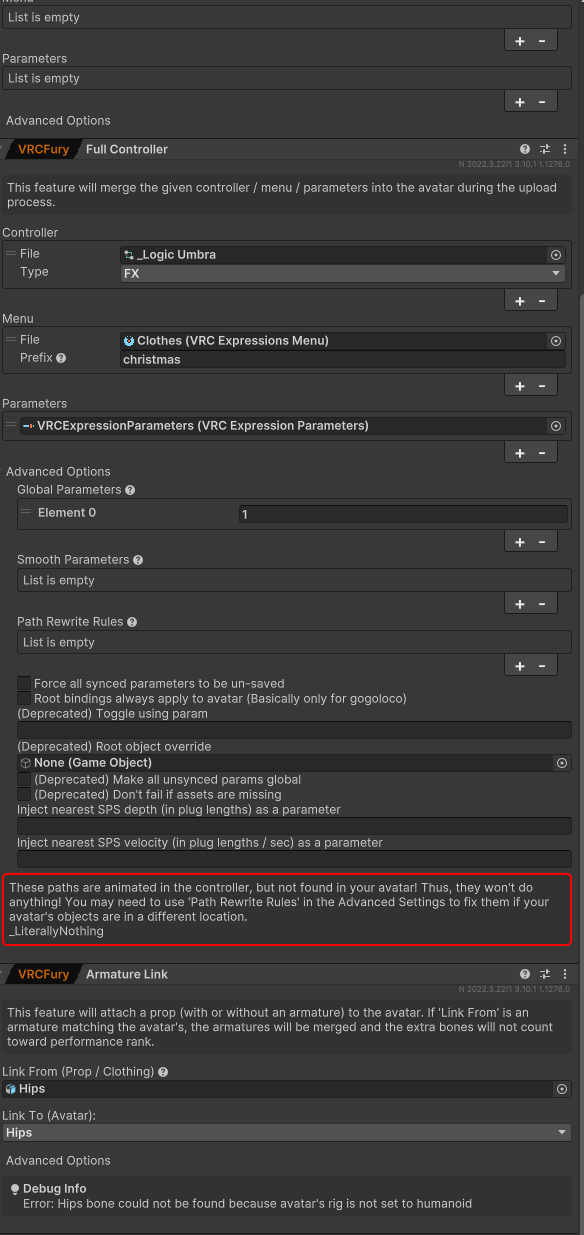
            and im not exactly sure what to do in path rewrite rules...

            Edit: this is after dragging and dropping the christmas prefab onto the avatar

            ShadowkurouS 1 Reply Last reply
            0
            • W whentheycry

              @astralashes Yeah, my issue is actually adding it through Vrcfury and having it as a toggle, the creator's page says to use vrcfury to add it but everytime i attempt to i'm always left with bbd806e8-41b0-4730-a630-166bed01b41f-image.png

              and im not exactly sure what to do in path rewrite rules...

              Edit: this is after dragging and dropping the christmas prefab onto the avatar

              ShadowkurouS
              ShadowkurouS
              Shadowkurou
              wrote on last edited by
              #7

              @whentheycry You should be able to ignore that assuming you did not move the imported assets anywhere, and unless you are making changes to the assets, its best to not unpack the prefab. All that is saying is that the names of some objects in the animator are not on the avatar. Also looking at the animation that uses is modifying an object not on the avatar, its there as an idle animation, or a default animation to always run back onto before moving to a new animation. If you want to fix it you can, just simply edit the "_Nothing CO" animation and remove the "_LiterallyNothing" game object property from the animation and it will clear the warning from vrcfury. It will not prevent you from uploading.

              Be sure to upvote if I was able to help out. Emojis don't help my rep. I am talking to you, the people who only react with emojis instead of actually upvoting if I was able to help.

              W 1 Reply Last reply
              1
              • ShadowkurouS Shadowkurou

                @whentheycry You should be able to ignore that assuming you did not move the imported assets anywhere, and unless you are making changes to the assets, its best to not unpack the prefab. All that is saying is that the names of some objects in the animator are not on the avatar. Also looking at the animation that uses is modifying an object not on the avatar, its there as an idle animation, or a default animation to always run back onto before moving to a new animation. If you want to fix it you can, just simply edit the "_Nothing CO" animation and remove the "_LiterallyNothing" game object property from the animation and it will clear the warning from vrcfury. It will not prevent you from uploading.

                W
                W
                whentheycry
                wrote on last edited by
                #8

                @Shadowkurou im too new to the site, so i cant give you any upvotes, but i really appreciate the help. thank you so much!

                1 Reply Last reply
                0
                • A
                  A
                  AvatarsCreation
                  wrote on last edited by AvatarsCreation
                  #9

                  @astralashes, hey, I'm very grateful for the outfit, but I have a question: how do I fix Quest Glacy to fit? Because somehow, when I add it, it spawns somewhere else with a weird scaled size. (+ note for others, that version of outfit have bell issue im pretty sure, atleast for me it did that bell spawned in a middle of character instead of where its supposed to)

                  astralashesA 1 Reply Last reply
                  0
                  • A AvatarsCreation

                    @astralashes, hey, I'm very grateful for the outfit, but I have a question: how do I fix Quest Glacy to fit? Because somehow, when I add it, it spawns somewhere else with a weird scaled size. (+ note for others, that version of outfit have bell issue im pretty sure, atleast for me it did that bell spawned in a middle of character instead of where its supposed to)

                    astralashesA
                    astralashesA
                    astralashes
                    wrote on last edited by
                    #10

                    @AvatarsCreation I dont know whats wrong with the quest glacy sadly :c
                    Works fine on my umbra, and I havent touched my liepard in ages to try it
                    I just uploaded v1.1.3, i know that fixes the bell
                    Merry Christmas!

                    1 Reply Last reply
                    0
                    • astralashesA astralashes

                      https://meowiie.gumroad.com/l/XmaxMaid

                      Requirements
                      Poiyomi Toon Shader 9.0+
                      VRCFury
                      Warren's Fast Fur Shader - Free Version

                      Downloads:

                      Christmas Maid by Kainet v1.1.3.unitypackage
                      Blend & SPP will be uploaded tomorrow-ish, sorry ^.^
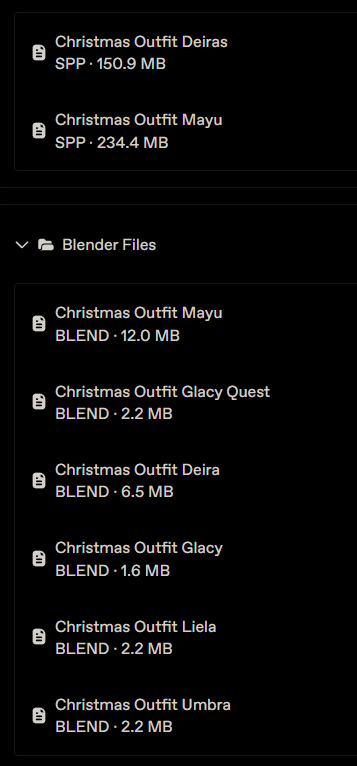
                      d68134a1-0a69-4a2d-a9cd-f80ac0d0389e-image.png

                      The TrapperDBDT
                      The TrapperDBDT
                      The TrapperDBD
                      wrote on last edited by
                      #11

                      @astralashes Are you still planning on uploading the .spp files?

                      1 Reply Last reply
                      0
                      • The TrapperDBDT
                        The TrapperDBDT
                        The TrapperDBD
                        wrote on last edited by
                        #12

                        Bumping for the Christmas Outfit Deiras.spp
                        1 Reply Last reply
                        0

                        Hello! It looks like you're interested in this conversation, but you don't have an account yet.

                        Getting fed up of having to scroll through the same posts each visit? When you register for an account, you'll always come back to exactly where you were before, and choose to be notified of new replies (either via email, or push notification). You'll also be able to save bookmarks and upvote posts to show your appreciation to other community members.

                        With your input, this post could be even better 💗

                        Register Login
                        Reply
                        • Reply as topic
                        Log in to reply
                        • Oldest to Newest
                        • Newest to Oldest
                        • Most Votes


                        • Login

                        • Login or register to search.
                        • First post
                          Last post
                        0
                        • Categories
                        • Recent
                        • Tags
                        • Popular