
GIFT Mochi Fitter Profile もちふぃった~ with Chiffon and Selestia
-
@Ript_core could you try to recompress and send it again? 7zip says that the archive is messed up and the resulting file is only 63mb which is less than half of the archive size.
-
-
@meme002 7zip? im uploading it straight how i got it i used rar and works fine, tbh thats a lil more out of my knowledge
@Ript_core 7Zip is essentially just an open source version of WinRar that at least in my experience, is a bit more robust and has problems like this less often. it's pretty easy to use and the default settings work right out of the box, but with even the new zip you sent Windows zip extractor says it's empty, WinRAR says "unexpected end of archive" and then it says it's corrupt, and 7zip says "data error". If it's a unitypackage you can always try uploading it alone without zipping it or unzipping the problematic archive (if it still works for you) and re-zipping it to rule out any shenanigans by the downloading service
-
-
https://forum.ripper.store/topic/89485/gift-mochi-fitter-もちふぃった-37r/
Posting this again. Updates to MochiFitter are going to be uploaded here. 37r has been added already. -
-
https://forum.ripper.store/topic/89941/gift-ichigo-mochi-fitter
Ichigo profile foundhttps://forum.ripper.store/topic/89834/gift-mao-mochi-fitter
Mao profile found -
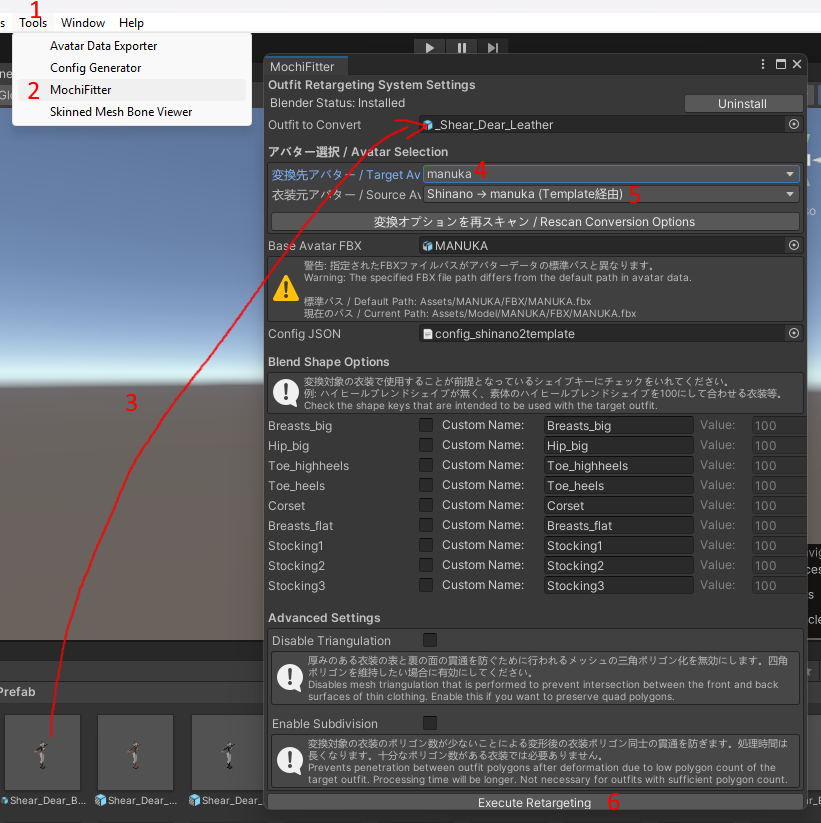
how to use mochifitter:
after drag and dropping the mochifitter unitypackage into unity follow these steps:
1 open tools
2 press on mochifitter
3 drag the outfit prefab from the project tab (NOT the hierachy) into the field
4 choose the profile for the avatar you want to fit it to (if the base avatar fbx field doesnt show the right avatar you either need to get the newest version of mochifitter or move the avatar fbx to the orginal location)
5 choose the profile which the outfit was originally made for
6 press execute retargeting(depending on your pc this could take a long time to finish)
-
how to use mochifitter:
after drag and dropping the mochifitter unitypackage into unity follow these steps:
1 open tools
2 press on mochifitter
3 drag the outfit prefab from the project tab (NOT the hierachy) into the field
4 choose the profile for the avatar you want to fit it to (if the base avatar fbx field doesnt show the right avatar you either need to get the newest version of mochifitter or move the avatar fbx to the orginal location)
5 choose the profile which the outfit was originally made for
6 press execute retargeting(depending on your pc this could take a long time to finish)
-
@Ezrek123 i do i have one question how do i fix this?
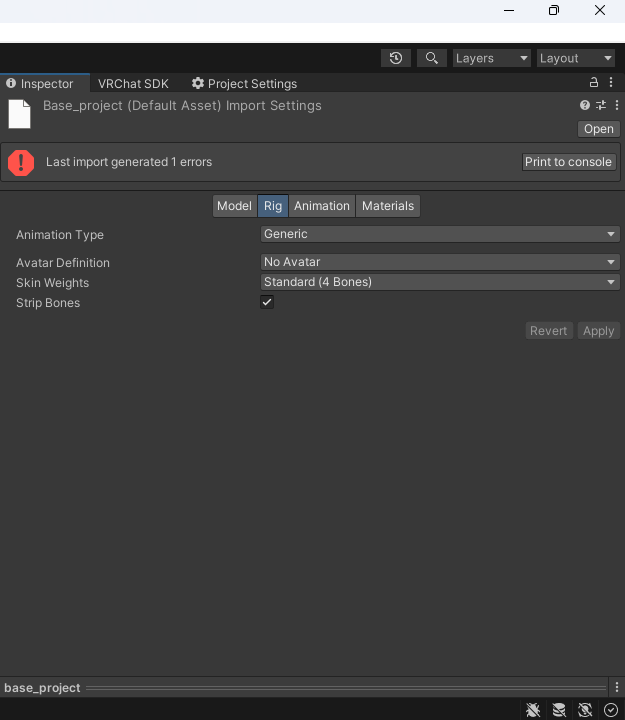
@pastelcutie i dont know what youre trying to do, but you can just delete all the mochifitter files and reimport the unitypackage again, you dont have to change anything in the files
-
-
https://mochifitter.eringi.me/
you can use this site to find a profile for your avatar
you'll need to know the name in japanese -
-
-
does anyone have this???
a profile for New NecoMaid
https://ekasilicon.booth.pm/items/7735455 -
new ririka profile: https://forum.ripper.store/post/1455138
-
-
-
-






Hello! It looks like you're interested in this conversation, but you don't have an account yet.
Getting fed up of having to scroll through the same posts each visit? When you register for an account, you'll always come back to exactly where you were before, and choose to be notified of new replies (either via email, or push notification). You'll also be able to save bookmarks and upvote posts to show your appreciation to other community members.
With your input, this post could be even better 💗
Register Login