Skip to content
  • Categories
  • Recent
  • Tags
  • Popular
Skins
  • Light
  • Brite
  • Cerulean
  • Cosmo
  • Flatly
  • Journal
  • Litera
  • Lumen
  • Lux
  • Materia
  • Minty
  • Morph
  • Pulse
  • Sandstone
  • Simplex
  • Sketchy
  • Spacelab
  • United
  • Yeti
  • Zephyr
  • Dark
  • Cyborg
  • Darkly
  • Quartz
  • Slate
  • Solar
  • Superhero
  • Vapor

  • Default (Zephyr)
  • No Skin
Collapse
RipperStore Logo
  1. Home
  2. Assets
  3. Looking for...
  4. Gumroad/Payhip Avatars
  5. Fae by kaiylast coming soon ☆

Fae by kaiylast coming soon ☆

Scheduled Pinned Locked Moved Gumroad/Payhip Avatars
waitingsearchkaiylastfemalee-girl
142 Posts 74 Posters 20.9k Views 60 Watching
  • Oldest to Newest
  • Newest to Oldest
  • Most Votes
Reply
  • Reply as topic
Log in to reply
This topic has been deleted. Only users with topic management privileges can see it.
  • RosesR Roses

    🔗 Download Link (pixeldrain.com)

    MERRY CHRISTMASSSSS

    I updated it to have all three

    FOR THE PEOPLE WHO ARE DOWNLOADING AND HAVENT UPVOTED PLEASE DO I AM SO CLOSE TO TRUSTED MEMBER

    R
    R
    randomacc1234
    wrote on last edited by
    #61

    @Roses Bit confused as to how i get it into unity considering after unzipping the files they still arent in unity format, help would be great ^^

    I 1 Reply Last reply
    0
    • gumgummoosebushG
      gumgummoosebushG
      gumgummoosebush
      wrote on last edited by
      #62

      thank you!

      1 Reply Last reply
      0
      • R randomacc1234

        @Roses Bit confused as to how i get it into unity considering after unzipping the files they still arent in unity format, help would be great ^^

        I
        I
        inactivr
        wrote on last edited by
        #63

        @randomacc1234 in vcc you click add project and you select the folder you unzipped

        R 1 Reply Last reply
        1
        • I inactivr

          @randomacc1234 in vcc you click add project and you select the folder you unzipped

          R
          R
          randomacc1234
          wrote on last edited by
          #64

          @Sleepybunnz thank youuu ^^

          1 Reply Last reply
          0
          • RosesR Roses

            🔗 Download Link (pixeldrain.com)

            MERRY CHRISTMASSSSS

            I updated it to have all three

            FOR THE PEOPLE WHO ARE DOWNLOADING AND HAVENT UPVOTED PLEASE DO I AM SO CLOSE TO TRUSTED MEMBER

            S
            S
            safethrone
            wrote on last edited by
            #65

            @Roses thank youuuuuuuuuu

            1 Reply Last reply
            0
            • U
              U
              unity_dummy
              wrote on last edited by
              #66

              It gives me an error when I try to extract them and it stops halfway through unzipping the files. I'm not sure if I'm doing something wrong?? But I'm following the instructions in this thread.

              RosesR 1 Reply Last reply
              0
              • U unity_dummy

                It gives me an error when I try to extract them and it stops halfway through unzipping the files. I'm not sure if I'm doing something wrong?? But I'm following the instructions in this thread.

                RosesR
                RosesR
                Roses
                wrote on last edited by
                #67

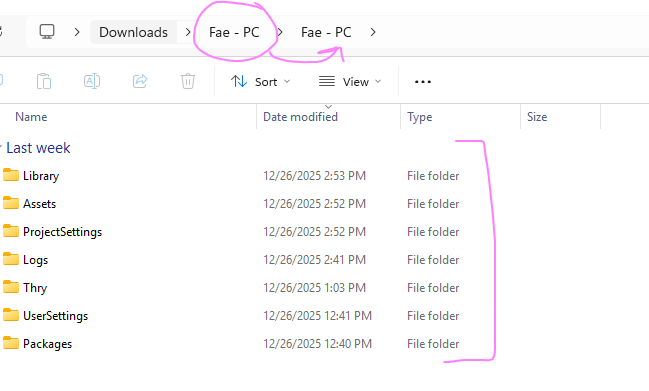
                @unity_dummy Use winrar and extract the whole folder named Fae - PC and put it in documents and then go to VCC and press on the add existing project and locate where you put Fae PC

                𝑅𝑜𝓈𝑒𝓈

                U 1 Reply Last reply
                0
                • NekothesillyN
                  NekothesillyN
                  Nekothesilly
                  wrote on last edited by
                  #68

                  Are Fae's arms supposed to be posed behind her back by default? Because I'm on PC and I don't want them behind her back but I can't find a setting to fix it.

                  1 Reply Last reply
                  0
                  • A
                    A
                    asinglebajablast
                    wrote on last edited by
                    #69
                    This post is deleted!
                    LaL 1 Reply Last reply
                    1
                    • A asinglebajablast
                      [[topic:post-is-deleted]]
                      LaL
                      LaL
                      La
                      wrote on last edited by
                      #70

                      @asinglebajablast That is the answer to uploading the avi! you should be using Unity 2022.3.22f1, When u extract the file it will put it into another folder you just have to put into the existing project the one with all the stuff in it dbd42003-e887-4d37-8c81-c1201f58240f-image.png
                      1 Reply Last reply
                      0
                      • RosesR Roses

                        @unity_dummy Use winrar and extract the whole folder named Fae - PC and put it in documents and then go to VCC and press on the add existing project and locate where you put Fae PC

                        U
                        U
                        unity_dummy
                        wrote on last edited by
                        #71

                        @Roses Thank you! But I'm getting a bit of error issues on the console and I'm not sure how to fix them. :C It won't let me upload otherwise. I'm so sorry to bother you, but do you know perhaps how to fix it? I heard other people were having the same issue.

                        1 Reply Last reply
                        0
                        • Taffy69T
                          Taffy69T
                          Taffy69
                          wrote on last edited by
                          #72

                          does anyone may have a texture for body that does not includes the freckles? I tried removing them but with no luck

                          1 Reply Last reply
                          0
                          • RosesR
                            RosesR
                            Roses
                            wrote on last edited by Roses
                            #73

                            This is v1.3

                            [register or login to view this hidden content]

                            Happy New Years everyone

                            𝑅𝑜𝓈𝑒𝓈

                            U 1 Reply Last reply
                            🎆 ❤
                            8
                            • bb bunnyB
                              bb bunnyB
                              bb bunny
                              wrote on last edited by
                              #74

                              quest updated as well or no?

                              RosesR 1 Reply Last reply
                              1
                              • bb bunnyB bb bunny

                                quest updated as well or no?

                                RosesR
                                RosesR
                                Roses
                                wrote on last edited by
                                #75

                                @bb-bunny I dont see anything about quest being updated so no

                                𝑅𝑜𝓈𝑒𝓈

                                1 Reply Last reply
                                ❤
                                1
                                • RosesR Roses

                                  This is v1.3

                                  [register or login to view this hidden content]

                                  Happy New Years everyone

                                  U
                                  U
                                  unity_dummy
                                  wrote on last edited by
                                  #76

                                  @Roses I'm uh, still getting a bunch of console errors on the avatar. Is there a way to fix them?

                                  RosesR 1 Reply Last reply
                                  0
                                  • U unity_dummy

                                    @Roses I'm uh, still getting a bunch of console errors on the avatar. Is there a way to fix them?

                                    RosesR
                                    RosesR
                                    Roses
                                    wrote on last edited by
                                    #77

                                    @unity_dummy Are you doing what was said before? Create an existing project?

                                    𝑅𝑜𝓈𝑒𝓈

                                    1 Reply Last reply
                                    0
                                    • thatrebeli0us1T
                                      thatrebeli0us1T
                                      thatrebeli0us1
                                      wrote on last edited by
                                      #78

                                      Can someone please do like a video on how to upload im getting so frustrated with the pc side lol

                                      1 Reply Last reply
                                      👍
                                      0
                                      • BelsieB
                                        BelsieB
                                        Belsie
                                        wrote on last edited by
                                        #79

                                        after creating an existing project did you try clicking manage project to update anything that may need to be updated?

                                        1 Reply Last reply
                                        0
                                        • InkRibbonI
                                          InkRibbonI
                                          InkRibbon
                                          wrote on last edited by
                                          #80

                                          i got an error that said "objective reference not set to an instance of an object" im not sure what to do now

                                          1 Reply Last reply
                                          0

                                          Hello! It looks like you're interested in this conversation, but you don't have an account yet.

                                          Getting fed up of having to scroll through the same posts each visit? When you register for an account, you'll always come back to exactly where you were before, and choose to be notified of new replies (either via email, or push notification). You'll also be able to save bookmarks and upvote posts to show your appreciation to other community members.

                                          With your input, this post could be even better 💗

                                          Register Login
                                          Reply
                                          • Reply as topic
                                          Log in to reply
                                          • Oldest to Newest
                                          • Newest to Oldest
                                          • Most Votes


                                          • Login

                                          • Login or register to search.
                                          • First post
                                            Last post
                                          0
                                          • Categories
                                          • Recent
                                          • Tags
                                          • Popular