
LF:Bakery - GPU Lightmapper
-
Anyone have the new version? I believe there's one that's only available through package manager updating. The version it shows on unity store isn't newest
-
-
Bump for bakery's secret update!
This post is deleted! -
Has anyone can lay out Github Patch which are not in general access?
-
I'm also looking for said update, 1.96 doesn't appear to be the latest, as Light Volumes complains

-
Bump for version 1.97
-
This post is deleted!
-
Search a bunch of telegrams for "bakery gpu lightmapper "1.97"" I found " Unity Development " russian group on page 2 google. try this and let me know if you get any malware (i dont think so)
-
Search a bunch of telegrams for "bakery gpu lightmapper "1.97"" I found " Unity Development " russian group on page 2 google. try this and let me know if you get any malware (i dont think so)
@linklexntx Huge! Thank you!
-
Search a bunch of telegrams for "bakery gpu lightmapper "1.97"" I found " Unity Development " russian group on page 2 google. try this and let me know if you get any malware (i dont think so)
-
@linklexntx said in LF:Bakery - GPU Lightmapper:
Search a bunch of telegrams for "bakery gpu lightmapper "1.97"" I found " Unity Development " russian group on page 2 google. try this and let me know if you get any malware (i dont think so)
Just a heads up to this version here: It only supports driver versions up to 581.XX. Drivers beyond 591.XX and newer will not able to run the RTX6 CUDA code, that the bakery developer used, which is a bummer. That driver class was pretty much stable to me. Either someone is able to find the latest version of GPU Lightmapper, which was 4 days ago
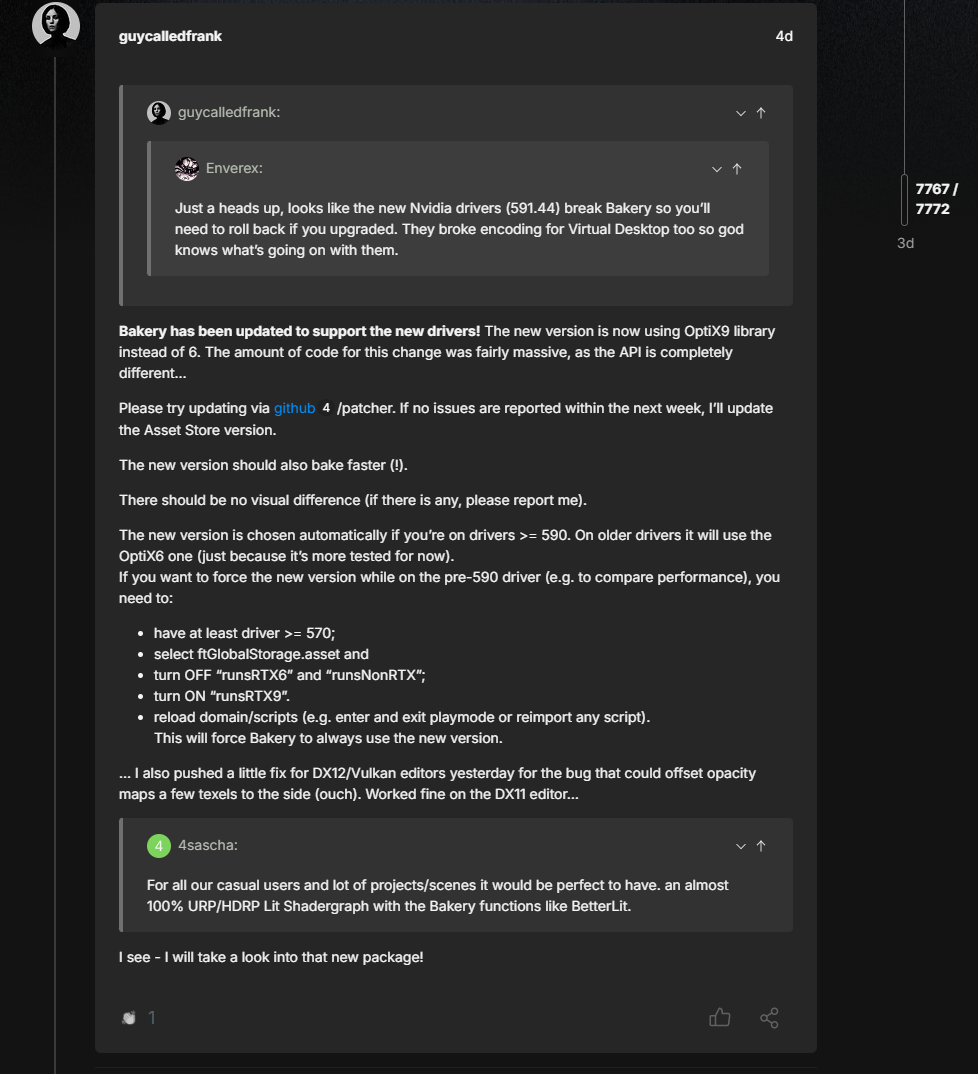
Or downgrade. So... sigh back to downgrading that shizzle. -
Here is the latest versions of the Light Mapper 1.98 and the Real-Time preview - grabbed from the unity store about an hour before I made this post
If you get errors about no RTX etc etc remove the contents of Editor\x64\Bakery and reimport it
MD5: d1c2987effdbb7f8f7d4230237cabe7646be2285bed5bca58e2d14b7c9848091
Bakery - GPU Lightmapper.unitypackageMD5: 10600f7fd61be6f8f807257b9d858dbf530066a1a12c8bb9c74d030db5d46d31
Bakery Real-Time Preview.unitypackage[]()
-
-
@CrystalDust The only thing i can even think of is the GPU running out of memory, except that I have no idea google isn't much help as it seems to happen with alot of different programs
-
Here is the latest versions of the Light Mapper 1.98 and the Real-Time preview - grabbed from the unity store about an hour before I made this post
If you get errors about no RTX etc etc remove the contents of Editor\x64\Bakery and reimport it
MD5: d1c2987effdbb7f8f7d4230237cabe7646be2285bed5bca58e2d14b7c9848091
Bakery - GPU Lightmapper.unitypackageMD5: 10600f7fd61be6f8f807257b9d858dbf530066a1a12c8bb9c74d030db5d46d31
Bakery Real-Time Preview.unitypackage[]()
@TheEnigma thank u
-
Where i can use it? since i was with the bakery 1.9 and that one has a menu up there, this one doesnt have
-
@CrystalDust

Your Graphs card just can't do it -
@CrystalDust
Your Graphs card just can't do it@CoffeeRipper Cannot be told surely.
Bakery's error logging is a bitch to identify. There are lots of issues with this addon.
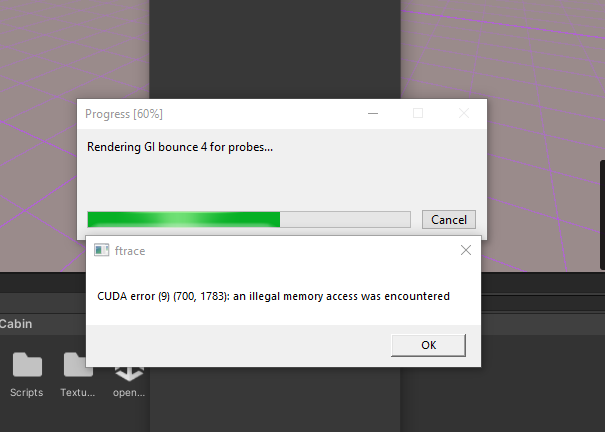
I have a 5070 ti and it refused to work, due to higher/newer driver versions, than the addon could handle, resulting into the exact same error CrystalDust had here.
On other occasions, when rendering and light baking, you will encounter issues as "scene has changed too much bla bla, cannot bake light probes, repeat rendering step" or posting some error codes and rebaking requirements - and you know what? Nothing has been moved at all nor done to trigger those error messages. Bakery is sometimes simply messing around with you, JUST BECAUSE of an object intersecting with another object (vertex manipulation) at the time of snapshooting it, and will fail light probe baking entirely, but will still show up with weird error messages completely out of context.People would say "well, just rebake", but yeah ... that is not so easily done, when rendering and light probe baking each taking over 7-10 minutes to complete with each time you run that process, and trying to figure out what triggers the bitchy diva gets onto the nerves, because recreating it with the suspected assets is nearly impossible (1:1 copy of the prefab setup to another, faster loading empty project, is not doing it).
-
@CoffeeRipper Cannot be told surely.
Bakery's error logging is a bitch to identify. There are lots of issues with this addon.
I have a 5070 ti and it refused to work, due to higher/newer driver versions, than the addon could handle, resulting into the exact same error CrystalDust had here.
On other occasions, when rendering and light baking, you will encounter issues as "scene has changed too much bla bla, cannot bake light probes, repeat rendering step" or posting some error codes and rebaking requirements - and you know what? Nothing has been moved at all nor done to trigger those error messages. Bakery is sometimes simply messing around with you, JUST BECAUSE of an object intersecting with another object (vertex manipulation) at the time of snapshooting it, and will fail light probe baking entirely, but will still show up with weird error messages completely out of context.People would say "well, just rebake", but yeah ... that is not so easily done, when rendering and light probe baking each taking over 7-10 minutes to complete with each time you run that process, and trying to figure out what triggers the bitchy diva gets onto the nerves, because recreating it with the suspected assets is nearly impossible (1:1 copy of the prefab setup to another, faster loading empty project, is not doing it).
@blapanda Sounds to me the person who made bakery did not make it reliable. So it's super picky on how and when it will work. I just use the unity baker. I just manually did the light probes. Or the Russian guys broke the code
-
@blapanda Sounds to me the person who made bakery did not make it reliable. So it's super picky on how and when it will work. I just use the unity baker. I just manually did the light probes. Or the Russian guys broke the code
@CoffeeRipper Exactly, Bakery is sometimes really unreliable, especially when trying to backtrack the issue. If you have a world with over 700 custom made assets in that scene, and you modified 10 of them, added 5 new, and changed some UVs on the go, because some dark spots appearing (because my dumbass forgot to unhide every mesh before selecting all and unpacking them to a secondary UV for lightmap baking...) or something seems cut weirdly, you will have a hard time figuring out what exactly caused the issue, and Bakery posting some nonsense error message is infuriating at that matter.
And about Unity's baking ... that was the reason I got Bakery in the first place
 Unity is causing horrible artefacts and takes uber-long processing, for me at least, despite a quite high end hardware (r7-9800x3d, 5070 ti prime oc, 64gb ddr5 ram 6gt/s).







Hello! It looks like you're interested in this conversation, but you don't have an account yet.
Getting fed up of having to scroll through the same posts each visit? When you register for an account, you'll always come back to exactly where you were before, and choose to be notified of new replies (either via email, or push notification). You'll also be able to save bookmarks and upvote posts to show your appreciation to other community members.
With your input, this post could be even better 💗
Register Login