Skip to content
  • Categories
  • Recent
  • Tags
  • Popular
Skins
  • Light
  • Brite
  • Cerulean
  • Cosmo
  • Flatly
  • Journal
  • Litera
  • Lumen
  • Lux
  • Materia
  • Minty
  • Morph
  • Pulse
  • Sandstone
  • Simplex
  • Sketchy
  • Spacelab
  • United
  • Yeti
  • Zephyr
  • Dark
  • Cyborg
  • Darkly
  • Quartz
  • Slate
  • Solar
  • Superhero
  • Vapor

  • Default (Zephyr)
  • No Skin
Collapse
RipperStore Logo
  1. Home
  2. Assets
  3. Looking for...
  4. Other Assets
  5. Uruki face tracking addon by hash

Uruki face tracking addon by hash

Scheduled Pinned Locked Moved Unsolved Other Assets
vrcftfacetrackinghashuruki
51 Posts 30 Posters 6.4k Views 22 Watching
  • Oldest to Newest
  • Newest to Oldest
  • Most Votes
Reply
  • Reply as topic
Log in to reply
This topic has been deleted. Only users with topic management privileges can see it.
  • lyeeL lyee

    also 🔗 Download Link (workupload.com)

    XenderUwUX
    XenderUwUX
    XenderUwU
    wrote on last edited by
    #22

    @lyee thank you so much 🙏

    1 Reply Last reply
    0
    • lyeeL lyee

      how come every time I ty to use the tool it says something went wrong?

      M
      M
      melia
      wrote on last edited by
      #23

      @lyee did you ever fix this?

      1 Reply Last reply
      0
      • lyeeL lyee

        also 🔗 Download Link (workupload.com)

        Y
        Y
        YouGetCrossedOut
        wrote on last edited by
        #24

        @lyee This is broken do you have the file so it can be uploaded agian

        W 1 Reply Last reply
        0
        • Y YouGetCrossedOut

          @lyee This is broken do you have the file so it can be uploaded agian

          W
          W
          Wooshy
          wrote on last edited by
          #25

          @YouGetCrossedOut It works fine, this one only works with the latest 1.2v of the model

          Y 1 Reply Last reply
          0
          • W Wooshy

            @YouGetCrossedOut It works fine, this one only works with the latest 1.2v of the model

            Y
            Y
            YouGetCrossedOut
            wrote on last edited by
            #26

            @Wooshy im using 1.2 cant get this to work at all

            W 1 Reply Last reply
            0
            • Y YouGetCrossedOut

              @Wooshy im using 1.2 cant get this to work at all

              W
              W
              Wooshy
              wrote on last edited by
              #27

              @YouGetCrossedOut Weird, try a new project with nothing but the avi and FT with the required packages nothing more. It worked fine for me

              1 Reply Last reply
              0
              • G
                G
                gimmeknife
                wrote on last edited by
                #28

                bump 1.2

                DrunkJesterD 1 Reply Last reply
                0
                • G gimmeknife

                  bump 1.2

                  DrunkJesterD
                  DrunkJesterD
                  DrunkJester
                  wrote on last edited by
                  #29

                  @gimmeknife [register or login to view this hidden content]

                  1 Reply Last reply
                  💜
                  0
                  • G
                    G
                    gimmeknife
                    wrote on last edited by
                    #30

                    @Sophia-Bonkers Is this working for you? I'm having the same issue as @Wooshy

                    1 Reply Last reply
                    0
                    • YukaaY
                      YukaaY
                      Yukaa
                      wrote on last edited by
                      #31

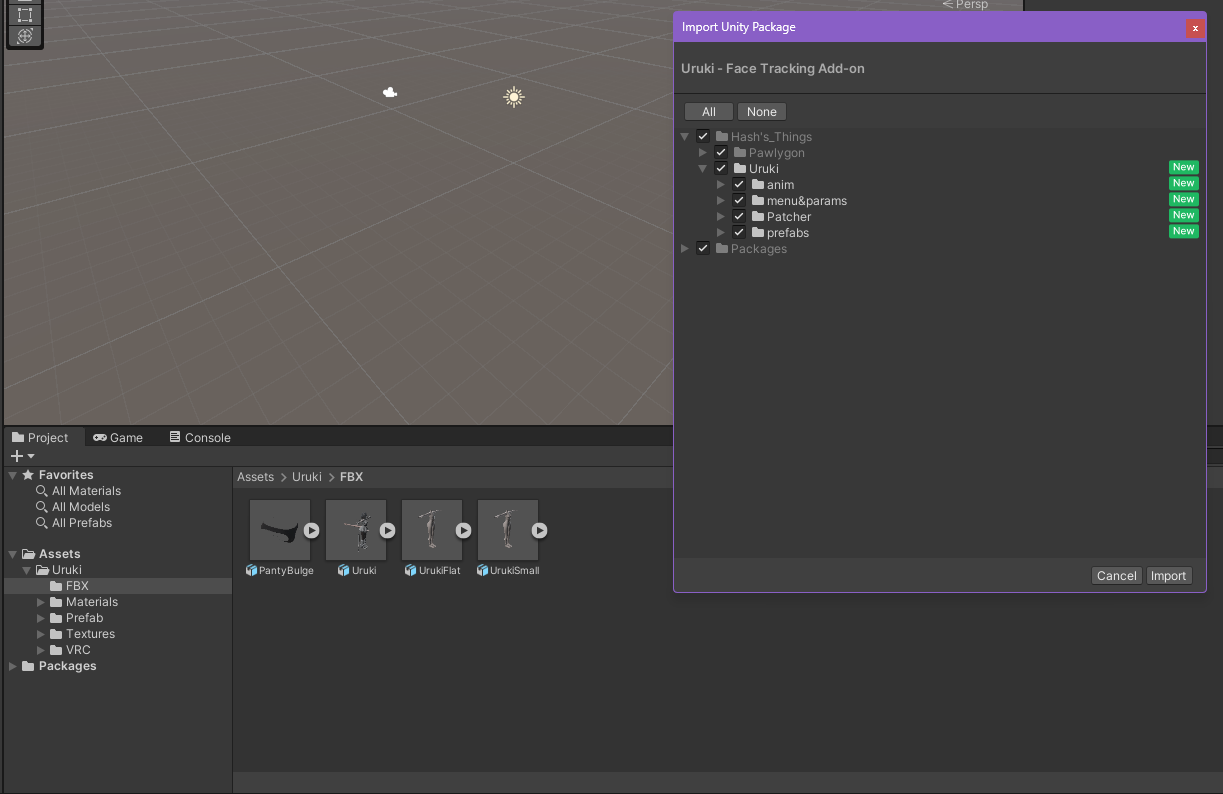
                      Why i don't have the FT FBX in the project ?
                      image.png

                      GuppG 1 Reply Last reply
                      0
                      • YukaaY Yukaa

                        Why i don't have the FT FBX in the project ?
                        image.png

                        GuppG
                        GuppG
                        Gupp
                        wrote on last edited by Gupp
                        #32

                        @Yukaa in the patcher folder go to Data>hdiff>hpatchz. Click the folder for your Operating system and double click the file inside, then got to Tools>Hash>Patcher. it should generate that fbx you need

                        🐟🐟🐟🐟🐟🐟🐟🐟🐟🐟🐟
                        upvotes are always appreciated
                        🐟🐟🐟🐟🐟🐟🐟🐟🐟🐟🐟

                        zombiemikuZ HollowedH 2 Replies Last reply
                        0
                        • GuppG Gupp

                          @Yukaa in the patcher folder go to Data>hdiff>hpatchz. Click the folder for your Operating system and double click the file inside, then got to Tools>Hash>Patcher. it should generate that fbx you need

                          zombiemikuZ
                          zombiemikuZ
                          zombiemiku
                          wrote on last edited by
                          #33

                          @Gupp I tried this just now and I still received the same error.

                          1 Reply Last reply
                          0
                          • JoeBam4351J
                            JoeBam4351J
                            JoeBam4351
                            wrote on last edited by
                            #34

                            You will need to have Uruki 1.2 for it to work along with the 1.2 hash FT

                            GuppG 1 Reply Last reply
                            1
                            • JoeBam4351J JoeBam4351

                              You will need to have Uruki 1.2 for it to work along with the 1.2 hash FT

                              GuppG
                              GuppG
                              Gupp
                              wrote on last edited by Gupp
                              #35

                              @JoeBam4351 completely forgot about fbx version compatibility. ty for reminding me.

                              🐟🐟🐟🐟🐟🐟🐟🐟🐟🐟🐟
                              upvotes are always appreciated
                              🐟🐟🐟🐟🐟🐟🐟🐟🐟🐟🐟

                              1 Reply Last reply
                              0
                              • JoeBam4351J
                                JoeBam4351J
                                JoeBam4351
                                wrote on last edited by
                                #36
                                This post is deleted!
                                1 Reply Last reply
                                0
                                • JoeBam4351J
                                  JoeBam4351J
                                  JoeBam4351
                                  wrote on last edited by
                                  #37

                                  @gupp Anytime! I even tried it my self and it didn't work with the versions that I found so it could either mean someone has uploaded the wrong version even know it says 1.2 or the hash patchier is broken

                                  GuppG 1 Reply Last reply
                                  0
                                  • JoeBam4351J JoeBam4351

                                    @gupp Anytime! I even tried it my self and it didn't work with the versions that I found so it could either mean someone has uploaded the wrong version even know it says 1.2 or the hash patchier is broken

                                    GuppG
                                    GuppG
                                    Gupp
                                    wrote on last edited by Gupp
                                    #38

                                    @JoeBam4351 let me check if i have the file for uruki. i remember having the same issue but managed to get it working. i'm going to take the avatar and hash's files from my unity project folder if i cant find the unity project files

                                    🐟🐟🐟🐟🐟🐟🐟🐟🐟🐟🐟
                                    upvotes are always appreciated
                                    🐟🐟🐟🐟🐟🐟🐟🐟🐟🐟🐟

                                    1 Reply Last reply
                                    0
                                    • GuppG
                                      GuppG
                                      Gupp
                                      wrote on last edited by
                                      #39

                                      found the files. both the correct v1.2 avatar and hash's facetracking are inside. I tested them twice. make sure to delete the folders for the avatar and hash's facetracking before importing these to the unity project to prevent issues

                                      ---> [register or login to view this hidden content]

                                      🐟🐟🐟🐟🐟🐟🐟🐟🐟🐟🐟
                                      upvotes are always appreciated
                                      🐟🐟🐟🐟🐟🐟🐟🐟🐟🐟🐟

                                      M J 2 Replies Last reply
                                      💜
                                      4
                                      • JoeBam4351J
                                        JoeBam4351J
                                        JoeBam4351
                                        wrote on last edited by
                                        #40

                                        @gupp Thanks!!

                                        1 Reply Last reply
                                        1
                                        • GuppG Gupp

                                          @Yukaa in the patcher folder go to Data>hdiff>hpatchz. Click the folder for your Operating system and double click the file inside, then got to Tools>Hash>Patcher. it should generate that fbx you need

                                          HollowedH
                                          HollowedH
                                          Hollowed
                                          wrote on last edited by
                                          #41

                                          @Gupp for some reason after i do the hpatch nothing pops up in my tools? (im still new to doing ft on avis)

                                          GuppG 1 Reply Last reply
                                          0

                                          Hello! It looks like you're interested in this conversation, but you don't have an account yet.

                                          Getting fed up of having to scroll through the same posts each visit? When you register for an account, you'll always come back to exactly where you were before, and choose to be notified of new replies (either via email, or push notification). You'll also be able to save bookmarks and upvote posts to show your appreciation to other community members.

                                          With your input, this post could be even better 💗

                                          Register Login
                                          Reply
                                          • Reply as topic
                                          Log in to reply
                                          • Oldest to Newest
                                          • Newest to Oldest
                                          • Most Votes


                                          • Login

                                          • Login or register to search.
                                          • First post
                                            Last post
                                          0
                                          • Categories
                                          • Recent
                                          • Tags
                                          • Popular