
[Chrome/Edge/Firefox supported] Browser Extension Backup | Booth Searcher
-
Find out "extension manager" or paste these in the search bar
chrome://extensions/
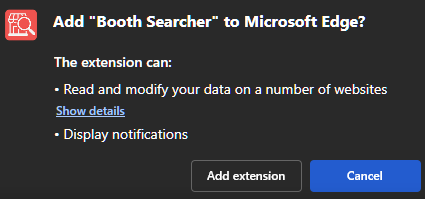
edge://extensions/Drag the .crx file into the Chrome/Edge/Firefox extension page
It's sure to work in any browsers that use the Chromium framework.
You need to be logged into the forum that be workChrome Version 139.0.7258.128 (Official Build) (64-bit)
Edge Version 142.0.3595.94 (Official build) (64-bit)
-
-
Can you share it in .zip format? I can't download, because my browser wants to install it, and right after it deletes it, and .crx source file too. THX!
Most assets on gumroad have a 60% discount for people from my country, so I can help you buy the asset you need at a discounted price. Write to me if you are interested.
-
Can you share it in .zip format? I can't download, because my browser wants to install it, and right after it deletes it, and .crx source file too. THX!
@Gatito Sry, but u can use Edge or Firefox to download.
Free sharing is a costly charity.
Once sharing becomes others' resale, that's a monopoly.I respect every creator and any takedown request. Please contact me using the forum function first before you decide to do anything that exposes me on social media. Thank you.
-
-
just tested both chromium and ff
still works! just according to my finding you NEED to be logged in to the same browser to ripper store so that it can use its api (discovered it wouldn't work because i wasn't logged into ripperstore in my chromium browser when testing)
if your firefox refuses to install this, change extensions.quarantinedDomains.enabled in about:config to false temporarily as you install it - don't forget to reenable this for your security sake. reenabling that flag will toggle the extension off but you can ask it to turn it back on.
as for chromium, i tested thorium browser and i didn't need to do anything special to install the extension.
edit: for firefox, get the XPI from the other thread. i can reup if/when needed
-
-
I matched my Chrome version exactly as instructed and completed the installation.
However, the extension’s ON switch cannot be toggled. What should I do?It shows the message:
“This extension is not listed in the Chrome Web Store and may have been added without the user’s knowledge.” -
just tested both chromium and ff
still works! just according to my finding you NEED to be logged in to the same browser to ripper store so that it can use its api (discovered it wouldn't work because i wasn't logged into ripperstore in my chromium browser when testing)
if your firefox refuses to install this, change extensions.quarantinedDomains.enabled in about:config to false temporarily as you install it - don't forget to reenable this for your security sake. reenabling that flag will toggle the extension off but you can ask it to turn it back on.
as for chromium, i tested thorium browser and i didn't need to do anything special to install the extension.
edit: for firefox, get the XPI from the other thread. i can reup if/when needed
-
Thanks so much

-
-
I matched my Chrome version exactly as instructed and completed the installation.
However, the extension’s ON switch cannot be toggled. What should I do?It shows the message:
“This extension is not listed in the Chrome Web Store and may have been added without the user’s knowledge.”@brobrobro14312 you could try Thorium and if it doesn't work, just ditch Chromium and use Firefox

-
Thank youuu! My pc had to be reset, and I was afraid I wouldn't be able to use this great tool anymore. You're my savior!

-
-
-
-
-
@eerie @雨约min it still works on firefox! please read my post above
https://forum.ripper.store/post/1341233 -
-
@smolvix69 If you have already installed it, it works fine, but there is a problem with the new installation.
I've been experiencing it not working since I reset my pc.











Hello! It looks like you're interested in this conversation, but you don't have an account yet.
Getting fed up of having to scroll through the same posts each visit? When you register for an account, you'll always come back to exactly where you were before, and choose to be notified of new replies (either via email, or push notification). You'll also be able to save bookmarks and upvote posts to show your appreciation to other community members.
With your input, this post could be even better 💗
Register Login