Skip to content
  • Categories
  • Recent
  • Tags
  • Popular
Skins
  • Light
  • Brite
  • Cerulean
  • Cosmo
  • Flatly
  • Journal
  • Litera
  • Lumen
  • Lux
  • Materia
  • Minty
  • Morph
  • Pulse
  • Sandstone
  • Simplex
  • Sketchy
  • Spacelab
  • United
  • Yeti
  • Zephyr
  • Dark
  • Cyborg
  • Darkly
  • Quartz
  • Slate
  • Solar
  • Superhero
  • Vapor

  • Default (Zephyr)
  • No Skin
Collapse
RipperStore Logo
  1. Home
  2. Assets
  3. Found Avatars and Assets
  4. 【VRChat】リアル映像システム(アバター用) VRC用PCSS (Found by cefi) ✔

【VRChat】リアル映像システム(アバター用) VRC用PCSS (Found by cefi) ✔

Scheduled Pinned Locked Moved Found Avatars and Assets
248 Posts 109 Posters 158.3k Views 129 Watching
  • Oldest to Newest
  • Newest to Oldest
  • Most Votes
Reply
  • Reply as topic
Log in to reply
This topic has been deleted. Only users with topic management privileges can see it.
  • chuusdayC chuusday

    @picturesque where is that at im assuming i found it but it still shows the colors in game 😞

    picturesqueP
    picturesqueP
    picturesque
    wrote on last edited by
    #193

    @stewpwid If your talking about about the brightness, in the LightControl you'll find and Radial menu called "LightIntensity" that will allow you to increase or decrease your PCSS Brightness
    hope this helps 🙂

    Happy hunting
    ᴜɴᴋɴᴏᴡɴ

    chuusdayC 1 Reply Last reply
    0
    • picturesqueP picturesque

      @stewpwid If your talking about about the brightness, in the LightControl you'll find and Radial menu called "LightIntensity" that will allow you to increase or decrease your PCSS Brightness
      hope this helps 🙂

      chuusdayC
      chuusdayC
      chuusday
      wrote on last edited by
      #194

      @picturesque im not 😞 my pcss works but in game its red , can change the colors but not the normal pcss

      OrganzO 1 Reply Last reply
      0
      • chuusdayC chuusday

        @picturesque im not 😞 my pcss works but in game its red , can change the colors but not the normal pcss

        OrganzO
        OrganzO
        Organz
        wrote on last edited by
        #195

        @stewpwid In unity open your "Self Light" Prefab in the hierarchy Go to Auto Lighting > Plane > Cam And move the camera forward a hair.

        ヾ(^-^)ノ

        chuusdayC 1 Reply Last reply
        1
        • OrganzO Organz

          @stewpwid In unity open your "Self Light" Prefab in the hierarchy Go to Auto Lighting > Plane > Cam And move the camera forward a hair.

          chuusdayC
          chuusdayC
          chuusday
          wrote on last edited by
          #196

          @Organz omg it worked tysm ily

          1 Reply Last reply
          0
          • OrganzO
            OrganzO
            Organz
            wrote on last edited by
            #197

            Having issues with the newer versions saying I'm missing sum and idk how to fix it, hellpp!
            !!28ab3020-7218-46f4-ae9a-a79e8717a7e5-image.png

            ヾ(^-^)ノ

            201544342 1 Reply Last reply
            0
            • OrganzO Organz

              Having issues with the newer versions saying I'm missing sum and idk how to fix it, hellpp!
              !!28ab3020-7218-46f4-ae9a-a79e8717a7e5-image.png

              201544342
              201544342
              20154434
              wrote on last edited by
              #198

              @Organz u need modular avatar

              OrganzO 1 Reply Last reply
              0
              • 201544342 20154434

                @Organz u need modular avatar

                OrganzO
                OrganzO
                Organz
                wrote on last edited by
                #199

                @20154434 I'll try that tysm, Wasn't ever required before the newer versions so I've been so confused

                ヾ(^-^)ノ

                1 Reply Last reply
                1
                • OrganzO
                  OrganzO
                  Organz
                  wrote on last edited by
                  #200

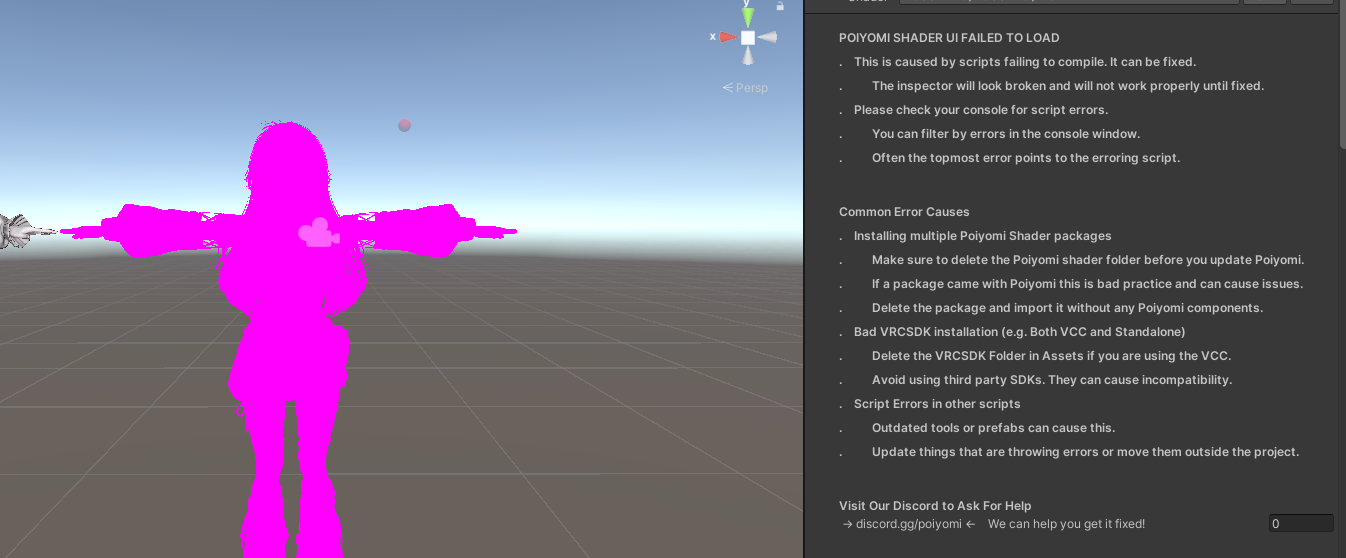
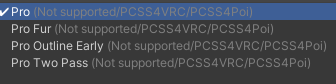
                  Sadly I have more issues and I have a smooth brain. So... I have Poi Pro 9.3.51, PCSS Poi Pro 8.2.2, and MA, but for some reason the shader fails to load and goes pink.. I have no clue why either and I know it used to do that because of the Decal layer, so I'm curious if something like that is breaking it or what I need to do?
                  (Ps thanks to everyone in this thread being so helpful)

                  ヾ(^-^)ノ

                  TofuTofuT WitchofasiaW 2 Replies Last reply
                  1
                  • OrganzO Organz

                    Sadly I have more issues and I have a smooth brain. So... I have Poi Pro 9.3.51, PCSS Poi Pro 8.2.2, and MA, but for some reason the shader fails to load and goes pink.. I have no clue why either and I know it used to do that because of the Decal layer, so I'm curious if something like that is breaking it or what I need to do?
                    (Ps thanks to everyone in this thread being so helpful)

                    TofuTofuT
                    TofuTofuT
                    TofuTofu
                    wrote on last edited by
                    #201

                    @Organz i am not really good with this stuff but when the only solution i know was changing the render queue to something between 2400-3000 to make it work, my shaders were liltoon, i don't know if poiyomi have that option

                    1 Reply Last reply
                    0
                    • OrganzO Organz

                      Sadly I have more issues and I have a smooth brain. So... I have Poi Pro 9.3.51, PCSS Poi Pro 8.2.2, and MA, but for some reason the shader fails to load and goes pink.. I have no clue why either and I know it used to do that because of the Decal layer, so I'm curious if something like that is breaking it or what I need to do?
                      (Ps thanks to everyone in this thread being so helpful)

                      WitchofasiaW
                      WitchofasiaW
                      Witchofasia
                      wrote on last edited by
                      #202

                      @Organz Don't normally comment but changed this to a normal pcss shader by typing in pcss into sahders. alt text

                      OrganzO 1 Reply Last reply
                      0
                      • OrganzO
                        OrganzO
                        Organz
                        wrote on last edited by
                        #203

                        for reference this is what's happening
                        image.png
                        image.png

                        ヾ(^-^)ノ

                        OrganzO 1 Reply Last reply
                        0
                        • WitchofasiaW Witchofasia

                          @Organz Don't normally comment but changed this to a normal pcss shader by typing in pcss into sahders. alt text

                          OrganzO
                          OrganzO
                          Organz
                          wrote on last edited by
                          #204

                          @Witchofasia That's just to fix the lighting color, not the material!
                          Also its supposed to be VRChat > Toon (I'm pretty sure, sum like that)

                          ヾ(^-^)ノ

                          1 Reply Last reply
                          0
                          • HisMaimaiH
                            HisMaimaiH
                            HisMaimai
                            wrote on last edited by
                            #205

                            whats the most updated verison

                            ‧ ⁺ ︵⏜ 𓇼 ⏜︵ ‧ ₊

                            1 Reply Last reply
                            0
                            • tabsT
                              tabsT
                              tabs
                              wrote on last edited by
                              #206

                              [register or login to view this hidden content] latest liltoon

                              1 Reply Last reply
                              😊 👍
                              5
                              • Black-LiteB
                                Black-LiteB
                                Black-Lite
                                wrote on last edited by Black-Lite
                                #207

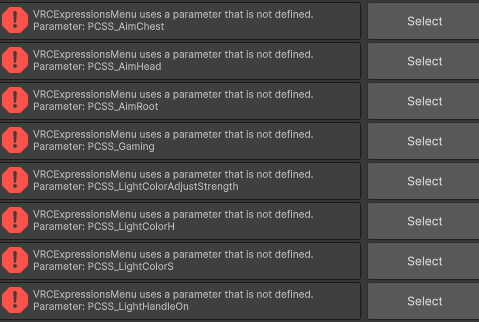
                                can anyone explain where/what the parameter expression menu and fx layered are named/located. i think i put the right ones in the slots but. not a single option does anything in game nothing changes
                                pls help

                                1 Reply Last reply
                                0
                                • Black-LiteB
                                  Black-LiteB
                                  Black-Lite
                                  wrote on last edited by Black-Lite
                                  #208

                                  well theres some problem here i put the only parameter controller in the slot. and the vrc uploader gives me errors saying that the parameters dont existScreenshot 2026-01-13 045530.png

                                  1 Reply Last reply
                                  0
                                  • Black-LiteB
                                    Black-LiteB
                                    Black-Lite
                                    wrote on last edited by
                                    #209

                                    fixed that i think i have the right menu in but still it fuckin does nothing no options work not even lowering and raising the light intensity

                                    JadenCrossJ 1 Reply Last reply
                                    1
                                    • Black-LiteB Black-Lite

                                      fixed that i think i have the right menu in but still it fuckin does nothing no options work not even lowering and raising the light intensity

                                      JadenCrossJ
                                      JadenCrossJ
                                      JadenCross
                                      wrote on last edited by
                                      #210

                                      @Black-Lite ive never been able to get pcss to work idk how people do it

                                      1 Reply Last reply
                                      0
                                      • OrganzO Organz

                                        for reference this is what's happening
                                        image.png
                                        image.png

                                        OrganzO
                                        OrganzO
                                        Organz
                                        wrote on last edited by
                                        #211

                                        Bump for help with this issue!

                                        ヾ(^-^)ノ

                                        1 Reply Last reply
                                        0
                                        • EchidnaE
                                          EchidnaE
                                          Echidna
                                          wrote on last edited by
                                          #212

                                          Think latest poiyomi(normal & other) is broken on it - for me in game, it will never turn on. Seems to mess up especially if you use any other optimization systems.
                                          Liltoon only.
                                          It requires MA setup.
                                          Expect installing/setting this up to fuck your whole avatar project.
                                          Also, the way it's setup, the point light it adds is always on and cannot be turned off unless you manage to edit the whole system around it.
                                          So -20 fps for everyone at all times in same room as you, even if you turn it off.
                                          if you fucked with it then messed up, delete the whole folder nHaruka folder and start again.

                                          Signature: "Unless otherwise told:
                                          Echidna will not be uploading any updated versions of this asstes in the future, so please do not ask about it in this thread.
                                          If you have never shared any "Gifts / Download" posts yourself, please refrain from requesting a re-upload."
                                          Thank me by finding one of the items I'm bumping.

                                          cake-yumC 1 Reply Last reply
                                          1

                                          Hello! It looks like you're interested in this conversation, but you don't have an account yet.

                                          Getting fed up of having to scroll through the same posts each visit? When you register for an account, you'll always come back to exactly where you were before, and choose to be notified of new replies (either via email, or push notification). You'll also be able to save bookmarks and upvote posts to show your appreciation to other community members.

                                          With your input, this post could be even better 💗

                                          Register Login
                                          Reply
                                          • Reply as topic
                                          Log in to reply
                                          • Oldest to Newest
                                          • Newest to Oldest
                                          • Most Votes


                                          • Login

                                          • Login or register to search.
                                          • First post
                                            Last post
                                          0
                                          • Categories
                                          • Recent
                                          • Tags
                                          • Popular