
『Avatar Blink Fix』表情改変後の目のBlendShapeを修正するツール v1.0.08
-
We're deeply grateful for your update to version 1.0.08—
this tool is so brilliantly crafted, it feels like having a digital Swiss Army knife in our creative toolbox!

Thank you for making workflows smoother than a freshly oiled gear—every tweak shows your relentless dedication!
 ️
️
-
Bump for complete v1.0.10 update whenever possible ;w;
-
@yuuyasadf Thank you so much for updating to version 1.0.11

This tool is truly wonderful, and I'm deeply grateful for your continued support in providing these updates
It's an incredible help! Thank you~
-
@yuuyasadf Heyyyy!!! Sorry to bother you, just wanted to check if there are any updates for Lumina? TYSM!!!
-
bump update
-
@yuuyasadf yees pls, update for lumina
-
The files described below, provided by @yuuyasadf, contain malicious code that executes once the avatar is being uploaded. If you have imported any of these files, immediately purge the affected Unity project and reset your Discord password.
Unitypackage: "Avatar Blink Fix Complete 1.0.10.unitypackage"
Affected files: AvatarBlinkMeshFix.cs, AvatarBlinkFix.cs -
-
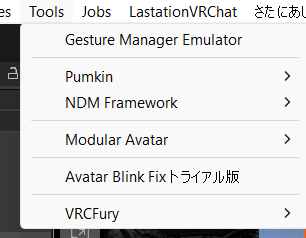
So how do I get this to show up in 'Tools'?
@LocalSpoonLover just drag and drop the unity package into your project and import, then it should show up in your Tools section like this
-
I was a bit nervous about downloading it so I bought it.
Happy New Year guys and stay safe!Edit: Was my first time using a Tool like this, it's pretty easy to use honestly.
Just make sure to test the blendshapes before uploading, sometimes you get faulty Auto Fixes. When this happens, just run the Tool again and check again if anything looks off.
Unfortunately there is no english localization for this Tool
.//Be nice and don't forget to upvote to contributors!
.//優しくして、貢献者にアップボートを! -
I was a bit nervous about downloading it so I bought it.
Happy New Year guys and stay safe!Edit: Was my first time using a Tool like this, it's pretty easy to use honestly.
Just make sure to test the blendshapes before uploading, sometimes you get faulty Auto Fixes. When this happens, just run the Tool again and check again if anything looks off.
Unfortunately there is no english localization for this Tool -
Bump update












Hello! It looks like you're interested in this conversation, but you don't have an account yet.
Getting fed up of having to scroll through the same posts each visit? When you register for an account, you'll always come back to exactly where you were before, and choose to be notified of new replies (either via email, or push notification). You'll also be able to save bookmarks and upvote posts to show your appreciation to other community members.
With your input, this post could be even better 💗
Register Login