Skip to content
  • Categories
  • Recent
  • Tags
  • Popular
Skins
  • Light
  • Brite
  • Cerulean
  • Cosmo
  • Flatly
  • Journal
  • Litera
  • Lumen
  • Lux
  • Materia
  • Minty
  • Morph
  • Pulse
  • Sandstone
  • Simplex
  • Sketchy
  • Spacelab
  • United
  • Yeti
  • Zephyr
  • Dark
  • Cyborg
  • Darkly
  • Quartz
  • Slate
  • Solar
  • Superhero
  • Vapor

  • Default (Zephyr)
  • No Skin
Collapse
RipperStore Logo
  1. Home
  2. Assets
  3. Looking for...
  4. Furry Avatars
  5. LF: Death's BBL Male (NEED)

LF: Death's BBL Male (NEED)

Scheduled Pinned Locked Moved Unsolved Furry Avatars
nsfwfurrymale
42 Posts 16 Posters 7.4k Views 84 Watching
  • Oldest to Newest
  • Newest to Oldest
  • Most Votes
Reply
  • Reply as topic
Log in to reply
This topic has been deleted. Only users with topic management privileges can see it.
  • chocolatemintyC
    chocolatemintyC
    chocolateminty
    wrote on last edited by
    #28

    To anyone who can help ;w;
    {F73425E0-B6AC-4DAA-887E-59511352946B}.png

    1 Reply Last reply
    1
    • chocolatemintyC
      chocolatemintyC
      chocolateminty
      wrote on last edited by
      #29

      i dont think im alowed to see that but if anyone can help me to put it in unity that would be great ;w;

      BungusEnjoyer442B 1 Reply Last reply
      0
      • chocolatemintyC chocolateminty

        i dont think im alowed to see that but if anyone can help me to put it in unity that would be great ;w;

        BungusEnjoyer442B
        BungusEnjoyer442B
        BungusEnjoyer442
        wrote on last edited by
        #30

        @chocolateminty all you gotta do is drag alll the files and drop them into unity, its like the unity package. let me know if you need more help ^ ^

        G 1 Reply Last reply
        0
        • chocolatemintyC
          chocolatemintyC
          chocolateminty
          wrote on last edited by
          #31

          i did that before with the female one and it gave me a lot of errors ;w; but i think i got it

          A Former UserA 1 Reply Last reply
          1
          • chocolatemintyC chocolateminty

            i did that before with the female one and it gave me a lot of errors ;w; but i think i got it

            A Former UserA
            A Former UserA
            A Former User
            wrote on last edited by
            #32

            @chocolateminty extract the compressed file > open vrchat creator companion > create project drop down > add project

            1 Reply Last reply
            0
            • chocolatemintyC
              chocolatemintyC
              chocolateminty
              wrote on last edited by
              #33

              I got it dont worry all is good!

              1 Reply Last reply
              1
              • SammyWammyS
                SammyWammyS
                SammyWammy
                wrote on last edited by
                #34

                Currently making a fixed version for the toggles, that way most of everything will switch properly instead of having to turn them off manually

                ʚ I create Avatar Edits
                ʚ I also repair VRCA's & turn them in Unity Packages
                ʚ I do have Avatars & VRCA's to trade, just ask and I'll show what I have

                bxrry_bugzzB 1 Reply Last reply
                3
                • SammyWammyS SammyWammy

                  Currently making a fixed version for the toggles, that way most of everything will switch properly instead of having to turn them off manually

                  bxrry_bugzzB
                  bxrry_bugzzB
                  bxrry_bugzz
                  wrote on last edited by
                  #35

                  @SammyWammy happy-super-happy.png

                  1 Reply Last reply
                  0
                  • IcepandaI
                    IcepandaI
                    Icepanda
                    wrote on last edited by
                    #36

                    bump for female and male quest ver plz ❤

                    D 1 Reply Last reply
                    0
                    • IcepandaI Icepanda

                      bump for female and male quest ver plz ❤

                      D
                      D
                      Drekkta
                      wrote on last edited by
                      #37

                      @Icepanda bump

                      1 Reply Last reply
                      0
                      • BungusEnjoyer442B BungusEnjoyer442

                        @chocolateminty all you gotta do is drag alll the files and drop them into unity, its like the unity package. let me know if you need more help ^ ^

                        G
                        G
                        girusk
                        wrote on last edited by
                        #38

                        @BungusEnjoyer442 i've been trying to upload the character but it showed some errors with the FT. then i removed it and it still wont work. can you help?

                        BungusEnjoyer442B 1 Reply Last reply
                        0
                        • G girusk

                          @BungusEnjoyer442 i've been trying to upload the character but it showed some errors with the FT. then i removed it and it still wont work. can you help?

                          BungusEnjoyer442B
                          BungusEnjoyer442B
                          BungusEnjoyer442
                          wrote on last edited by BungusEnjoyer442
                          #39

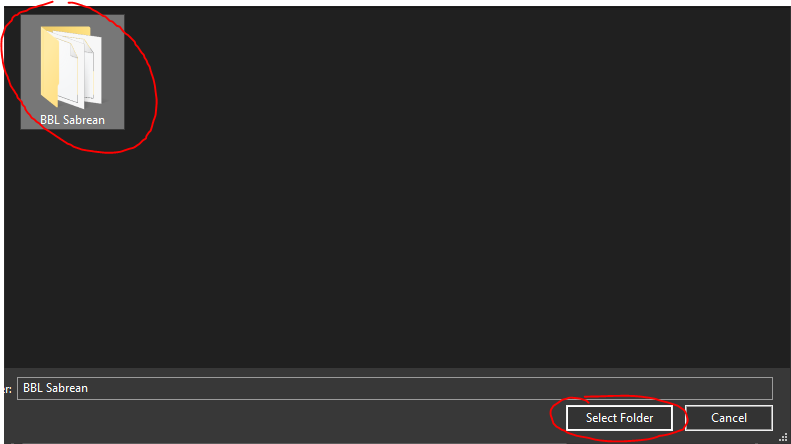
                          @girusk @chocolateminty I figured out what you need to do to upload it is just extract the files (im using the female version but its pretty much the same, except for the folder name)
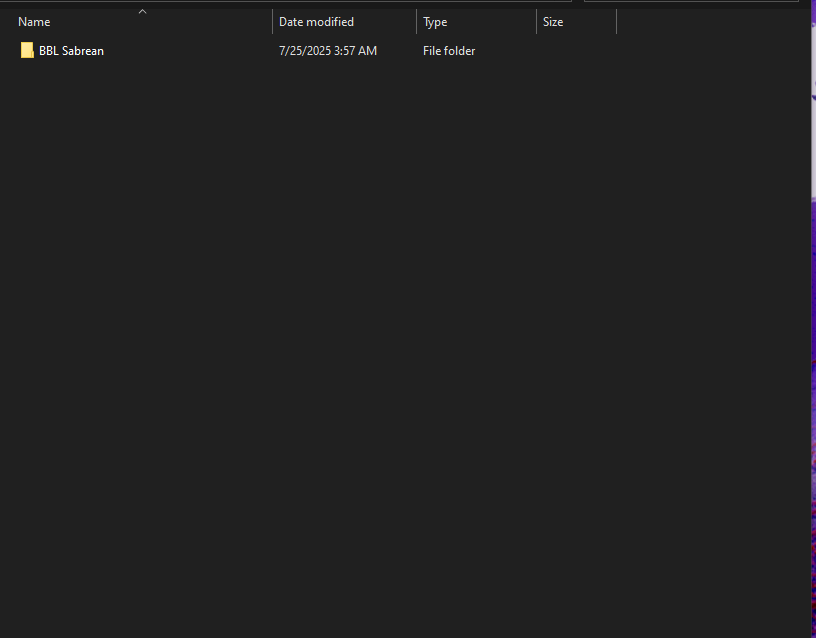
                          14e4f41e-cf75-49cf-bcd4-a6613a6202c9-image.png
                          then you have to go to VCC (Vrchat Creator Companion) and hit add existing Project
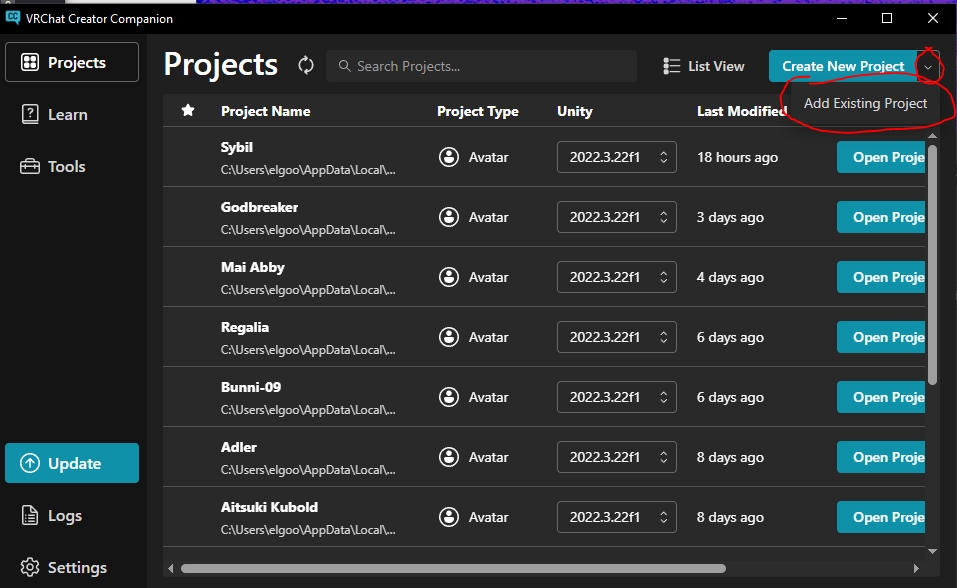
                          28505a22-56cd-41fb-a2d2-a3dab74f3fce-image.png
                          then add the folder you extracted
                          ac83384f-14e5-4da0-893a-9a9fa15bcb1e-image.png
                          thats pretty much it, all the dependencies are all in there so you dont need to add anything else. After that its as simple as opening the new project (it should have the name of the folder you added) and uploading it. Hope this helps and sorry bout the late reply ^ ^

                          1 Reply Last reply
                          👍
                          1
                          • D
                            D
                            Drekkta
                            wrote on last edited by
                            #40

                            Bump quest version

                            1 Reply Last reply
                            0
                            • chocolatemintyC
                              chocolatemintyC
                              chocolateminty
                              wrote on last edited by
                              #41

                              whats the dick model?

                              1 Reply Last reply
                              0
                              • A
                                A
                                Apeldid
                                wrote last edited by
                                #42

                                It was on VRM for free :0, i do have it and use it toooo. 3.6GB of stuff, also as it is a edit there are not much clothes that will fit him only the ones the creater made already in the package. Ima try to get it Uploaded and share you a link 😄

                                1 Reply Last reply
                                0

                                Hello! It looks like you're interested in this conversation, but you don't have an account yet.

                                Getting fed up of having to scroll through the same posts each visit? When you register for an account, you'll always come back to exactly where you were before, and choose to be notified of new replies (either via email, or push notification). You'll also be able to save bookmarks and upvote posts to show your appreciation to other community members.

                                With your input, this post could be even better 💗

                                Register Login
                                Reply
                                • Reply as topic
                                Log in to reply
                                • Oldest to Newest
                                • Newest to Oldest
                                • Most Votes


                                • Login

                                • Login or register to search.
                                • First post
                                  Last post
                                0
                                • Categories
                                • Recent
                                • Tags
                                • Popular