Skip to content
  • Categories
  • Recent
  • Tags
  • Popular
Skins
  • Light
  • Brite
  • Cerulean
  • Cosmo
  • Flatly
  • Journal
  • Litera
  • Lumen
  • Lux
  • Materia
  • Minty
  • Morph
  • Pulse
  • Sandstone
  • Simplex
  • Sketchy
  • Spacelab
  • United
  • Yeti
  • Zephyr
  • Dark
  • Cyborg
  • Darkly
  • Quartz
  • Slate
  • Solar
  • Superhero
  • Vapor

  • Default (Zephyr)
  • No Skin
Collapse
RipperStore Logo
  1. Home
  2. Assets
  3. Gifts / Downloads
  4. [Gifts] / Downloads POINTLESS MEGA ASSET DUMP!!!!!!

[Gifts] / Downloads POINTLESS MEGA ASSET DUMP!!!!!!

Scheduled Pinned Locked Moved Gifts / Downloads
giftspointlessavatar assetsfunsgift-gumroad
253 Posts 103 Posters 77.9k Views 179 Watching
  • Oldest to Newest
  • Newest to Oldest
  • Most Votes
Reply
  • Reply as topic
Log in to reply
This topic has been deleted. Only users with topic management privileges can see it.
  • N nekokittysen

    WE NEED TUTORIALS ON HOW TO ADD THESE TO AVATARS....... can't get NUT button to work lol pun intended POINTLESS

    white-powderW
    white-powderW
    white-powder
    wrote on last edited by
    #127

    @nekokittysen they all should be vrc fury toggles

    https://lostmediawiki.com/Jeff_the_Killer_(lost_unedited_image_of_Creepypasta_character;_date_unknown)

    1 Reply Last reply
    0
    • J
      J
      john190_maniac
      wrote on last edited by
      #128

      Any chance on getting the new Avatar Music Player he made?

      1 Reply Last reply
      0
      • KittyK1nK
        KittyK1nK
        KittyK1n
        wrote on last edited by
        #129

        Anyone have this yet
        https://pointlesscreations.gumroad.com/l/CassettePlayer
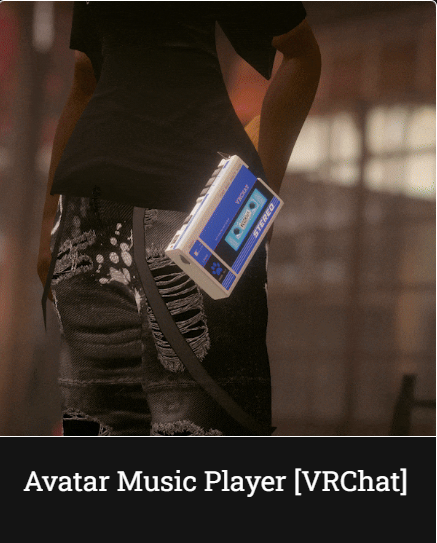
        image.png

        YuriLSKY 1 Reply Last reply
        1
        • KittyK1nK KittyK1n

          Anyone have this yet
          https://pointlesscreations.gumroad.com/l/CassettePlayer

          image.png

          YuriLSKY
          YuriLSKY
          YuriLSK
          wrote on last edited by YuriLSK
          #130

          Omg I'm bumping for the cassette Player, Please add it to this list ๐Ÿ˜„

          โ•ญ หšโ‚Šโ‹…โ”€โ”€โ”€โ”€โ”€โ”€โ”€โ”€โ”€โ”€โ”€โ”€ /แ  - ห• -ใƒž โ”€โ”€โ”€โ”€โ”€โ”€โ”€โ”€โ”€โ”€โ”€โ”€โ‹… หšโ‚Š โ•ฎ
          โ€Žโ€Ž โ€Ž โ€Ž โ€Ž โ€Ž โ€ผ๏ธ I do NOT accept any PM's, Trades, Ect! โ€ผ๏ธ
          โ™ก Always be kind to yourself and others sweethearts โ™ก
          โ•ฐ หšโ‚Šโ‹…โ”€โ”€โ”€โ”€โ”€โ”€โ”€โ”€โ”€โ”€ โ‹…ใƒปใƒป๐Ÿฆดใƒปใƒปโ‹… โ”€โ”€โ”€โ”€โ”€โ”€โ”€โ”€โ”€โ”€โ‹… หšโ‚Š โ•ฏ

          devonda745D 1 Reply Last reply
          0
          • YuriLSKY YuriLSK

            Omg I'm bumping for the cassette Player, Please add it to this list ๐Ÿ˜„

            devonda745D
            devonda745D
            devonda745
            wrote on last edited by devonda745
            #131

            @YuriLSK [register or login to view this hidden content]

            1. Drag the Cassette Player prefab onto your avatars root. [No need to unpack the prefab]
            2. Position the "Hip Constraint" to your avatars hip or if you have pants, your belt loop, you can place this on either side of your hip.
            3. TO ADD YOUR OWN SONGS TO THIS PREFAB GO HERE "open prefab > Armature > ClipRoot > CassettePlayer"
              and you will see 7 different audio sources, click on 1 of the 7 and in the inspector window you will see a "AudioClip" slot, place your audio file in there!
            4. You can scale the prefabs root incase you need it to be bigger or smaller.
            5. Disable the prefab.
            6. Done! VRCFury does the rest!

            Thank you for the upvotes. โค

            SweetSangriaS YuriLSKY 2 Replies Last reply
            7
            • devonda745D devonda745

              @YuriLSK [register or login to view this hidden content]

              1. Drag the Cassette Player prefab onto your avatars root. [No need to unpack the prefab]
              2. Position the "Hip Constraint" to your avatars hip or if you have pants, your belt loop, you can place this on either side of your hip.
              3. TO ADD YOUR OWN SONGS TO THIS PREFAB GO HERE "open prefab > Armature > ClipRoot > CassettePlayer"
                and you will see 7 different audio sources, click on 1 of the 7 and in the inspector window you will see a "AudioClip" slot, place your audio file in there!
              4. You can scale the prefabs root incase you need it to be bigger or smaller.
              5. Disable the prefab.
              6. Done! VRCFury does the rest!
              SweetSangriaS
              SweetSangriaS
              SweetSangria
              wrote on last edited by
              #132

              @devonda745 Thank you for sharing. This looks so cool! What file type do the audio files need to be?

              Upvotes always appreciated! <3

              TokeiNekoT devonda745D 2 Replies Last reply
              0
              • SweetSangriaS SweetSangria

                @devonda745 Thank you for sharing. This looks so cool! What file type do the audio files need to be?

                TokeiNekoT
                TokeiNekoT
                TokeiNeko
                wrote on last edited by
                #133

                @SweetSangria more then likely, as with all these, it's a mp3 or mp4.

                1 Reply Last reply
                0
                • SweetSangriaS SweetSangria

                  @devonda745 Thank you for sharing. This looks so cool! What file type do the audio files need to be?

                  devonda745D
                  devonda745D
                  devonda745
                  wrote on last edited by
                  #134

                  @SweetSangria .aif / .wav / .mp3 / .ogg

                  Thank you for the upvotes. โค

                  1 Reply Last reply
                  1
                  • SweetSangriaS
                    SweetSangriaS
                    SweetSangria
                    wrote on last edited by
                    #135

                    Has anyone gotten this to work correctly in-game? I got it loaded and it's working properly in Unity and playing the different songs, but when I get it in-game, the animations of loading the tapes work, but there's no music. Any thoughts on what might be going wrong?

                    Upvotes always appreciated! <3

                    1 Reply Last reply
                    0
                    • SweetSangriaS
                      SweetSangriaS
                      SweetSangria
                      wrote on last edited by
                      #136

                      Nevermind, I figured it out. It does work, it's just so quiet I could barely hear it even with my Avatar sound turned all the way up, so I went back in Unity and adjusted the settings to make it loud enough to hear it.

                      Upvotes always appreciated! <3

                      KittyK1nK 1 Reply Last reply
                      1
                      • T
                        T
                        TheForgottenOne
                        wrote on last edited by
                        #137

                        does anyone have the extra skins for the steel knife v1 by chance?

                        VisaeresV 1 Reply Last reply
                        0
                        • SweetSangriaS SweetSangria

                          Nevermind, I figured it out. It does work, it's just so quiet I could barely hear it even with my Avatar sound turned all the way up, so I went back in Unity and adjusted the settings to make it loud enough to hear it.

                          KittyK1nK
                          KittyK1nK
                          KittyK1n
                          wrote on last edited by
                          #138

                          @SweetSangria Does the whole song or does it only play clips of the song?

                          SweetSangriaS 1 Reply Last reply
                          0
                          • KittyK1nK KittyK1n

                            @SweetSangria Does the whole song or does it only play clips of the song?

                            SweetSangriaS
                            SweetSangriaS
                            SweetSangria
                            wrote on last edited by
                            #139

                            @KittyK1n The whole song. It's a really cool little toy. I will say attaching it to the hip doesn't make a ton of sense to me because it just kind of hangs there loosely. I'm a little tempted to try moving it to the hand instead so you can hold it closer to head level and control the sound a little better, but I haven't tried that yet. I adjusted the volume and then adjusted the graph to keep the volume and sound more consistent. Otherwise the sound falls off really fast. And like I said, I couldn't even hear the music initially. I had to have someone else in game put their head down by the player to check, because they could hear it from hip level when I could barely hear it at full volume just in that distance between my hip and my head. Hope that helps others figure it out a little better!

                            Upvotes always appreciated! <3

                            VisaeresV 1 Reply Last reply
                            1
                            • TokeiNekoT
                              TokeiNekoT
                              TokeiNeko
                              wrote on last edited by
                              #140

                              I haven't touched it yet, but I more then likely would move the sound to the head area and making it so I can only hear it. It's also funny that he made this when nearly a year ago, someone made this same thing for the Novabeast (my partner bought it for me when it first came out)

                              1 Reply Last reply
                              1
                              • Devil's SplicerD
                                Devil's SplicerD
                                Devil's Splicer
                                wrote on last edited by
                                #141

                                Has there been any created models of the Outbreak Perfected or the Khvostov from Destiny?

                                1 Reply Last reply
                                0
                                • VisaeresV
                                  VisaeresV
                                  Visaeres
                                  wrote on last edited by
                                  #142

                                  bump for dual mac's

                                  Wow that's a lot a' words, too bad I'm not reading em'

                                  1 Reply Last reply
                                  0
                                  • T TheForgottenOne

                                    does anyone have the extra skins for the steel knife v1 by chance?

                                    VisaeresV
                                    VisaeresV
                                    Visaeres
                                    wrote on last edited by
                                    #143

                                    @TheForgottenOne Yes, me

                                    Wow that's a lot a' words, too bad I'm not reading em'

                                    1 Reply Last reply
                                    0
                                    • SweetSangriaS SweetSangria

                                      @KittyK1n The whole song. It's a really cool little toy. I will say attaching it to the hip doesn't make a ton of sense to me because it just kind of hangs there loosely. I'm a little tempted to try moving it to the hand instead so you can hold it closer to head level and control the sound a little better, but I haven't tried that yet. I adjusted the volume and then adjusted the graph to keep the volume and sound more consistent. Otherwise the sound falls off really fast. And like I said, I couldn't even hear the music initially. I had to have someone else in game put their head down by the player to check, because they could hear it from hip level when I could barely hear it at full volume just in that distance between my hip and my head. Hope that helps others figure it out a little better!

                                      VisaeresV
                                      VisaeresV
                                      Visaeres
                                      wrote on last edited by
                                      #144

                                      @SweetSangria So like, am I adjusting the vol of the songs I'm adding in unity? or..?

                                      Wow that's a lot a' words, too bad I'm not reading em'

                                      SweetSangriaS 1 Reply Last reply
                                      0
                                      • TokeiNekoT
                                        TokeiNekoT
                                        TokeiNeko
                                        wrote on last edited by
                                        #145

                                        I adjusted the music on the casset player to be like the Novabeast one. I put it around the head and fixed a few things here and there. I plan to test it tonight, so if it works good, I'll post how I set mine up. Just be mindful, I keep it around the head for mine so it's more for just me to vibe to.

                                        1 Reply Last reply
                                        0
                                        • VisaeresV Visaeres

                                          @SweetSangria So like, am I adjusting the vol of the songs I'm adding in unity? or..?

                                          SweetSangriaS
                                          SweetSangriaS
                                          SweetSangria
                                          wrote on last edited by
                                          #146

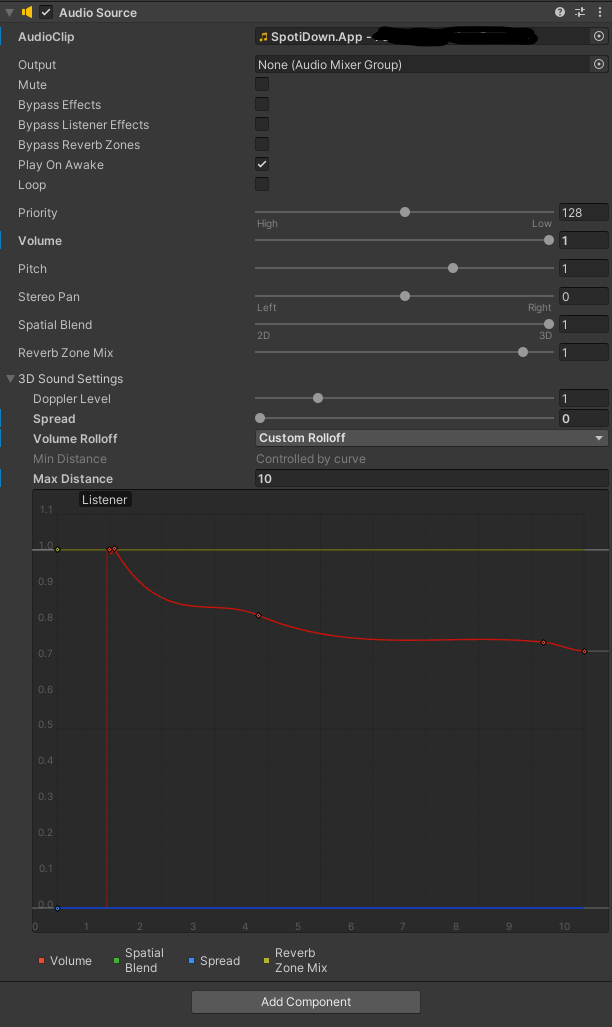
                                          @Visaeres c35a6d7b-2cc0-43ce-97e1-6d2f47d14a5a-image.png

                                          With each song you do, you can adjust these settings. The second slider is Volume, I maxed that out at 1. If you want the music to stay quiet and mostly local to just you, that might be enough. I wanted my friends to be able to hear it (at a reasonable volume, not obnoxious for anyone), so I ended up manually adjusting the red line on the curve. You'll probably have to experiment in game with a friend to decide what you want it to sound like for you, and figure out how it sounds to the people around you.

                                          Upvotes always appreciated! <3

                                          VisaeresV 1 Reply Last reply
                                          0

                                          Hello! It looks like you're interested in this conversation, but you don't have an account yet.

                                          Getting fed up of having to scroll through the same posts each visit? When you register for an account, you'll always come back to exactly where you were before, and choose to be notified of new replies (either via email, or push notification). You'll also be able to save bookmarks and upvote posts to show your appreciation to other community members.

                                          With your input, this post could be even better ๐Ÿ’—

                                          Register Login
                                          Reply
                                          • Reply as topic
                                          Log in to reply
                                          • Oldest to Newest
                                          • Newest to Oldest
                                          • Most Votes


                                          • Login

                                          • Login or register to search.
                                          • First post
                                            Last post
                                          0
                                          • Categories
                                          • Recent
                                          • Tags
                                          • Popular