
[Gifts] / Downloads POINTLESS MEGA ASSET DUMP!!!!!!
-
bump for disco balll!
-
Portal gun has been shared! Go say thank you and give updoots!
https://forum.ripper.store/topic/75631/gift-rick-and-morty-portal-gun-vrchat-by-pointless
-
bump for if anyone has the steel knife v2 textures
-
Bump for the mayu avatar Christmas lights :3
-
-
-
-
-
-
@Alizzyvr could you put this on something other then workupload, it's not letting on every browser I have. T-T
@TokeiNeko Try this link, it is only active a few days tho
https://limewire.com/d/qLldR#e5m47WIEIh -
-
Does someone have the Reactive Avatar Glowsticks for the ScoutArtz Pupper if possible?
-
WE NEED TUTORIALS ON HOW TO ADD THESE TO AVATARS....... can't get NUT button to work lol pun intended POINTLESS
-
WE NEED TUTORIALS ON HOW TO ADD THESE TO AVATARS....... can't get NUT button to work lol pun intended POINTLESS
@nekokittysen they all should be vrc fury toggles
-
Any chance on getting the new Avatar Music Player he made?
-
-
Anyone have this yet
https://pointlesscreations.gumroad.com/l/CassettePlayer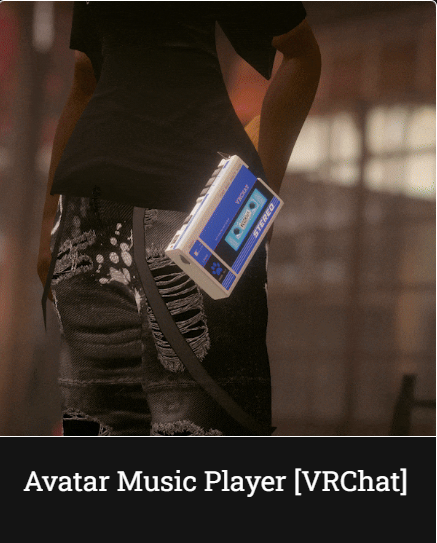
Omg I'm bumping for the cassette Player, Please add it to this list

╭ ˚₊⋅──────────── /ᐠ - ˕ -マ ────────────⋅ ˚₊ ╮
‼️ I do NOT accept any PM's, Trades, Ect! ‼️
♡ Always be kind to yourself and others sweethearts ♡
╰ ˚₊⋅────────── ⋅・・🦴・・⋅ ──────────⋅ ˚₊ ╯ -
- Drag the Cassette Player prefab onto your avatars root. [No need to unpack the prefab]
- Position the "Hip Constraint" to your avatars hip or if you have pants, your belt loop, you can place this on either side of your hip.
- TO ADD YOUR OWN SONGS TO THIS PREFAB GO HERE "open prefab > Armature > ClipRoot > CassettePlayer"
and you will see 7 different audio sources, click on 1 of the 7 and in the inspector window you will see a "AudioClip" slot, place your audio file in there! - You can scale the prefabs root incase you need it to be bigger or smaller.
- Disable the prefab.
- Done! VRCFury does the rest!
Thank you for the upvotes. ❤
-
- Drag the Cassette Player prefab onto your avatars root. [No need to unpack the prefab]
- Position the "Hip Constraint" to your avatars hip or if you have pants, your belt loop, you can place this on either side of your hip.
- TO ADD YOUR OWN SONGS TO THIS PREFAB GO HERE "open prefab > Armature > ClipRoot > CassettePlayer"
and you will see 7 different audio sources, click on 1 of the 7 and in the inspector window you will see a "AudioClip" slot, place your audio file in there! - You can scale the prefabs root incase you need it to be bigger or smaller.
- Disable the prefab.
- Done! VRCFury does the rest!
@devonda745 Thank you for sharing. This looks so cool! What file type do the audio files need to be?
Upvotes always appreciated! <3
-
@devonda745 Thank you for sharing. This looks so cool! What file type do the audio files need to be?
@SweetSangria more then likely, as with all these, it's a mp3 or mp4.









Hello! It looks like you're interested in this conversation, but you don't have an account yet.
Getting fed up of having to scroll through the same posts each visit? When you register for an account, you'll always come back to exactly where you were before, and choose to be notified of new replies (either via email, or push notification). You'll also be able to save bookmarks and upvote posts to show your appreciation to other community members.
With your input, this post could be even better 💗
Register Login