Skip to content
  • Categories
  • Recent
  • Tags
  • Popular
Skins
  • Light
  • Brite
  • Cerulean
  • Cosmo
  • Flatly
  • Journal
  • Litera
  • Lumen
  • Lux
  • Materia
  • Minty
  • Morph
  • Pulse
  • Sandstone
  • Simplex
  • Sketchy
  • Spacelab
  • United
  • Yeti
  • Zephyr
  • Dark
  • Cyborg
  • Darkly
  • Quartz
  • Slate
  • Solar
  • Superhero
  • Vapor

  • Default (Zephyr)
  • No Skin
Collapse
RipperStore Logo
  1. Home
  2. Assets
  3. Gifts / Downloads
  4. GIFT: 【セール中】【多機能カメラ】Gesture Cam

GIFT: 【セール中】【多機能カメラ】Gesture Cam

Scheduled Pinned Locked Moved Gifts / Downloads
giftboothassetgimmickgift-booth
45 Posts 26 Posters 30.2k Views 29 Watching
  • Oldest to Newest
  • Newest to Oldest
  • Most Votes
Reply
  • Reply as topic
Log in to reply
This topic has been deleted. Only users with topic management privileges can see it.
  • AccountA
    AccountA
    Account
    wrote on last edited by
    #8

    All of the asset is in Japanese and im having trouble understanding how to set it up.. after dragging and dropping onto the avi, what else is there to do?

    ˚₊‧꒰ა ☆ ໒꒱ ‧₊˚

    ExcaligatorE OneShotaVRCO 2 Replies Last reply
    1
    • AccountA Account

      All of the asset is in Japanese and im having trouble understanding how to set it up.. after dragging and dropping onto the avi, what else is there to do?

      ExcaligatorE
      ExcaligatorE
      Excaligator
      wrote on last edited by
      #9

      @Account If ya need to translate, you can use DeepL. I use it often.

      deepl.com/en/translator

      1 Reply Last reply
      0
      • A
        A
        Alskdj
        wrote on last edited by
        #10

        1.5.0 Bump

        1 Reply Last reply
        0
        • AccountA Account

          All of the asset is in Japanese and im having trouble understanding how to set it up.. after dragging and dropping onto the avi, what else is there to do?

          OneShotaVRCO
          OneShotaVRCO
          OneShotaVRC
          wrote on last edited by
          #11

          @Account AI Translations;

          Gesture Cam
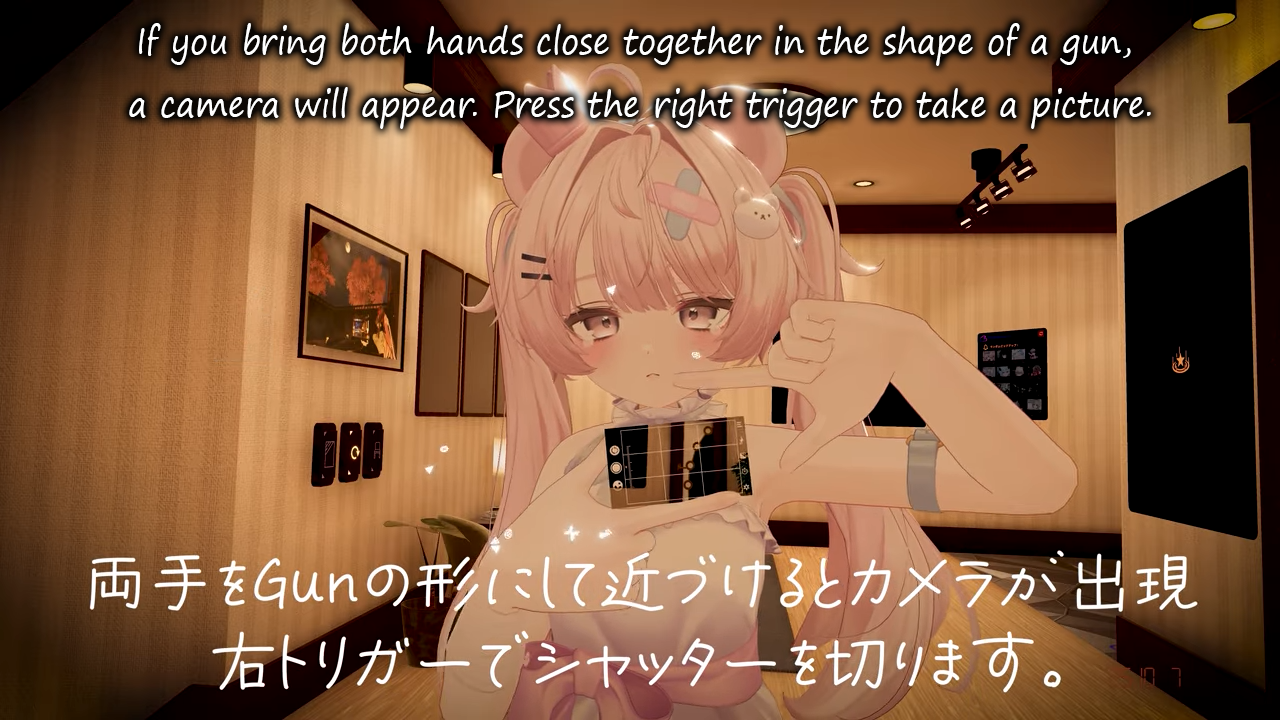
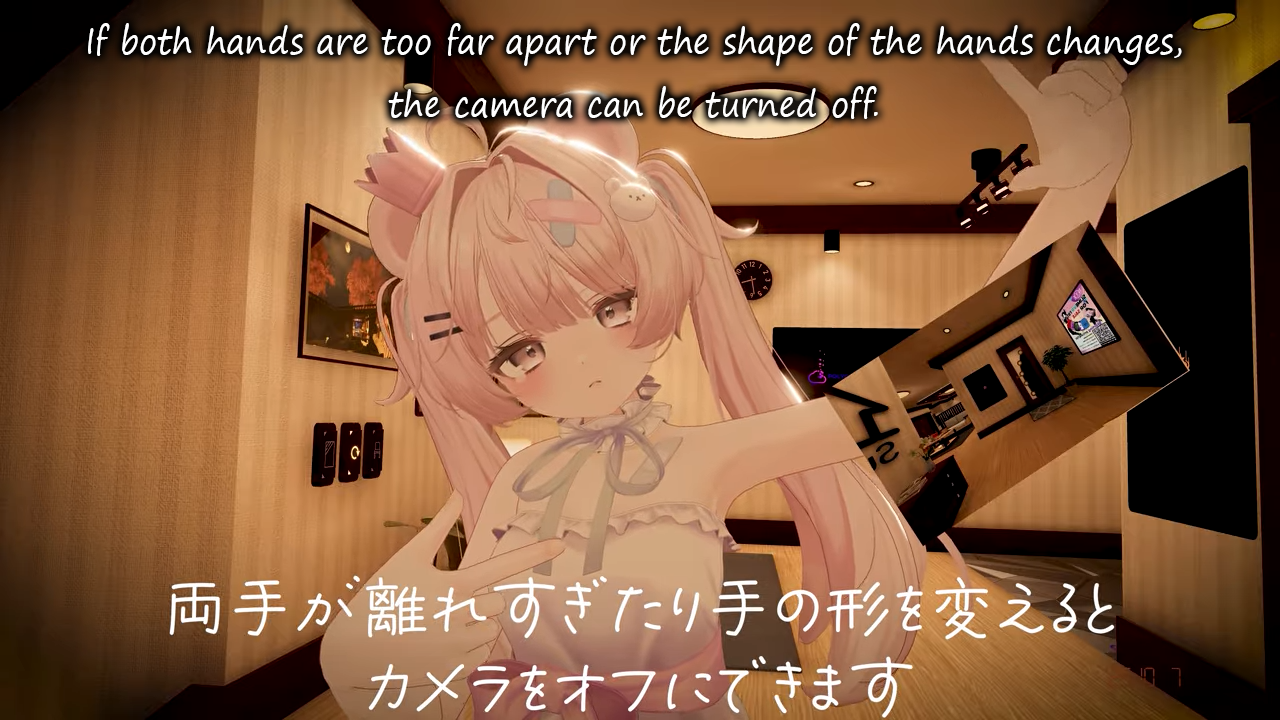
          Strike a camera pose with both hands to form a square—and snap a photo! This multifunctional gizmo lets you take pictures with an intuitive gesture.
          
          📸 Features
          1. Take up to 5 photos
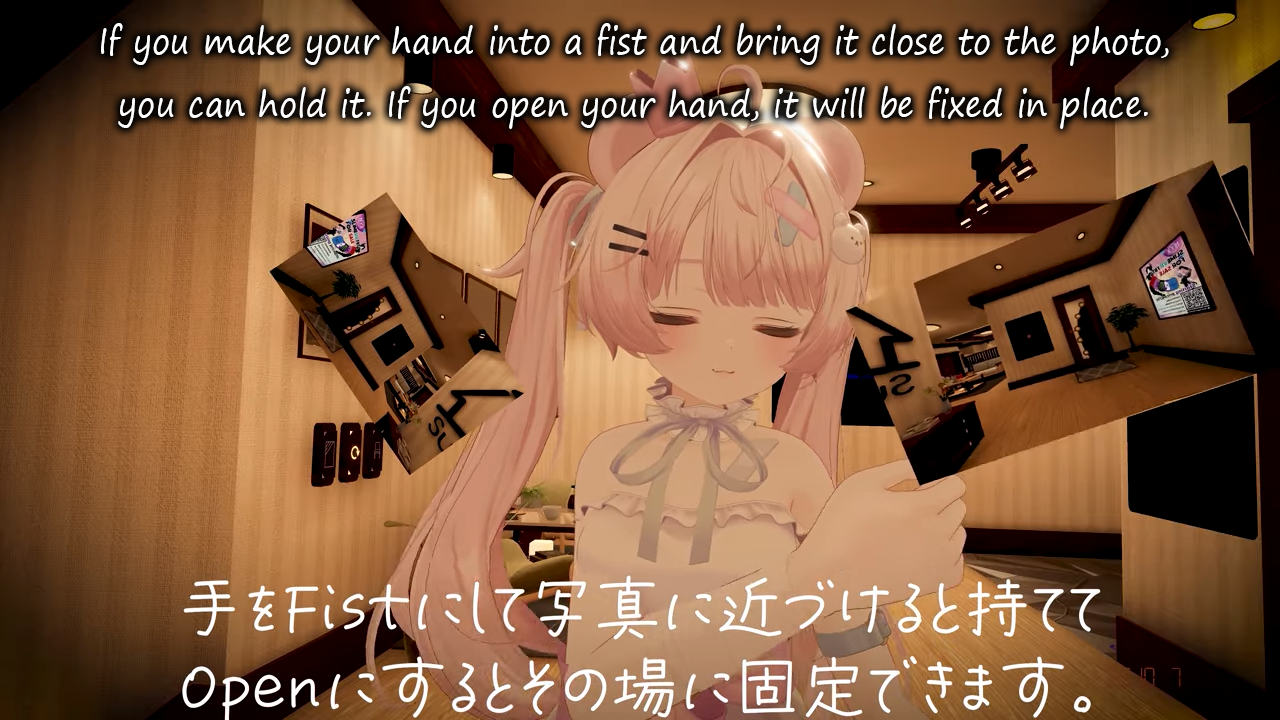
          2. Photos stay fixed in the world
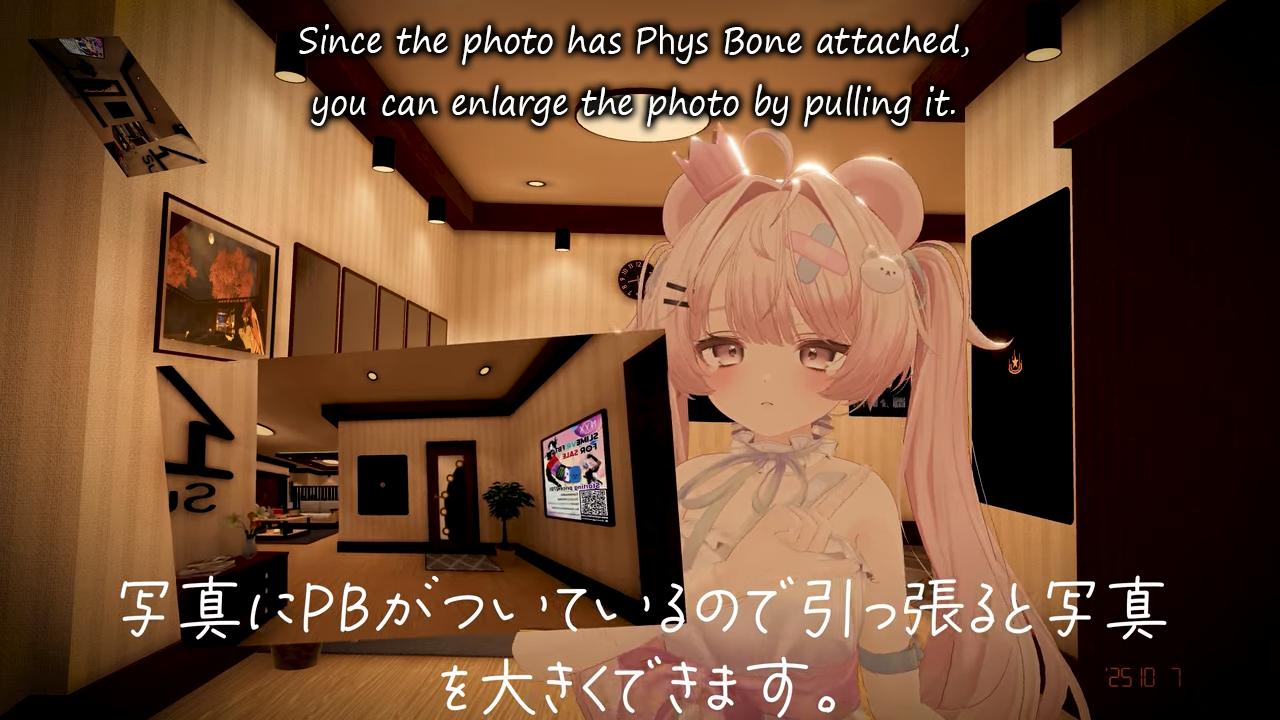
          3. Adjust field of view by spreading your hands
          4. Enlarge locked photos with Physical Back (PB)!
          5. Camera Jack feature
          6. Retake photos
          7. Reset via Ex Menu
          8. Share with friends!
          ※ Friends must be wearing the same avatar or have "Show Avatar" enabled for visibility.
          
          🎥 Check out the promo video for details!
          
          🎨 Design Variants
          Choose from 4 camera UI styles:
          
          -Near-Futuristic
          -Professional Camera
          -Smartphone Style
          -Digital Camera Style
          
          Pick your favorite design and start shooting!
          
          ⚙️ Performance Options
          Three quality presets are included—choose based on your PC’s specs:
          
          High
          3840×2160 | Fine color separation | Detailed depth recognition
          
          Middle
          1920×1080 | Standard color separation | Moderate depth recognition
          
          Low
          1280×720 | Standard color separation | Slightly coarse depth recognition
          
          👤 Compatible Avatars (Presets Included)
          Pre-adjusted preset prefabs are available for:
          Airi, Chiffon, Elusion, Ichigo, Kipfel, Manuka, Milfy, Milltina, Pmma, Shinano
          
          Don’t see your avatar? No problem—simply adjust the position manually.
          
          📥 Installation
          Contents:
          
          UnityPackage
          
          Required Shader:
          
          lilToon – Download and import first:
          https://lilxyzw.booth.pm/items/3087170
          
          Required Tool:
          
          Modular Avatar
          https://modular-avatar.nadena.dev/ja
          
          Steps:
          
          1. Import lilToon and Modular Avatar.
          2. Import this product.
          3. Place the prefab directly under your avatar root.
          4. Adjust hand positions if needed:
          
          Use "Keep World Position and Rotation" mode to freely move LeftHandPosition and RightHandPosition (MABoneProxy components).
          
          🎨 You can also customize the UI by replacing the camera material.
          
          📖 Refer to the product images for adjustment guidelines.
          
          ⚠️ Important Note
          This gizmo is built Write Defaults OFF for parameter efficiency.
          It has been tested to work with both WD On and WD Off avatars.
          
          However, conflicts may occur when used with other modified items (not specific to this tool). Please test accordingly.
          

          Corrupted File After Extraction?💻 Virus Detected?👾
          of easy fixes you can try right away. I hope you’ll give it a read!🛠

          Is Booth avatar's default body type a bit too slender for your taste?
          Worry not! You can use Unity alone to transform her into a voluptuous, alluring Venus—plump and perfectly curved! 🥰

          I eagerly await the benevolent deity who will bless us with the latest version, including the profile picture costume!
          I would be delighted if you could take a look at my Profile & Topic List💖

          AccountA 1 Reply Last reply
          1
          • OneShotaVRCO OneShotaVRC

            @Account AI Translations;

            Gesture Cam
            Strike a camera pose with both hands to form a square—and snap a photo! This multifunctional gizmo lets you take pictures with an intuitive gesture.
            
            📸 Features
            1. Take up to 5 photos
            2. Photos stay fixed in the world
            3. Adjust field of view by spreading your hands
            4. Enlarge locked photos with Physical Back (PB)!
            5. Camera Jack feature
            6. Retake photos
            7. Reset via Ex Menu
            8. Share with friends!
            ※ Friends must be wearing the same avatar or have "Show Avatar" enabled for visibility.
            
            🎥 Check out the promo video for details!
            
            🎨 Design Variants
            Choose from 4 camera UI styles:
            
            -Near-Futuristic
            -Professional Camera
            -Smartphone Style
            -Digital Camera Style
            
            Pick your favorite design and start shooting!
            
            ⚙️ Performance Options
            Three quality presets are included—choose based on your PC’s specs:
            
            High
            3840×2160 | Fine color separation | Detailed depth recognition
            
            Middle
            1920×1080 | Standard color separation | Moderate depth recognition
            
            Low
            1280×720 | Standard color separation | Slightly coarse depth recognition
            
            👤 Compatible Avatars (Presets Included)
            Pre-adjusted preset prefabs are available for:
            Airi, Chiffon, Elusion, Ichigo, Kipfel, Manuka, Milfy, Milltina, Pmma, Shinano
            
            Don’t see your avatar? No problem—simply adjust the position manually.
            
            📥 Installation
            Contents:
            
            UnityPackage
            
            Required Shader:
            
            lilToon – Download and import first:
            https://lilxyzw.booth.pm/items/3087170
            
            Required Tool:
            
            Modular Avatar
            https://modular-avatar.nadena.dev/ja
            
            Steps:
            
            1. Import lilToon and Modular Avatar.
            2. Import this product.
            3. Place the prefab directly under your avatar root.
            4. Adjust hand positions if needed:
            
            Use "Keep World Position and Rotation" mode to freely move LeftHandPosition and RightHandPosition (MABoneProxy components).
            
            🎨 You can also customize the UI by replacing the camera material.
            
            📖 Refer to the product images for adjustment guidelines.
            
            ⚠️ Important Note
            This gizmo is built Write Defaults OFF for parameter efficiency.
            It has been tested to work with both WD On and WD Off avatars.
            
            However, conflicts may occur when used with other modified items (not specific to this tool). Please test accordingly.
            
            AccountA
            AccountA
            Account
            wrote on last edited by
            #12

            @OneShotaVRC Thank you! I guess I just don't quite know how to use it in-game? I used the Ichigo prefab, and I dragged and dropped it onto the avatar. Besides changing the menu location, that was all. I don't know how to get it to work in-game... T_T

            ˚₊‧꒰ა ☆ ໒꒱ ‧₊˚

            OneShotaVRCO 1 Reply Last reply
            1
            • D
              D
              dangyi
              wrote on last edited by
              #13

              1.5.0 Bump

              1 Reply Last reply
              0
              • D
                D
                d0800556
                wrote on last edited by
                #14

                1.5.0 Bump

                1 Reply Last reply
                0
                • D
                  D
                  darkblackcow
                  wrote on last edited by darkblackcow
                  #15

                  BUMP

                  2025/10/11
                  v1.6.0

                  1 Reply Last reply
                  0
                  • TenaT
                    TenaT
                    Tena
                    wrote on last edited by
                    #16

                    here's the 1.6.0 + for NCC (idk what it means but anyway you got both in it)
                    [register or login to view this hidden content]

                    J G 2 Replies Last reply
                    0
                    • TenaT Tena

                      here's the 1.6.0 + for NCC (idk what it means but anyway you got both in it)
                      [register or login to view this hidden content]

                      J
                      J
                      Joymin
                      wrote on last edited by
                      #17

                      @Tena Hey, the link is invaild now, could you share again?

                      1 Reply Last reply
                      0
                      • TenaT Tena

                        here's the 1.6.0 + for NCC (idk what it means but anyway you got both in it)
                        [register or login to view this hidden content]

                        G
                        G
                        gudaimax
                        wrote on last edited by
                        #18

                        @Tena file not found.....

                        TenaT 1 Reply Last reply
                        0
                        • G gudaimax

                          @Tena file not found.....

                          TenaT
                          TenaT
                          Tena
                          wrote on last edited by
                          #19

                          @gudaimax [register or login to view this hidden content]
                          This one should work

                          G 1 Reply Last reply
                          👍
                          3
                          • TenaT Tena

                            @gudaimax [register or login to view this hidden content]
                            This one should work

                            G
                            G
                            gudaimax
                            wrote on last edited by
                            #20

                            @Tena oh thx!

                            1 Reply Last reply
                            0
                            • AccountA Account

                              @OneShotaVRC Thank you! I guess I just don't quite know how to use it in-game? I used the Ichigo prefab, and I dragged and dropped it onto the avatar. Besides changing the menu location, that was all. I don't know how to get it to work in-game... T_T

                              OneShotaVRCO
                              OneShotaVRCO
                              OneShotaVRC
                              wrote on last edited by
                              #21

                              @Tena Thank you so deeply for the latest version—I’m truly grateful💖
                              It really means a lot that you keep everything updated—I can’t thank you enough…! ✨
                              Your generous kindness is appreciated from the bottom of my heart!

                              @Account If it's a hassle, try pasting screenshots from videos (Alt+PrtSc → Ctrl+V) into an AI like Copilot and have it translate them into English.

                              Please translate the following Chinese text into English.  
                              Format the result with a line break between sentences, using CRLF line endings so it shows correctly in Windows Notepad.  
                              Do not add quotation marks around the text.
                              

                              If you give instructions like the example below, it can convert mysterious caption languages into familiar English for you!
                              (Of course, these images with translated text I share should be my own.)

                              If you come across items in unfamiliar languages again,
                              please try this method and help others out too🤝

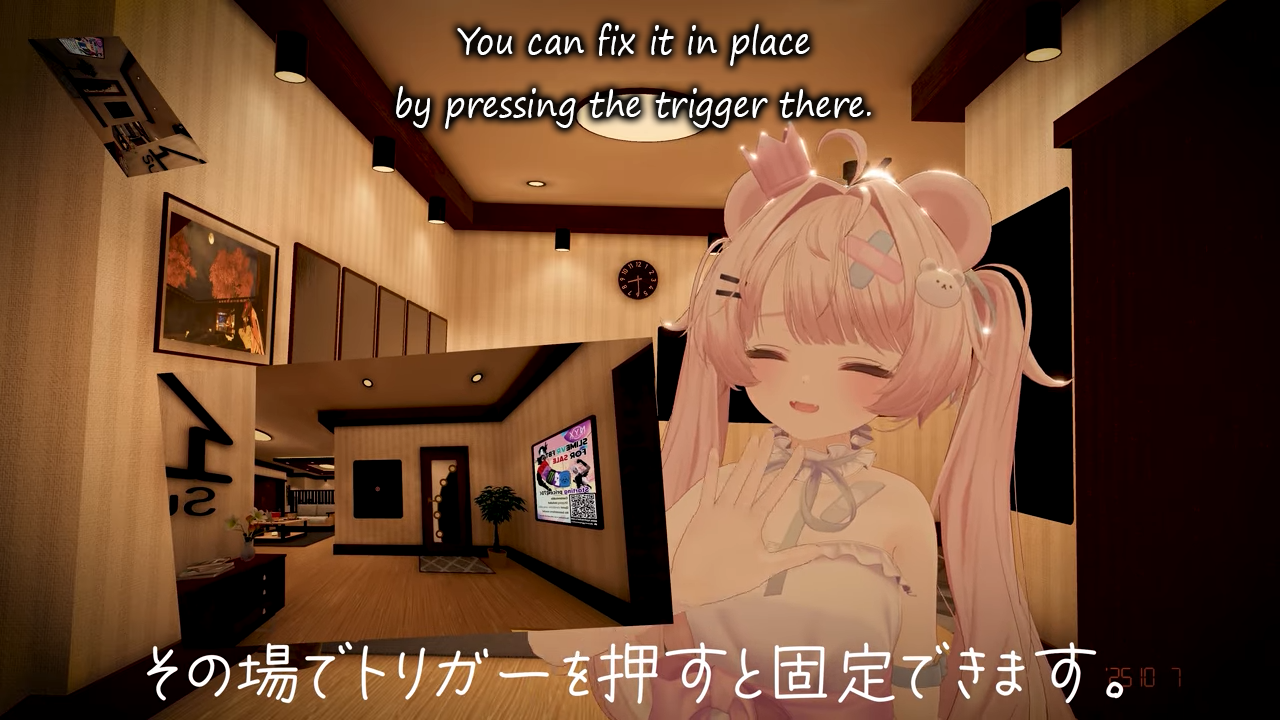
                              【セール中】【多機能カメラ】Gesture Cam1.png

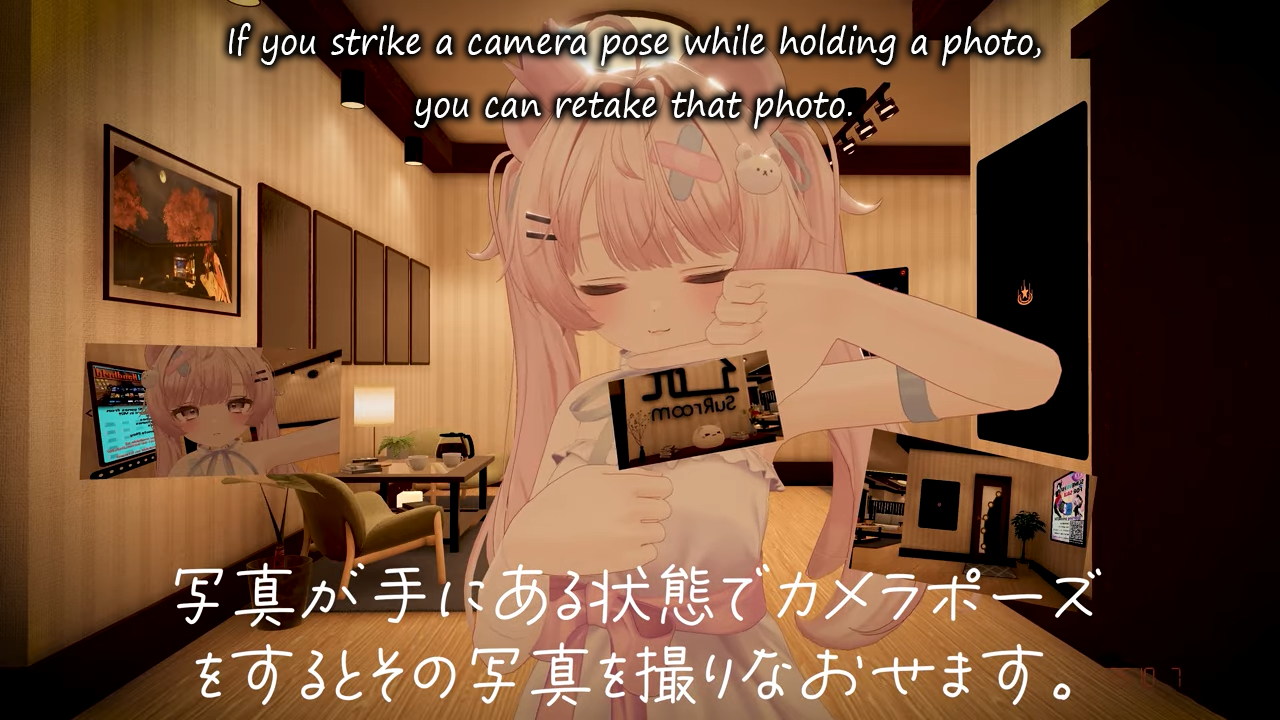
                              【セール中】【多機能カメラ】Gesture Cam2.png

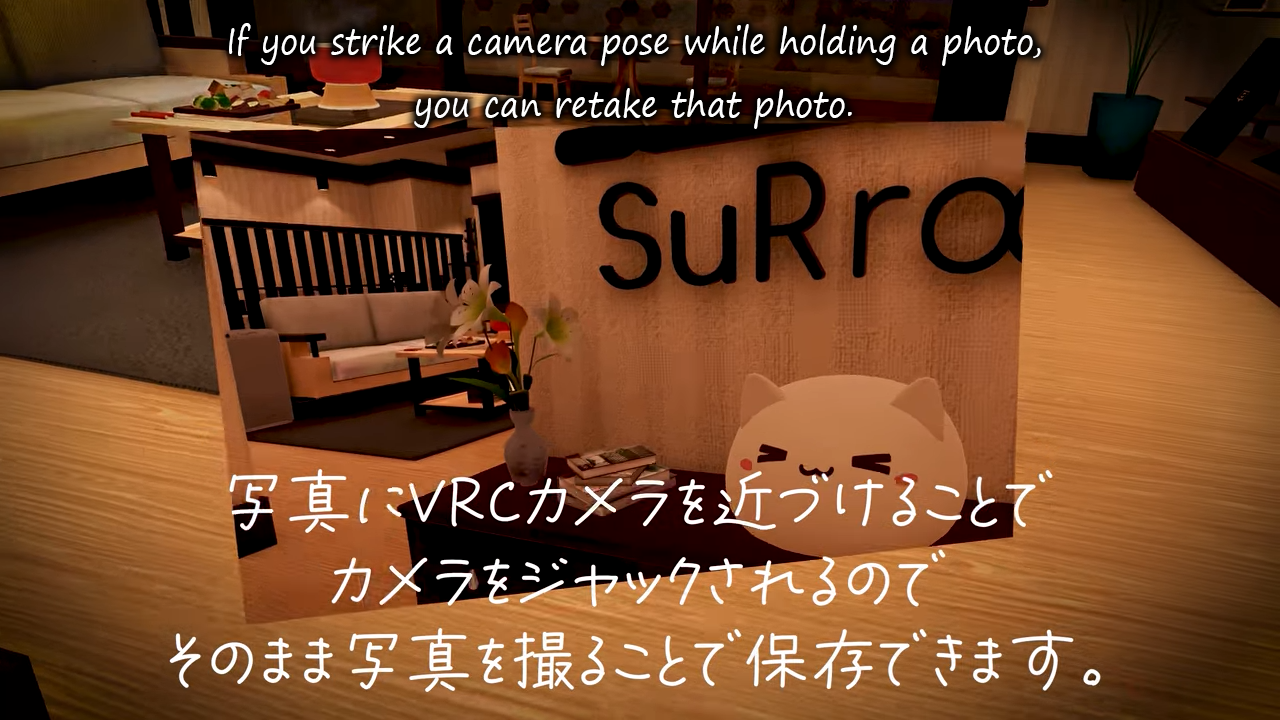
                              【セール中】【多機能カメラ】Gesture Cam3.png

                              【セール中】【多機能カメラ】Gesture Cam4.png

                              【セール中】【多機能カメラ】Gesture Cam5.png

                              【セール中】【多機能カメラ】Gesture Cam6.png

                              【セール中】【多機能カメラ】Gesture Cam7.png

                              Corrupted File After Extraction?💻 Virus Detected?👾
                              of easy fixes you can try right away. I hope you’ll give it a read!🛠

                              Is Booth avatar's default body type a bit too slender for your taste?
                              Worry not! You can use Unity alone to transform her into a voluptuous, alluring Venus—plump and perfectly curved! 🥰

                              I eagerly await the benevolent deity who will bless us with the latest version, including the profile picture costume!
                              I would be delighted if you could take a look at my Profile & Topic List💖

                              AccountA 1 Reply Last reply
                              ♥
                              2
                              • OneShotaVRCO OneShotaVRC

                                @Tena Thank you so deeply for the latest version—I’m truly grateful💖
                                It really means a lot that you keep everything updated—I can’t thank you enough…! ✨
                                Your generous kindness is appreciated from the bottom of my heart!

                                @Account If it's a hassle, try pasting screenshots from videos (Alt+PrtSc → Ctrl+V) into an AI like Copilot and have it translate them into English.

                                Please translate the following Chinese text into English.  
                                Format the result with a line break between sentences, using CRLF line endings so it shows correctly in Windows Notepad.  
                                Do not add quotation marks around the text.
                                

                                If you give instructions like the example below, it can convert mysterious caption languages into familiar English for you!
                                (Of course, these images with translated text I share should be my own.)

                                If you come across items in unfamiliar languages again,
                                please try this method and help others out too🤝

                                【セール中】【多機能カメラ】Gesture Cam1.png

                                【セール中】【多機能カメラ】Gesture Cam2.png

                                【セール中】【多機能カメラ】Gesture Cam3.png

                                【セール中】【多機能カメラ】Gesture Cam4.png

                                【セール中】【多機能カメラ】Gesture Cam5.png

                                【セール中】【多機能カメラ】Gesture Cam6.png

                                【セール中】【多機能カメラ】Gesture Cam7.png

                                AccountA
                                AccountA
                                Account
                                wrote on last edited by
                                #22

                                @OneShotaVRC Thank you SO much for these images and the information! I'll try it again with the newest version following these instructions!

                                ˚₊‧꒰ა ☆ ໒꒱ ‧₊˚

                                1 Reply Last reply
                                0
                                • O
                                  O
                                  OOOAAA
                                  wrote on last edited by
                                  #23

                                  it didn't work 😢
                                  Pressing the trigger only displays the UI but not the photo.
                                  does anyone know how to fix it?

                                  VRChat_2025-10-12_23-14-42.590_2560x1440.png

                                  Green EggG AccountA thebeesguy29T 3 Replies Last reply
                                  1
                                  • O OOOAAA

                                    it didn't work 😢
                                    Pressing the trigger only displays the UI but not the photo.
                                    does anyone know how to fix it?

                                    VRChat_2025-10-12_23-14-42.590_2560x1440.png

                                    Green EggG
                                    Green EggG
                                    Green Egg
                                    wrote on last edited by
                                    #24

                                    @OOOAAA Second this

                                    1 Reply Last reply
                                    0
                                    • O OOOAAA

                                      it didn't work 😢
                                      Pressing the trigger only displays the UI but not the photo.
                                      does anyone know how to fix it?

                                      VRChat_2025-10-12_23-14-42.590_2560x1440.png

                                      AccountA
                                      AccountA
                                      Account
                                      wrote on last edited by
                                      #25

                                      @OOOAAA I was never able to get it to work. I'm suprised you got that far

                                      ˚₊‧꒰ა ☆ ໒꒱ ‧₊˚

                                      1 Reply Last reply
                                      0
                                      • O OOOAAA

                                        it didn't work 😢
                                        Pressing the trigger only displays the UI but not the photo.
                                        does anyone know how to fix it?

                                        VRChat_2025-10-12_23-14-42.590_2560x1440.png

                                        thebeesguy29T
                                        thebeesguy29T
                                        thebeesguy29
                                        wrote on last edited by
                                        #26

                                        @OOOAAA third this

                                        1 Reply Last reply
                                        0
                                        • AccountA
                                          AccountA
                                          Account
                                          wrote on last edited by
                                          #27

                                          So I did get it to work but I also had that issue. The UI pops up but not the actual photo. I was using the high quality version of the prefab

                                          ˚₊‧꒰ა ☆ ໒꒱ ‧₊˚

                                          1 Reply Last reply
                                          0

                                          Hello! It looks like you're interested in this conversation, but you don't have an account yet.

                                          Getting fed up of having to scroll through the same posts each visit? When you register for an account, you'll always come back to exactly where you were before, and choose to be notified of new replies (either via email, or push notification). You'll also be able to save bookmarks and upvote posts to show your appreciation to other community members.

                                          With your input, this post could be even better 💗

                                          Register Login
                                          Reply
                                          • Reply as topic
                                          Log in to reply
                                          • Oldest to Newest
                                          • Newest to Oldest
                                          • Most Votes


                                          • Login

                                          • Login or register to search.
                                          • First post
                                            Last post
                                          0
                                          • Categories
                                          • Recent
                                          • Tags
                                          • Popular