Skip to content
  • Categories
  • Recent
  • Tags
  • Popular
Skins
  • Light
  • Brite
  • Cerulean
  • Cosmo
  • Flatly
  • Journal
  • Litera
  • Lumen
  • Lux
  • Materia
  • Minty
  • Morph
  • Pulse
  • Sandstone
  • Simplex
  • Sketchy
  • Spacelab
  • United
  • Yeti
  • Zephyr
  • Dark
  • Cyborg
  • Darkly
  • Quartz
  • Slate
  • Solar
  • Superhero
  • Vapor

  • Default (Zephyr)
  • No Skin
Collapse
RipperStore Logo
  1. Home
  2. Assets
  3. Looking for...
  4. Uncategorized
  5. Looking for this locomotion asset

Looking for this locomotion asset

Scheduled Pinned Locked Moved Uncategorized
27 Posts 16 Posters 8.5k Views 12 Watching
  • Oldest to Newest
  • Newest to Oldest
  • Most Votes
Reply
  • Reply as topic
Log in to reply
This topic has been deleted. Only users with topic management privileges can see it.
  • N
    N
    nyfen
    wrote on last edited by
    #11

    How do i add this to my avatar? can anyone help please? 😞

    1 Reply Last reply
    0
    • DisomniaD
      DisomniaD
      Disomnia
      wrote on last edited by Disomnia
      #12

      Does someone know the name of the creator? or their booth was deleted too?

      ʚーーーーーーーーーーɞ
      ᛫ ♡ ᛫ You can call me Disom or Ninfa~ Nice to meet you!

      DON'T TAG/@ me IF IT'S NOT FOR A RE-UP, Please and thank you <3
      ʚーーーーーーーーーーɞ

      1 Reply Last reply
      0
      • I
        I
        inactivr
        wrote on last edited by
        #13
        This post is deleted!
        1 Reply Last reply
        0
        • lalal44L lalal44 referenced this topic on
        • ElbrusDoubleDoorE ElbrusDoubleDoor referenced this topic on
        • VisaeresV
          VisaeresV
          Visaeres
          wrote on last edited by
          #14

          How is this installed?

          1 Reply Last reply
          0
          • System moved this topic from Looking for... on
          • Pretend LikeP Pretend Like referenced this topic on
          • NemesisN
            NemesisN
            Nemesis
            wrote on last edited by Nemesis
            #15

            @Visaeres @nyfen @sub_puppy For the Installation make sur to follow this step :

            1. double click on the unity package with your projet open!
              double click.png

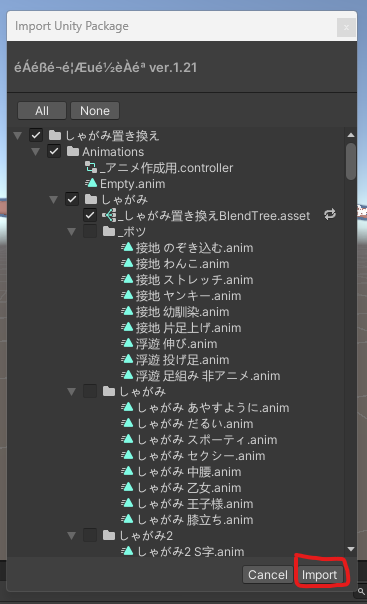
            2. a window gonna pop, click on import
              import.png

            3. If the import went well, a file should appear in your project
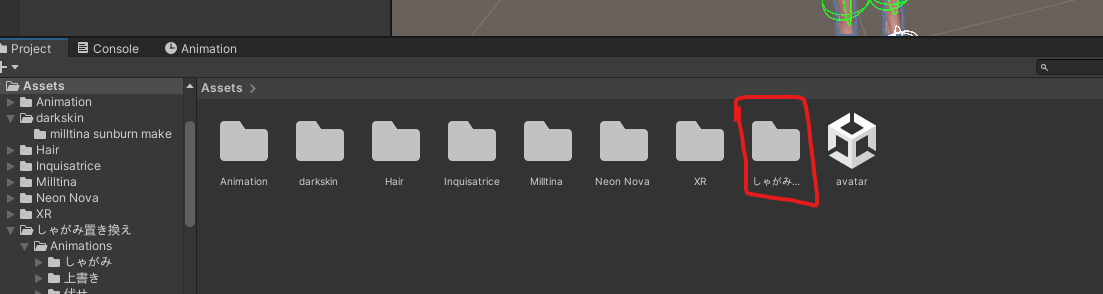
              inside unity.png

            4)a good ways to check if the installation is a succes a new menu appear on top between VRChatSDK and Window
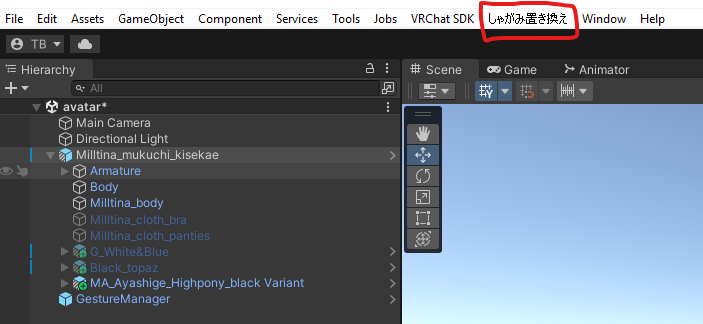
            good install.png

            1. left click on it and two option appear choose the one where you get this menu
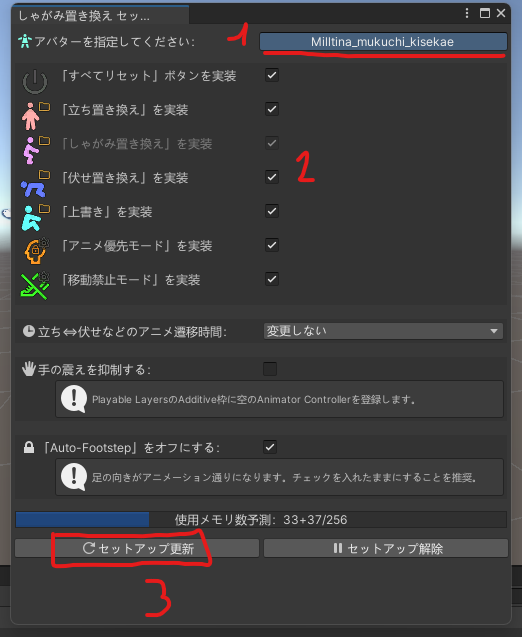
              window left click.png
              1. First, make sure it's the correct avatar on the top right
              1. select all of the seven pose choice
                -4. make sure to refresh on the left bottom button
            1. when it's done check with gesture manager and enjoy 😄
            VisaeresV 1 Reply Last reply
            0
            • VisaeresV
              VisaeresV
              Visaeres
              wrote on last edited by
              #16
              This post is deleted!
              1 Reply Last reply
              0
              • VisaeresV
                VisaeresV
                Visaeres
                wrote on last edited by
                #17

                Nothing happens when I try to use the poses Lol

                1 Reply Last reply
                0
                • NemesisN Nemesis

                  @Visaeres @nyfen @sub_puppy For the Installation make sur to follow this step :

                  1. double click on the unity package with your projet open!
                    double click.png

                  2. a window gonna pop, click on import
                    import.png

                  3. If the import went well, a file should appear in your project
                    inside unity.png

                  4)a good ways to check if the installation is a succes a new menu appear on top between VRChatSDK and Window
                  good install.png

                  1. left click on it and two option appear choose the one where you get this menu
                    window left click.png
                    1. First, make sure it's the correct avatar on the top right
                    1. select all of the seven pose choice
                      -4. make sure to refresh on the left bottom button
                  1. when it's done check with gesture manager and enjoy 😄
                  VisaeresV
                  VisaeresV
                  Visaeres
                  wrote on last edited by
                  #18

                  @Nemesis Doesn't work 😕

                  NemesisN 1 Reply Last reply
                  0
                  • VisaeresV Visaeres

                    @Nemesis Doesn't work 😕

                    NemesisN
                    NemesisN
                    Nemesis
                    wrote on last edited by
                    #19

                    @Visaeres did you check with gesture manager that it's inside your avatar ? by the way, you can't use all of seven pose ( only the first one work ( the other one work if you have a full body ))

                    VisaeresV 1 Reply Last reply
                    0
                    • NemesisN Nemesis

                      @Visaeres did you check with gesture manager that it's inside your avatar ? by the way, you can't use all of seven pose ( only the first one work ( the other one work if you have a full body ))

                      VisaeresV
                      VisaeresV
                      Visaeres
                      wrote on last edited by
                      #20

                      @Nemesis Yes, I did

                      NemesisN 1 Reply Last reply
                      0
                      • ratdrownerR
                        ratdrownerR
                        ratdrowner
                        wrote on last edited by
                        #21

                        idk if this is a dumb question but is there a way to raise and lower yourself when in a pose like you can in gogo loco? and if that's not a functionality with this pose tool are there any pose tools that can do that? im trying not to use gogoloco right now because it overrides my custom walking animations and idk how to make it not do that lol

                        VisaeresV NemesisN 2 Replies Last reply
                        1
                        • ratdrownerR ratdrowner

                          idk if this is a dumb question but is there a way to raise and lower yourself when in a pose like you can in gogo loco? and if that's not a functionality with this pose tool are there any pose tools that can do that? im trying not to use gogoloco right now because it overrides my custom walking animations and idk how to make it not do that lol

                          VisaeresV
                          VisaeresV
                          Visaeres
                          wrote on last edited by
                          #22

                          @ratdrowner The asset doesn't work lol

                          1 Reply Last reply
                          0
                          • VisaeresV Visaeres

                            @Nemesis Yes, I did

                            NemesisN
                            NemesisN
                            Nemesis
                            wrote on last edited by
                            #23

                            @Visaeres that weird i've done a new avatar and i put it inside and that worked. just a quick question, do you use gogoloco on your project ? i ask because you can't put them together like this you must do some manipulation to use both of them separetely

                            try on a new project to see if it's the assets or your project which don't want to install on your avatar.

                            1 Reply Last reply
                            0
                            • ratdrownerR ratdrowner

                              idk if this is a dumb question but is there a way to raise and lower yourself when in a pose like you can in gogo loco? and if that's not a functionality with this pose tool are there any pose tools that can do that? im trying not to use gogoloco right now because it overrides my custom walking animations and idk how to make it not do that lol

                              NemesisN
                              NemesisN
                              Nemesis
                              wrote on last edited by
                              #24

                              @ratdrowner i know that it's possible to use the gogoloco system to raise and lower yourself ... i'm not gonna lie but i don't know enough unity to help you sorry.

                              The assets has been made for full body user, you can still use OVR advanced setting to go up or down

                              1 Reply Last reply
                              0
                              • burgerbutcoldB
                                burgerbutcoldB
                                burgerbutcold
                                wrote on last edited by
                                #25

                                reup?

                                port price: $35
                                don't take most of what I say seriously, I like to joke around a lot
                                AUTISTIC AND HAVE HEAVY MOOD SWING!!!!!

                                1 Reply Last reply
                                0
                                • VisaeresV
                                  VisaeresV
                                  Visaeres
                                  wrote on last edited by
                                  #26

                                  eng verrr

                                  1 Reply Last reply
                                  0
                                  • H
                                    H
                                    hahahahaha
                                    wrote on last edited by
                                    #27

                                    ty

                                    1 Reply Last reply
                                    0

                                    Hello! It looks like you're interested in this conversation, but you don't have an account yet.

                                    Getting fed up of having to scroll through the same posts each visit? When you register for an account, you'll always come back to exactly where you were before, and choose to be notified of new replies (either via email, or push notification). You'll also be able to save bookmarks and upvote posts to show your appreciation to other community members.

                                    With your input, this post could be even better 💗

                                    Register Login
                                    Reply
                                    • Reply as topic
                                    Log in to reply
                                    • Oldest to Newest
                                    • Newest to Oldest
                                    • Most Votes


                                    • Login

                                    • Login or register to search.
                                    • First post
                                      Last post
                                    0
                                    • Categories
                                    • Recent
                                    • Tags
                                    • Popular