Skip to content
  • Categories
  • Recent
  • Tags
  • Popular
Skins
  • Light
  • Brite
  • Cerulean
  • Cosmo
  • Flatly
  • Journal
  • Litera
  • Lumen
  • Lux
  • Materia
  • Minty
  • Morph
  • Pulse
  • Sandstone
  • Simplex
  • Sketchy
  • Spacelab
  • United
  • Yeti
  • Zephyr
  • Dark
  • Cyborg
  • Darkly
  • Quartz
  • Slate
  • Solar
  • Superhero
  • Vapor

  • Default (Zephyr)
  • No Skin
Collapse
RipperStore Logo
  1. Home
  2. Assets
  3. Looking for...
  4. Gumroad/Payhip Avatars
  5. LF: Beck & Baddie (Pc/Quest/FT)

LF: Beck & Baddie (Pc/Quest/FT)

Scheduled Pinned Locked Moved Solved Gumroad/Payhip Avatars
pc and questcouplelooking for
123 Posts 61 Posters 31.8k Views 61 Watching
  • Oldest to Newest
  • Newest to Oldest
  • Most Votes
Reply
  • Reply as topic
Log in to reply
This topic has been deleted. Only users with topic management privileges can see it.
  • BlondeBunnyB BlondeBunny

    Baddie's menus all refuse to work, every toggle does not work.m and also the puppy ears on PC have no physbones but quest does? Bump for fix or update!

    KittyRoseK
    KittyRoseK
    KittyRose
    wrote on last edited by
    #90

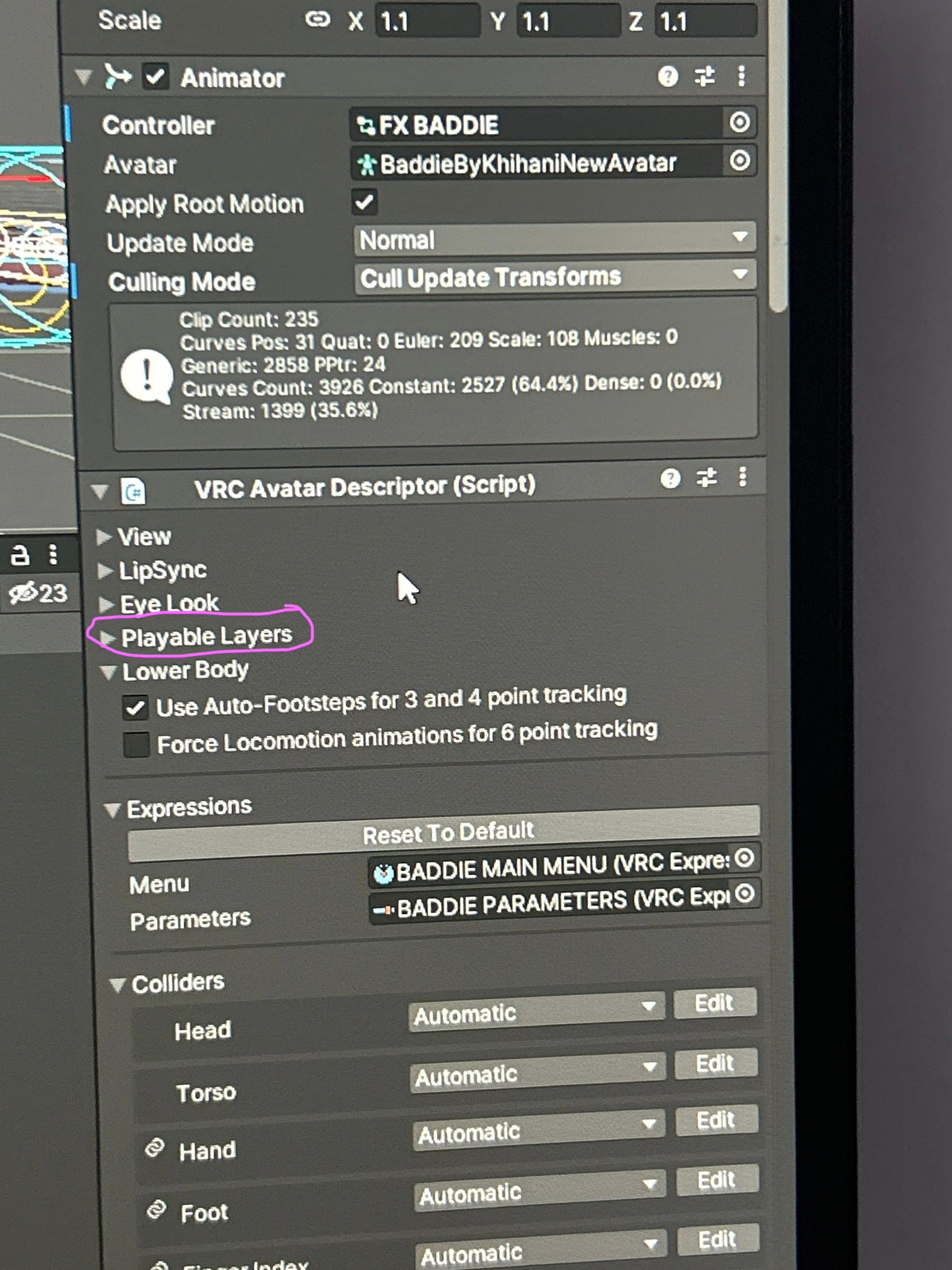
    @BlondeBunny In playable layers in the fx put “FX BADDIE”

    BlondeBunnyB 1 Reply Last reply
    ❤
    1
    • KittyRoseK KittyRose

      @BlondeBunny In playable layers in the fx put “FX BADDIE”

      BlondeBunnyB
      BlondeBunnyB
      BlondeBunny
      wrote on last edited by
      #91

      @Mew Found that the FX was there already still not working so i re-imported her then I saw the fx was mixed up, fixed that and it worked! Thanks!

      Want a specific furry texture? Check my bio!

      1 Reply Last reply
      0
      • PurrblonddeP
        PurrblonddeP
        Purrblondde
        wrote on last edited by
        #92

        image.jpg I put the fx I think idk even know but I pretty sure I did it right someone help me

        KittyRoseK 1 Reply Last reply
        0
        • PurrblonddeP Purrblondde

          image.jpg I put the fx I think idk even know but I pretty sure I did it right someone help me

          KittyRoseK
          KittyRoseK
          KittyRose
          wrote on last edited by KittyRose
          #93

          @allabout.zozo go to playable layers then look for were it says FX 1df2c439-af8b-4cd4-b14c-fe68f13eafc2-image.jpeg

          1 Reply Last reply
          0
          • H
            H
            Harmonyflys
            wrote on last edited by
            #94

            where the download link?

            KittyRoseK 1 Reply Last reply
            0
            • H Harmonyflys

              where the download link?

              KittyRoseK
              KittyRoseK
              KittyRose
              wrote on last edited by
              #95

              @Harmonyflys here [register or login to view this hidden content]

              1 Reply Last reply
              0
              • BelsieB
                BelsieB
                Belsie
                wrote on last edited by
                #96

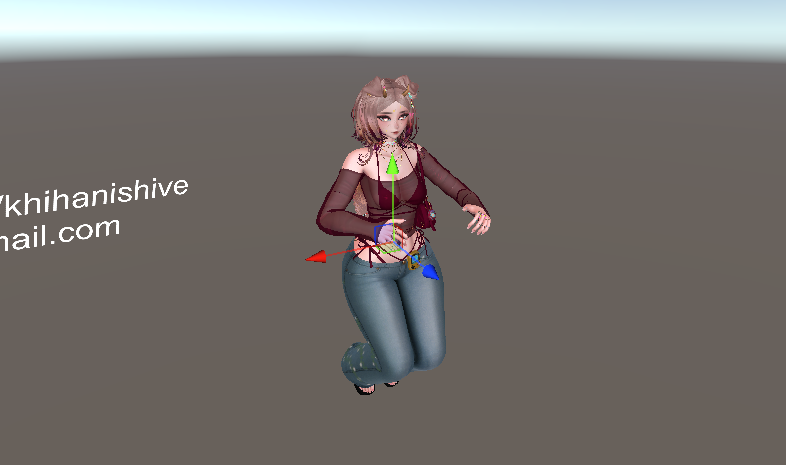
                is baddie like messed up or is it just me lol im not the best with unity, like her toggles work and the fx is set to fx baddie but she looks like this in gesture manager Screenshot 2025-10-06 074722.png
                VapeV P S0FTLYS 3 Replies Last reply
                0
                • BelsieB Belsie

                  is baddie like messed up or is it just me lol im not the best with unity, like her toggles work and the fx is set to fx baddie but she looks like this in gesture manager Screenshot 2025-10-06 074722.png

                  VapeV
                  VapeV
                  Vape
                  wrote on last edited by
                  #97

                  @Belsie that would be a gogo issue im pretty sure

                  1 Reply Last reply
                  0
                  • BelsieB Belsie

                    is baddie like messed up or is it just me lol im not the best with unity, like her toggles work and the fx is set to fx baddie but she looks like this in gesture manager Screenshot 2025-10-06 074722.png

                    P
                    P
                    PhantomWolf4417
                    wrote on last edited by
                    #98

                    @Belsie try removing the gogo and adding a different version

                    1 Reply Last reply
                    0
                    • BelsieB Belsie

                      is baddie like messed up or is it just me lol im not the best with unity, like her toggles work and the fx is set to fx baddie but she looks like this in gesture manager Screenshot 2025-10-06 074722.png

                      S0FTLYS
                      S0FTLYS
                      S0FTLY
                      wrote on last edited by
                      #99

                      @Belsie When u look in play mode are you clicked in one the scene tab and not looking in the game tab and are u using gesture manager. i had no issues uploading her.

                      1 Reply Last reply
                      0
                      • BelsieB
                        BelsieB
                        Belsie
                        wrote on last edited by
                        #100

                        Yeahh it was the gogo, swapping it fixed it, thank you guys!

                        P 1 Reply Last reply
                        1
                        • BelsieB Belsie

                          Yeahh it was the gogo, swapping it fixed it, thank you guys!

                          P
                          P
                          PhantomWolf4417
                          wrote on last edited by
                          #101

                          @Belsie gogo messes up on a few avis theres one i use thats always reliable its a bit older but feels like there more to it

                          1 Reply Last reply
                          0
                          • T
                            T
                            teataking
                            wrote on last edited by
                            #102

                            what is needed to upload them?

                            TheMinnieNewtonT 1 Reply Last reply
                            0
                            • T teataking

                              what is needed to upload them?

                              TheMinnieNewtonT
                              TheMinnieNewtonT
                              TheMinnieNewton
                              wrote on last edited by
                              #103

                              @teataking said in LF: Beck & Baddie (Pc/Quest/FT):

                              what is needed to upload them?

                              bump, I have so many issues uploading them

                              1 Reply Last reply
                              0
                              • M
                                M
                                Meowtron
                                wrote on last edited by
                                #104

                                Can anyone rip the custom Gogoloco poses from Baddie and turn it into a file please?

                                1 Reply Last reply
                                0
                                • A
                                  A
                                  asinglebajablast
                                  wrote on last edited by
                                  #105
                                  This post is deleted!
                                  Lena catL I 2 Replies Last reply
                                  -15
                                  • A asinglebajablast
                                    [[topic:post-is-deleted]]
                                    Lena catL
                                    Lena catL
                                    Lena cat
                                    wrote on last edited by
                                    #106

                                    @asinglebajablast no need to be a dickhead about it. you could ask nicely. almost all avas now a days take vrc fury, latest poimi and thts about it. maybe sps config.your lucky i even said this.

                                    1 Reply Last reply
                                    1
                                    • A
                                      A
                                      asinglebajablast
                                      wrote on last edited by
                                      #107
                                      This post is deleted!
                                      1 Reply Last reply
                                      -18
                                      • A asinglebajablast
                                        [[topic:post-is-deleted]]
                                        I
                                        I
                                        inactivr
                                        wrote on last edited by
                                        #108

                                        @asinglebajablast I'm going to neg rep u but these are the upload instructions for beck
                                        (and baddie)

                                        Hey cuties ♥ Please read!

                                        First of all: IF you got this package without buying it from me, khihani, please have in mind that i put a lot of time, effort, money and love into my models.
                                        To make it possible for me to continue to make these unique avatars, please go to my website and purchase the avatar legally: dyzzy.store or Khihani.com

                                        DEPENDENCIES:

                                        Unity & Creator Companion: https://vcc.docs.vrchat.com/#download-it
                                        VrcFury: https://vrcfury.com
                                        Poiyomi Shader: https://www.poiyomi.com

                                        PROJECT SETUP:

                                        1. Create New Unity 2022 Avatar Project (Sdk Version: 3.8.2)
                                        2. Import Poiyomi Toon Shader (Version: 9.2.74)
                                        3. Import VrcFury (Version: 1.1252.0)
                                        4. Open the Project and import BeckByDyzzy.unitypackage

                                        HOW TO UPLOAD FOR PC:

                                        1. Go to the folder "Beck by Dyzzy" and double click on the scene CLICK ME - BECK
                                        2. Go to the top of the screen -> VRChat SDK -> Show Control Panel -> put in your login informations
                                        3. Choose the prefab you would like to upload (choose between light version and full version)
                                        4. Go to the tab called "Builder" and click "Build & Publish for Windows"
                                        5. Let everything load and save

                                        HOW TO UPLOAD FOR QUEST:

                                        1. Go to the top left of the screen -> File-> Buildsettings -> Android -> Switch Platform (you might have to install the android support first)
                                        2. It might take a while to convert the project to quest, so wait for that
                                        3. Go to the top of the screen -> VRChat SDK -> Content Manager and copy the Blueprint ID of the Pc Upload you just did
                                        4. Paste in and attach the Blueprint ID of the pc prefab upload into the quest prefab
                                        5. Go to the top of the screen -> VRChat SDK -> Builder -> Choose the questversion you would like to upload (choose between the pc light version and the pc full version) -> Build & Publish for Android

                                        TIPS:

                                        We tried describing everything as good as possible, if you still have any questions regarding my avatars, please join our server and use the ticket bot, we always try to help! ♥

                                        -Only change the materials that are already on the model, dont drag other materials on the avatar, that will break the toggles.
                                        -Only one project for pc and quest is needed!
                                        -DO NOT IMPORT BECK AND BADDIE IN ONE PROJECT!
                                        -and please USE THE POIYOMI AND SDK VERSION THAT I USE!

                                        We recommend to upload the avatar first, before changing/editing anything.

                                        Discord server: https://discord.gg/khihanishive
                                        Our Discord: dyzzyvr & khihani
                                        Our Email: [email protected]


                                        ASSET CREDITS:

                                        VR Eboy Base: Zinpia • Head: Starlynn (edit by Dyzzy & Khihani) • Cat Tail, Puppy Ears & Tail: Jinxiewinks • Portable Boombox: DittyDos (Commercial use permitted)
                                        • Hair 1, 2, 3, 4, 5: Saikura, Delorblouse, Minki, V3N1X • Hairtexture: Saikura, Cicieaaa • Beret: Hayweee • Questconversion, Earrings, Heartnecklace and Rings: Khihani
                                        • Comfy Sweater: Bunisu • Sweatpants: Evan • Boxershorts: Catakitty • Jeans: Freshvrc • Headphones: Nuusix • Star Stickers: GM's Box • Star Bracelet: KennelWorks • Frog Ring: MoBubbler
                                        • Glasses: itshymn • Smiley Rings: Lukas369 • Eyetexture & Freckletexture: Missymod Nitro • Cassette Player: Commission by Crozzie • Follower & Plushie: Commission by Soleia
                                        • Corduroy Pants & Tshirt: Commission by Evan • Turtleneck & Hoodie: Commission by Bunisu • Guitar Mesh: House of Heretics • Guitar System: LodsGalaxy
                                        • Sneaker: Nyell Gelaev VR • Slides: Ssukiii. • Socks & Skate Shoes: Plaz • Kleats: Nectar • Charm Accessories: GelwO • Cat Ears: Loki's Vanity • GoGo locomotion: franada#0001
                                        • "Lollipop": Wholesome • Flowertrails: Kisustar • Star Trails: Xxuebi • Heart Particles: Bunky • Star Noseboop Particles: Commission by Phawksea

                                        All assets are bought with the right commercial license and you are not allowed to use anything of this avatar whatsoever.


                                        TERMS OF USE

                                        -Do NOT leak/share/Pricesplit my package with anyone
                                        -Do NOT purchase from me if you know nothing about unity or dont have a pc
                                        -Do NOT upload my work to filesharing websites/piracy websites
                                        -Do NOT make the model nor your edits of this model public
                                        -You can NOT take parts for your own personal or commercial models
                                        -I am NOT held accountable for any future game updates that may break the avatar nor am I accountable to fix all issues they may cause
                                        -No refunds due to the nature of these models being a digital one
                                        -You can NOT make any kind of profit off of my avatars, neither using them as showcase material for textures, nor streaming etc.
                                        -> contact me for a commercial streaming license
                                        -You can NOT import any of my models to other games than vrchat

                                        I HAVE A CERTIFICATED COPYRIGHT FOR THIS AVATAR, I WILL TAKE LEGAL ACTIONS IF SHARED.

                                        WARNING: I use Payhip Antileak and every leaked package can be traced back to the original buyer, which makes taking legal actions very easy, since its bound to your payment method.

                                        1 Reply Last reply
                                        👏 🤗
                                        1
                                        • ZoroarkMommyZ
                                          ZoroarkMommyZ
                                          ZoroarkMommy
                                          wrote on last edited by
                                          #109

                                          bump beck

                                          1 Reply Last reply
                                          0

                                          Hello! It looks like you're interested in this conversation, but you don't have an account yet.

                                          Getting fed up of having to scroll through the same posts each visit? When you register for an account, you'll always come back to exactly where you were before, and choose to be notified of new replies (either via email, or push notification). You'll also be able to save bookmarks and upvote posts to show your appreciation to other community members.

                                          With your input, this post could be even better 💗

                                          Register Login
                                          Reply
                                          • Reply as topic
                                          Log in to reply
                                          • Oldest to Newest
                                          • Newest to Oldest
                                          • Most Votes


                                          • Login

                                          • Login or register to search.
                                          • First post
                                            Last post
                                          0
                                          • Categories
                                          • Recent
                                          • Tags
                                          • Popular