Skip to content
  • Categories
  • Recent
  • Tags
  • Popular
Skins
  • Light
  • Brite
  • Cerulean
  • Cosmo
  • Flatly
  • Journal
  • Litera
  • Lumen
  • Lux
  • Materia
  • Minty
  • Morph
  • Pulse
  • Sandstone
  • Simplex
  • Sketchy
  • Spacelab
  • United
  • Yeti
  • Zephyr
  • Dark
  • Cyborg
  • Darkly
  • Quartz
  • Slate
  • Solar
  • Superhero
  • Vapor

  • Default (Zephyr)
  • No Skin
Collapse
RipperStore Logo
  1. Home
  2. Assets
  3. Looking for...
  4. Booth Avatars
  5. [FOUND!] Senmaku Customizable Model

[FOUND!] Senmaku Customizable Model

Scheduled Pinned Locked Moved Unsolved Booth Avatars
live2dcustomizableavatar2dmodellookingfor
185 Posts 82 Posters 34.8k Views 87 Watching
  • Oldest to Newest
  • Newest to Oldest
  • Most Votes
Reply
  • Reply as topic
Log in to reply
This topic has been deleted. Only users with topic management privileges can see it.
  • B
    B
    BebeBlossom
    wrote on last edited by
    #100

    Bump for 1.03 update.

    1 Reply Last reply
    0
    • JuniihJ Juniih
      [[topic:post-is-deleted]]
      B
      B
      BebeBlossom
      wrote on last edited by
      #101

      @Kiyaree Thank you!

      1 Reply Last reply
      1
      • T
        T
        toxicsun1
        wrote on last edited by
        #102

        Bump for 1.0.3

        1 Reply Last reply
        0
        • S
          S
          sillystarfish
          wrote on last edited by
          #103

          Bump for update!:)

          1 Reply Last reply
          0
          • PiperP
            PiperP
            Piper
            wrote on last edited by
            #104

            Bump for the new update

            1 Reply Last reply
            0
            • LyraHeartStringsL
              LyraHeartStringsL
              LyraHeartStrings
              wrote on last edited by
              #105

              We don't need a bump every hour gang ;; ❤ once a day is enough

              1 Reply Last reply
              0
              • I
                I
                iwanttoseevtu
                wrote on last edited by
                #106

                I actually wonder if 1.0.3 is that different from 1.0.2

                T 1 Reply Last reply
                0
                • I iwanttoseevtu

                  I actually wonder if 1.0.3 is that different from 1.0.2

                  T
                  T
                  toxicsun1
                  wrote on last edited by
                  #107

                  @iwanttoseevtu 1.0.3 has changes and also a floating head version if you wanted to use a dif body / outfit

                  1 Reply Last reply
                  0
                  • I
                    I
                    iwanttoseevtu
                    wrote on last edited by
                    #108

                    bump for 1.0.3 then

                    1 Reply Last reply
                    0
                    • SparxieS
                      SparxieS
                      Sparxie
                      wrote on last edited by
                      #109

                      bump for 1.0.3

                      1 Reply Last reply
                      0
                      • 0
                        0
                        0xilena
                        wrote on last edited by
                        #110

                        I'm back again to give yall 1.03 (sorry again... I don't check here often)

                        [register or login to view this hidden content]

                        zip includes:

                        • 1.03 update log
                        • PSD files for 2k and 4k
                        • Folders for 2k and 4k
                        • Model Head folder for people who like to use other body/clothing assets
                        0 I 2 Replies Last reply
                        ❤
                        5
                        • 0 0xilena

                          I'm back again to give yall 1.03 (sorry again... I don't check here often)

                          [register or login to view this hidden content]

                          zip includes:

                          • 1.03 update log
                          • PSD files for 2k and 4k
                          • Folders for 2k and 4k
                          • Model Head folder for people who like to use other body/clothing assets
                          0
                          0
                          0xilena
                          wrote on last edited by 0xilena
                          #111

                          in case who for those who don't know how to update to latest version:

                          • open vtube studio
                          • on third tab (person with cogwheel), click "auto setup"
                          • click "copy setup from other model"
                          • find and click the older model version (example: 1.02)
                          • enable everything EXCEPT "animation files" and "model icon file"

                          click ok and that's it!

                          note: if you edited the textures, you will want to copy/drag and paste them into the 1.03 texture folder to overwrite the default textures, just make sure to reload textures for it to take effect

                          R M 2 Replies Last reply
                          ❤
                          1
                          • 0 0xilena

                            I'm back again to give yall 1.03 (sorry again... I don't check here often)

                            [register or login to view this hidden content]

                            zip includes:

                            • 1.03 update log
                            • PSD files for 2k and 4k
                            • Folders for 2k and 4k
                            • Model Head folder for people who like to use other body/clothing assets
                            I
                            I
                            iwanttoseevtu
                            wrote on last edited by
                            #112

                            @0xilena Whoa, thank you!!!

                            1 Reply Last reply
                            ❤
                            0
                            • 0 0xilena

                              in case who for those who don't know how to update to latest version:

                              • open vtube studio
                              • on third tab (person with cogwheel), click "auto setup"
                              • click "copy setup from other model"
                              • find and click the older model version (example: 1.02)
                              • enable everything EXCEPT "animation files" and "model icon file"

                              click ok and that's it!

                              note: if you edited the textures, you will want to copy/drag and paste them into the 1.03 texture folder to overwrite the default textures, just make sure to reload textures for it to take effect

                              R
                              R
                              reotojn
                              wrote on last edited by
                              #113

                              @0xilena THANK YOU!

                              1 Reply Last reply
                              ❤
                              0
                              • ValTheMimeV
                                ValTheMimeV
                                ValTheMime
                                wrote on last edited by
                                #114

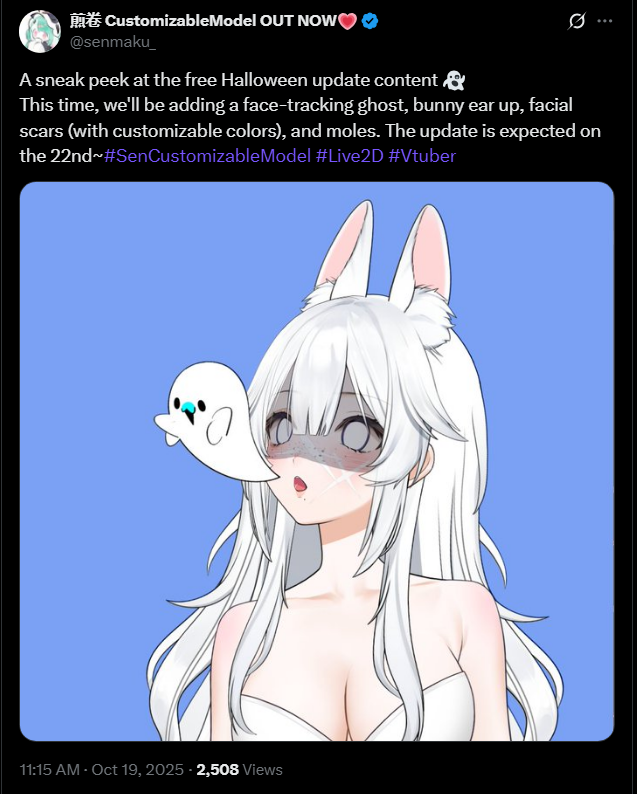
                                Hii peeps! There's news about a new update, apparently "upright bunny ears" will be added to the new update!

                                https://x.com/senmaku_/status/1975223563117531602?t=n3QG_C4_te8A0ezPN9mC1w&s=19

                                1 Reply Last reply
                                1
                                • T
                                  T
                                  tsunderabies
                                  wrote on last edited by
                                  #115

                                  Does anyone know what layer we should be pinning outfits to with the head model? I've been trying to pin to the neck, but the outfits all move around a lot so it's not a smooth pin

                                  1 Reply Last reply
                                  0
                                  • Y
                                    Y
                                    yiyi98
                                    wrote on last edited by
                                    #116

                                    Bunp

                                    1 Reply Last reply
                                    0
                                    • ValTheMimeV
                                      ValTheMimeV
                                      ValTheMime
                                      wrote on last edited by
                                      #117

                                      image.png
                                      Got some good news!!!

                                      1 Reply Last reply
                                      0
                                      • H
                                        H
                                        hearteyes4libb
                                        wrote on last edited by
                                        #118

                                        can anyone help me with removing the watermarks?

                                        Ulti_CreamU 1 Reply Last reply
                                        0
                                        • H hearteyes4libb

                                          can anyone help me with removing the watermarks?

                                          Ulti_CreamU
                                          Ulti_CreamU
                                          Ulti_Cream
                                          wrote on last edited by
                                          #119

                                          @hearteyes4libb so to settings > hotkey settings and expressions > expression editor > create new expression > an then turn on the first six options and slide them all to 0
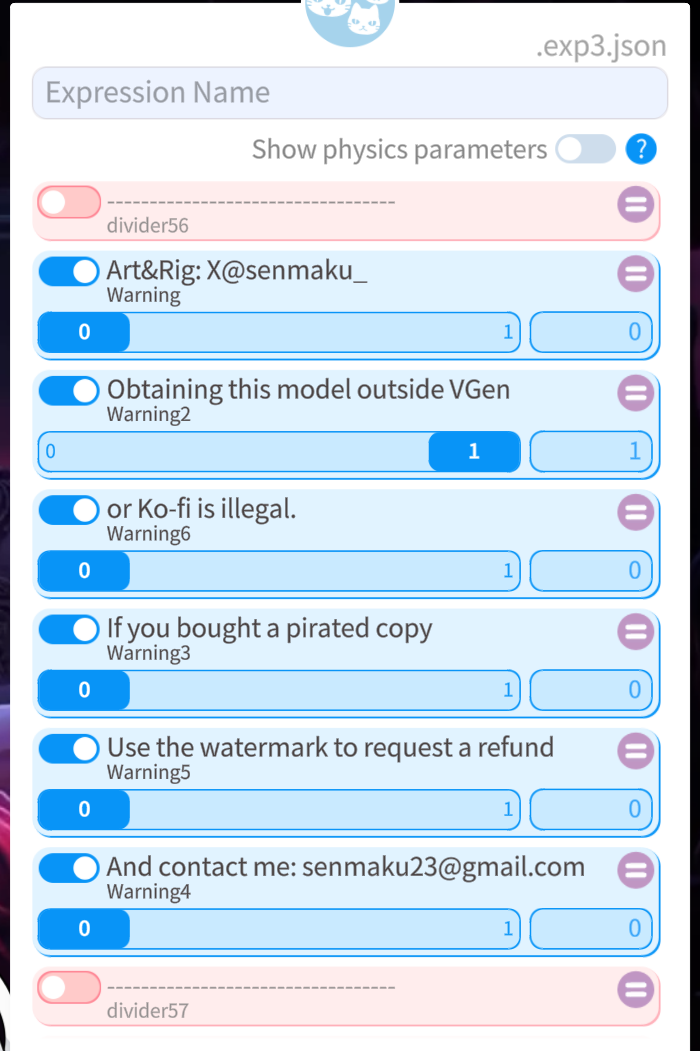
                                          f222ce31-83d0-46dc-8a07-aeb2e2cfcbd3-image.png

                                          Ulti_CreamU 1 Reply Last reply
                                          1

                                          Hello! It looks like you're interested in this conversation, but you don't have an account yet.

                                          Getting fed up of having to scroll through the same posts each visit? When you register for an account, you'll always come back to exactly where you were before, and choose to be notified of new replies (either via email, or push notification). You'll also be able to save bookmarks and upvote posts to show your appreciation to other community members.

                                          With your input, this post could be even better 💗

                                          Register Login
                                          Reply
                                          • Reply as topic
                                          Log in to reply
                                          • Oldest to Newest
                                          • Newest to Oldest
                                          • Most Votes


                                          • Login

                                          • Login or register to search.
                                          • First post
                                            Last post
                                          0
                                          • Categories
                                          • Recent
                                          • Tags
                                          • Popular