Skip to content
  • Categories
  • Recent
  • Tags
  • Popular
Skins
  • Light
  • Brite
  • Cerulean
  • Cosmo
  • Flatly
  • Journal
  • Litera
  • Lumen
  • Lux
  • Materia
  • Minty
  • Morph
  • Pulse
  • Sandstone
  • Simplex
  • Sketchy
  • Spacelab
  • United
  • Yeti
  • Zephyr
  • Dark
  • Cyborg
  • Darkly
  • Quartz
  • Slate
  • Solar
  • Superhero
  • Vapor

  • Default (Zephyr)
  • No Skin
Collapse
RipperStore Logo
  1. Home
  2. Assets
  3. Gifts / Downloads
  4. Ray-Line by AGNOSTOS

Ray-Line by AGNOSTOS

Scheduled Pinned Locked Moved Gifts / Downloads
vfxlaser rayrayraylineweapon lasergift-booth
26 Posts 11 Posters 5.3k Views 10 Watching
  • Oldest to Newest
  • Newest to Oldest
  • Most Votes
Reply
  • Reply as topic
Log in to reply
This topic has been deleted. Only users with topic management privileges can see it.
  • AbsoluteSolverA
    AbsoluteSolverA
    AbsoluteSolver
    wrote on last edited by AbsoluteSolver
    #1

    https://agnostos.booth.pm/items/6692066

    [register or login to view this hidden content]
    [register or login to view this hidden content] MEGA Encryption Key:bVcUKwqw3ttc1yGIZo1mXp1ktoK39jteFvyvEyteWfI
    This is RAY-LINE_ver1.0.7 that should have an updated a VRCFury version now with a tutorial video! Go on ahead and take it cuties ❤ I think i got the MEGA link working now thanks to @avatarofcorn ! @Donut @TokeiNeko this should absolutely work now with no issues and thank you @avatarofcorn for telling me how Encryption works!

    TokeiNekoT crbuh21C 2 Replies Last reply
    18
    • AbsoluteSolverA AbsoluteSolver referenced this topic on
    • DonutD
      DonutD
      Donut
      wrote on last edited by
      #2

      For those who wonder : https://booth.pm/ja/items/6692066

      I just said Bump

      1 Reply Last reply
      1
      • AbsoluteSolverA AbsoluteSolver

        https://agnostos.booth.pm/items/6692066

        [register or login to view this hidden content]
        [register or login to view this hidden content] MEGA Encryption Key:bVcUKwqw3ttc1yGIZo1mXp1ktoK39jteFvyvEyteWfI
        This is RAY-LINE_ver1.0.7 that should have an updated a VRCFury version now with a tutorial video! Go on ahead and take it cuties ❤ I think i got the MEGA link working now thanks to @avatarofcorn ! @Donut @TokeiNeko this should absolutely work now with no issues and thank you @avatarofcorn for telling me how Encryption works!

        TokeiNekoT
        TokeiNekoT
        TokeiNeko
        wrote on last edited by
        #3

        @AbsoluteSolver says it needs a key....

        AbsoluteSolverA 1 Reply Last reply
        1
        • TokeiNekoT TokeiNeko

          @AbsoluteSolver says it needs a key....

          AbsoluteSolverA
          AbsoluteSolverA
          AbsoluteSolver
          wrote on last edited by
          #4

          @TokeiNeko that idk why its saying that. i didnt make a key for it. just slapped it in and copied the link like i do with workupload

          1 Reply Last reply
          0
          • AbsoluteSolverA
            AbsoluteSolverA
            AbsoluteSolver
            wrote on last edited by
            #5

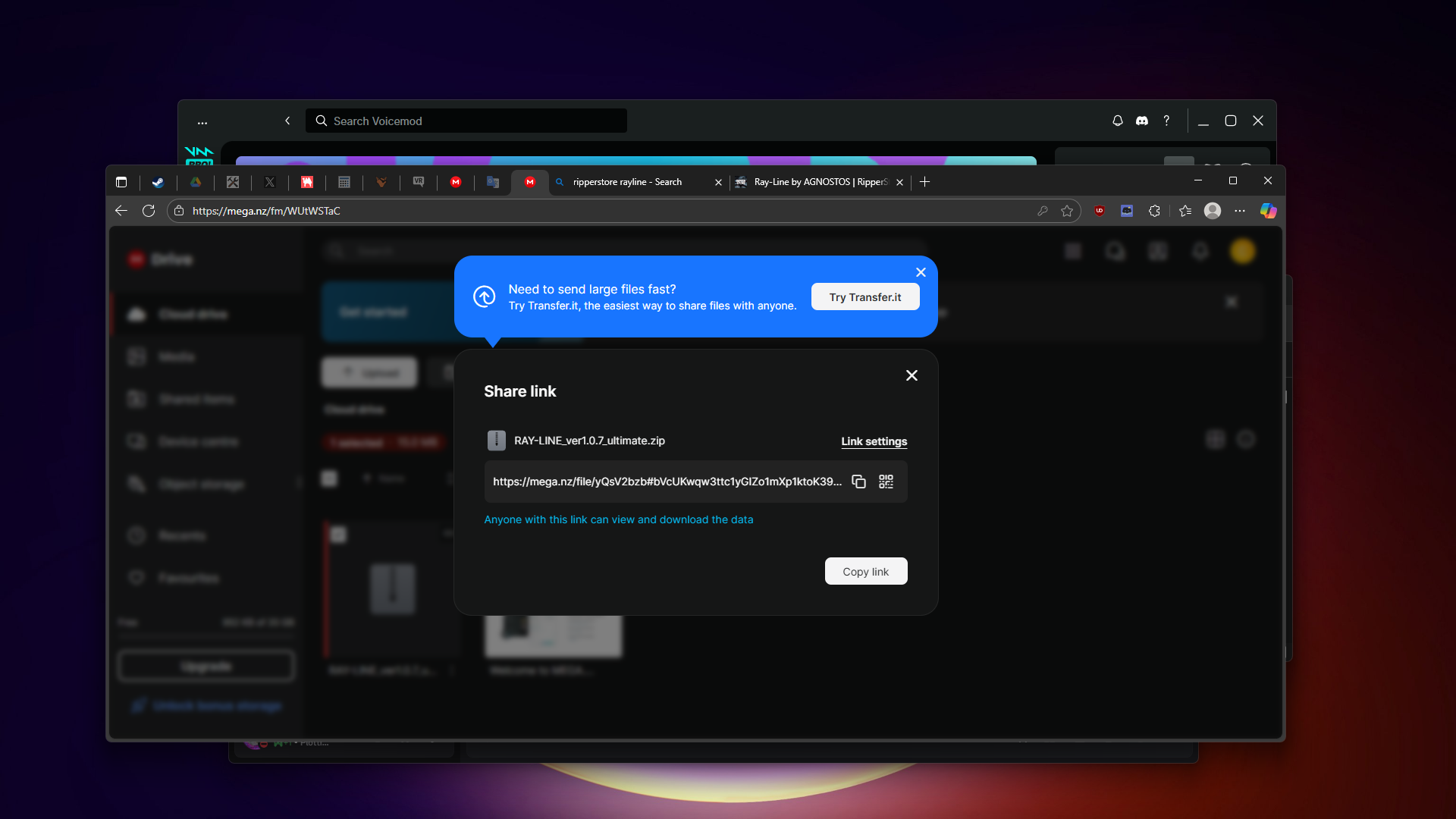
            Screenshot (985).png It even says that anyone with the link can view and download it. i didnt change anything

            avatarofcornA 1 Reply Last reply
            0
            • AbsoluteSolverA
              AbsoluteSolverA
              AbsoluteSolver
              wrote on last edited by
              #6
              This post is deleted!
              1 Reply Last reply
              0
              • AbsoluteSolverA
                AbsoluteSolverA
                AbsoluteSolver
                wrote on last edited by AbsoluteSolver
                #7
                This post is deleted!
                1 Reply Last reply
                0
                • AbsoluteSolverA AbsoluteSolver

                  Screenshot (985).png It even says that anyone with the link can view and download it. i didnt change anything

                  avatarofcornA
                  avatarofcornA
                  avatarofcorn
                  wrote on last edited by
                  #8

                  @AbsoluteSolver Mega links come with a code after the "#" character. You can paste the mega link and the code separately (which can be entered at the "needs key" popup).

                  AbsoluteSolverA 1 Reply Last reply
                  1
                  • avatarofcornA avatarofcorn

                    @AbsoluteSolver Mega links come with a code after the "#" character. You can paste the mega link and the code separately (which can be entered at the "needs key" popup).

                    AbsoluteSolverA
                    AbsoluteSolverA
                    AbsoluteSolver
                    wrote on last edited by
                    #9

                    @avatarofcorn gotcha,ty! did not know this. 1st time using MEGA

                    1 Reply Last reply
                    👍
                    0
                    • NОСTISN
                      NОСTISN
                      NОСTIS
                      wrote on last edited by
                      #10

                      Thank you @AbsoluteSolver I got the thing

                      1 Reply Last reply
                      1
                      • SnowFlan2020S
                        SnowFlan2020S
                        SnowFlan2020
                        wrote on last edited by
                        #11

                        ty

                        1 Reply Last reply
                        1
                        • NОСTISN
                          NОСTISN
                          NОСTIS
                          wrote on last edited by
                          #12

                          @AbsoluteSolver Is the asset just drag and drop on the model or do I need to adjust things to like the hands and all that

                          AbsoluteSolverA 1 Reply Last reply
                          0
                          • NОСTISN NОСTIS

                            @AbsoluteSolver Is the asset just drag and drop on the model or do I need to adjust things to like the hands and all that

                            AbsoluteSolverA
                            AbsoluteSolverA
                            AbsoluteSolver
                            wrote on last edited by
                            #13

                            @NОСTIS Drop the prefab onto the avatar in the heirarchy and move the ray_line(whatever color in brackets) to the left hand. go into gesture manager to see if you placed it right,then upload.

                            NОСTISN 1 Reply Last reply
                            0
                            • TokeiNekoT
                              TokeiNekoT
                              TokeiNeko
                              wrote on last edited by
                              #14

                              No matter what I try, it just wont go to the hand, it's always super far away, wish there was instructions or a video on how to set it correctly. :S

                              AbsoluteSolverA NОСTISN 2 Replies Last reply
                              0
                              • TokeiNekoT TokeiNeko

                                No matter what I try, it just wont go to the hand, it's always super far away, wish there was instructions or a video on how to set it correctly. :S

                                AbsoluteSolverA
                                AbsoluteSolverA
                                AbsoluteSolver
                                wrote on last edited by
                                #15

                                @TokeiNeko do you have Modular Avatar installed? If you dont,please install it. if you do,then idk keep messing with the prefab

                                1 Reply Last reply
                                0
                                • TokeiNekoT TokeiNeko

                                  No matter what I try, it just wont go to the hand, it's always super far away, wish there was instructions or a video on how to set it correctly. :S

                                  NОСTISN
                                  NОСTISN
                                  NОСTIS
                                  wrote on last edited by
                                  #16

                                  @TokeiNeko I agree and actually asked the creator and hope the new update had a tutorial but I guess they didn't really care

                                  1 Reply Last reply
                                  0
                                  • AbsoluteSolverA AbsoluteSolver

                                    @NОСTIS Drop the prefab onto the avatar in the heirarchy and move the ray_line(whatever color in brackets) to the left hand. go into gesture manager to see if you placed it right,then upload.

                                    NОСTISN
                                    NОСTISN
                                    NОСTIS
                                    wrote on last edited by
                                    #17

                                    @AbsoluteSolver How do I move it on the left hand? It's on the floor and when I try to move it's locked on the floor

                                    AbsoluteSolverA 1 Reply Last reply
                                    0
                                    • NОСTISN NОСTIS

                                      @AbsoluteSolver How do I move it on the left hand? It's on the floor and when I try to move it's locked on the floor

                                      AbsoluteSolverA
                                      AbsoluteSolverA
                                      AbsoluteSolver
                                      wrote on last edited by AbsoluteSolver
                                      #18

                                      @NОСTIS press on the prefab in the heirarchy and move it. i opened up my project and move it far away from my body,went into gesture manager and sure enough,it was far away from my body. i Ctrl+Z and bring it back to the original position i had it in and its back to normal. Just keep messing with it hun.
                                      [Information for people who misalign the prefab even if it is aligned]

                                      • In some environments, we have confirmed an issue where some bug causes misalignment in Unity play mode or uploaded avatars.

                                      ・This problem is,
                                      [Move the "spring_joint" in the prefab to the position you want it to appear
                                      ↓
                                      Click Edit Angular Limits with the Auto Configure Connected Anchor enabled for the component "Configurable Joint" in the object
                                      It is possible to correct it to the correct position with this procedure.

                                      NОСTISN 1 Reply Last reply
                                      1
                                      • pooplover45P
                                        pooplover45P
                                        pooplover45
                                        wrote on last edited by
                                        #19

                                        is there a quickfix file that need to be downloaded?

                                        1 Reply Last reply
                                        0
                                        • Coolcat2023C
                                          Coolcat2023C
                                          Coolcat2023
                                          wrote on last edited by
                                          #20

                                          its really weird when i use the playmode, its in the left hand but when i uploaded it its not...

                                          1 Reply Last reply
                                          0

                                          Hello! It looks like you're interested in this conversation, but you don't have an account yet.

                                          Getting fed up of having to scroll through the same posts each visit? When you register for an account, you'll always come back to exactly where you were before, and choose to be notified of new replies (either via email, or push notification). You'll also be able to save bookmarks and upvote posts to show your appreciation to other community members.

                                          With your input, this post could be even better 💗

                                          Register Login
                                          Reply
                                          • Reply as topic
                                          Log in to reply
                                          • Oldest to Newest
                                          • Newest to Oldest
                                          • Most Votes


                                          • Login

                                          • Login or register to search.
                                          • First post
                                            Last post
                                          0
                                          • Categories
                                          • Recent
                                          • Tags
                                          • Popular