Skip to content
  • Categories
  • Recent
  • Tags
  • Popular
Skins
  • Light
  • Brite
  • Cerulean
  • Cosmo
  • Flatly
  • Journal
  • Litera
  • Lumen
  • Lux
  • Materia
  • Minty
  • Morph
  • Pulse
  • Sandstone
  • Simplex
  • Sketchy
  • Spacelab
  • United
  • Yeti
  • Zephyr
  • Dark
  • Cyborg
  • Darkly
  • Quartz
  • Slate
  • Solar
  • Superhero
  • Vapor

  • Default (Zephyr)
  • No Skin
Collapse
RipperStore Logo
  1. Home
  2. Assets
  3. Looking for...
  4. Furry Avatars
  5. Skinnier Stylized Tasque Manager

Skinnier Stylized Tasque Manager

Scheduled Pinned Locked Moved Unsolved Furry Avatars
nsfw creatoravatar editcryptiacurves
364 Posts 87 Posters 49.0k Views 166 Watching
  • Oldest to Newest
  • Newest to Oldest
  • Most Votes
Reply
  • Reply as topic
Log in to reply
This topic has been deleted. Only users with topic management privileges can see it.
  • KokomimoK
    KokomimoK
    Kokomimo
    wrote on last edited by
    #61

    im having trouble uploading it could i get directions how how to uplaod it

    AvtorNtetA 1 Reply Last reply
    0
    • silly_kittyS
      silly_kittyS
      silly_kitty
      wrote on last edited by
      #62

      im guessing its kinda broken but it still looks great perfection takes time so take as long as you need

      Top 500 Jerkmate player

      1 Reply Last reply
      0
      • R
        R
        Randpay
        wrote on last edited by
        #63

        Okay so. For the bbobs it was a really easy fix. It was something I forgot to do. Which is to delete these shapekey thing on the animation. Essentially if you do this then the base thing will work, while the toggle is on it'll overide it.
        image.png
        image.png

        R 2 Replies Last reply
        0
        • AvtorNtetA AvtorNtet

          however, I don't know how to fix this either)
          image.png

          R
          R
          Randpay
          wrote on last edited by
          #64

          @AvtorNtet As for this tho... I have no idea how that happened.

          R 1 Reply Last reply
          0
          • R Randpay

            Okay so. For the bbobs it was a really easy fix. It was something I forgot to do. Which is to delete these shapekey thing on the animation. Essentially if you do this then the base thing will work, while the toggle is on it'll overide it.
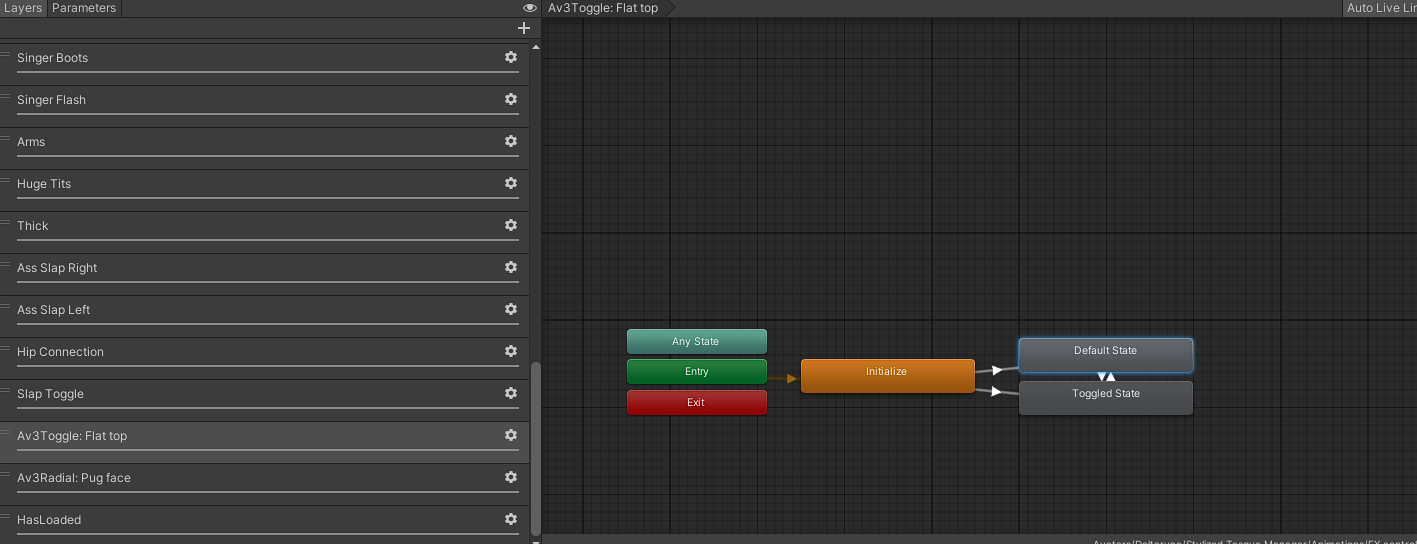
            image.png
            image.png

            R
            R
            Randpay
            wrote on last edited by
            #65

            Just to be 100% clear only do this for the default state. Not the toggled btw.

            1 Reply Last reply
            0
            • R Randpay

              @AvtorNtet As for this tho... I have no idea how that happened.

              R
              R
              Randpay
              wrote on last edited by
              #66

              SO. THE prob for that is a lot more than I thought. there is a small fix I did for mine, where I fixed a small weight paint issue, and added a rotation constraint to it. As in the og model it relied on the super thicc legs to cover it up. I might tweak it a bit and then share that, but tbh it doesn't solve the core issue. and tbh idk if I wanna fix it to that degree

              AvtorNtetA 1 Reply Last reply
              0
              • R Randpay

                SO. THE prob for that is a lot more than I thought. there is a small fix I did for mine, where I fixed a small weight paint issue, and added a rotation constraint to it. As in the og model it relied on the super thicc legs to cover it up. I might tweak it a bit and then share that, but tbh it doesn't solve the core issue. and tbh idk if I wanna fix it to that degree

                AvtorNtetA
                AvtorNtetA
                AvtorNtet
                wrote on last edited by
                #67

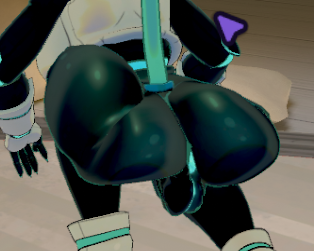
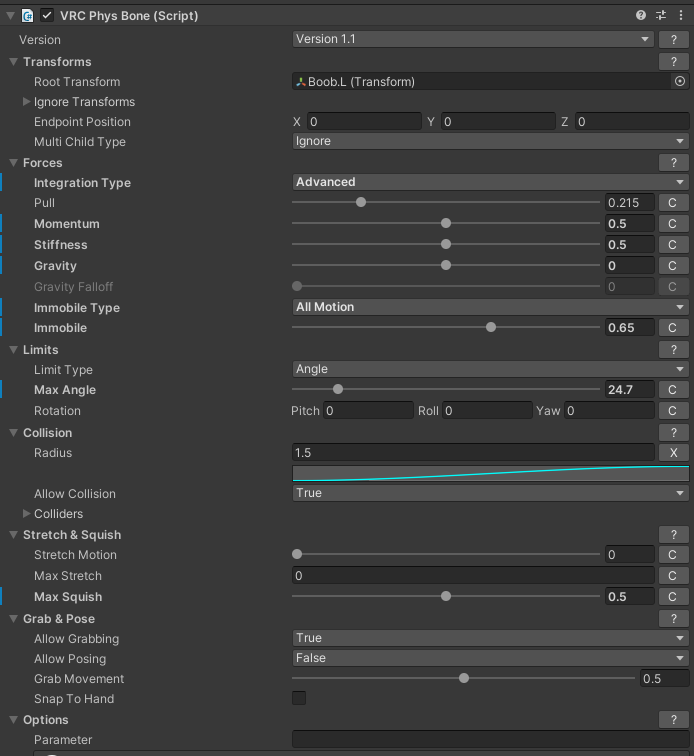
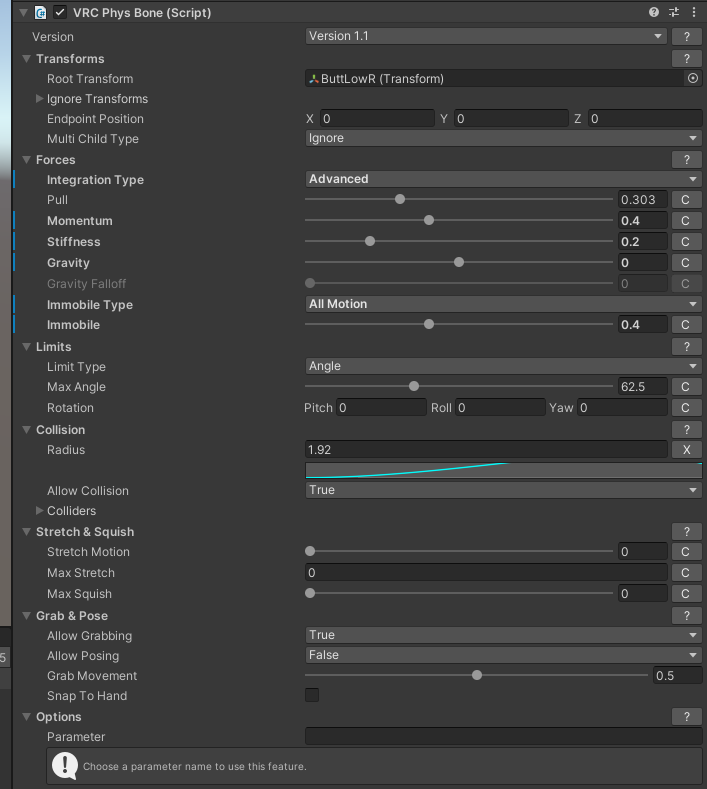
                @Randpay I have adjusted the physics of the chest and buttocks, as well as the angle of the chest, if necessary, I can throw off a photo of the settings.

                R 1 Reply Last reply
                0
                • AvtorNtetA
                  AvtorNtetA
                  AvtorNtet
                  wrote on last edited by
                  #68

                  However, I don't understand how to fix my breasts based on the photo.

                  1 Reply Last reply
                  0
                  • KokomimoK Kokomimo

                    im having trouble uploading it could i get directions how how to uplaod it

                    AvtorNtetA
                    AvtorNtetA
                    AvtorNtet
                    wrote on last edited by
                    #69

                    @Kokomimo after uploading to unity, find tasque.unitypackage in the project and upload it as well. After that, the scene will appear.

                    1 Reply Last reply
                    0
                    • R Randpay

                      Okay then heres the end. It finished uploading onto mega. For all those who want it here. Hope you have fun, be safe and responsible with it: 🔗 Download Link (mega.nz)

                      M
                      M
                      mini_viper26
                      wrote on last edited by
                      #70

                      @Randpay I ccan't access the files 😞

                      1 Reply Last reply
                      0
                      • R Randpay

                        Okay then heres the end. It finished uploading onto mega. For all those who want it here. Hope you have fun, be safe and responsible with it: 🔗 Download Link (mega.nz)

                        snatch_6S
                        snatch_6S
                        snatch_6
                        wrote on last edited by
                        #71

                        @Randpay i dont mean to accuse you but while downloading i got a virus warning, this has never EVER happened even though i downloaded many unity packages, any posible reason?

                        imagen_2025-08-15_144211594.png

                        If im asking for bone count, its because i may be interested on making a vrc port

                        I make custom vrc texture edits and sometimes wholve vrc ports of blender models

                        R 1 Reply Last reply
                        0
                        • snatch_6S snatch_6

                          @Randpay i dont mean to accuse you but while downloading i got a virus warning, this has never EVER happened even though i downloaded many unity packages, any posible reason?

                          imagen_2025-08-15_144211594.png

                          R
                          R
                          Randpay
                          wrote on last edited by
                          #72

                          @snatch_6 god thats weird. I swear I didn't put anything in it. its just the unity files for it.

                          1 Reply Last reply
                          0
                          • AvtorNtetA AvtorNtet

                            @Randpay I have adjusted the physics of the chest and buttocks, as well as the angle of the chest, if necessary, I can throw off a photo of the settings.

                            R
                            R
                            Randpay
                            wrote on last edited by
                            #73

                            @AvtorNtet that would be amazing, thank you. As for if your having trouble with it, I can kinda give a step by step.

                            1. Click on stylized tasq, then scrool down the vrc descriptor until you reach FX. Click on it
                              916be61b-479e-4248-a63f-c7e7bb26bbf0-image.png 7f5c73d2-2ef0-41bb-bd25-a2bfda89b65a-image.png

                            2. go onto animator, which you can scroll down to find Flat top. of which then you should be able to do what I said to do.
                              0326f30f-11e6-4de6-97d8-8cbeabaf6b36-image.png

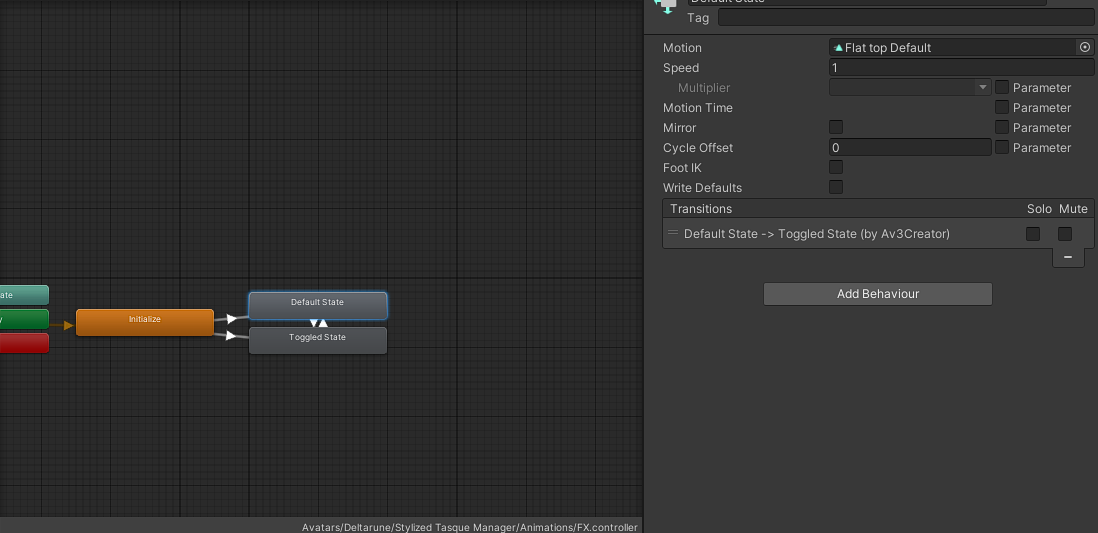
                            3. but just in case click on the default flat top. You should then be able to select the animation and proceed to go into the animation tab and delete the shirt on shapekey for default
                              a5fc5c05-e908-4756-85ea-ec814661c013-image.png

                            AvtorNtetA 2 Replies Last reply
                            0
                            • R Randpay

                              @AvtorNtet that would be amazing, thank you. As for if your having trouble with it, I can kinda give a step by step.

                              1. Click on stylized tasq, then scrool down the vrc descriptor until you reach FX. Click on it
                                916be61b-479e-4248-a63f-c7e7bb26bbf0-image.png 7f5c73d2-2ef0-41bb-bd25-a2bfda89b65a-image.png

                              2. go onto animator, which you can scroll down to find Flat top. of which then you should be able to do what I said to do.
                                0326f30f-11e6-4de6-97d8-8cbeabaf6b36-image.png

                              3. but just in case click on the default flat top. You should then be able to select the animation and proceed to go into the animation tab and delete the shirt on shapekey for default
                                a5fc5c05-e908-4756-85ea-ec814661c013-image.png

                              AvtorNtetA
                              AvtorNtetA
                              AvtorNtet
                              wrote on last edited by
                              #74

                              @Randpay Boobs R and Boobs L
                              0f8c2527-9352-48e0-a7cb-a8df654f4651-image.png
                              Physics
                              bdeebbdc-68d7-4e60-be83-db26c99ddb57-image.png

                              ButtLow R/L ButtTop R/L
                              7f9422e6-14d3-496f-b18f-558eddc3e21d-image.png
                              Physics ButtLow R/L
                              11026a56-b972-43e3-8894-52d2e9cdc3e4-image.png
                              Physics ButtTop R/L
                              f0b6884b-d8af-421a-bda6-2fb5d54e50b2-image.png

                              1 Reply Last reply
                              0
                              • R Randpay

                                @AvtorNtet that would be amazing, thank you. As for if your having trouble with it, I can kinda give a step by step.

                                1. Click on stylized tasq, then scrool down the vrc descriptor until you reach FX. Click on it
                                  916be61b-479e-4248-a63f-c7e7bb26bbf0-image.png 7f5c73d2-2ef0-41bb-bd25-a2bfda89b65a-image.png

                                2. go onto animator, which you can scroll down to find Flat top. of which then you should be able to do what I said to do.
                                  0326f30f-11e6-4de6-97d8-8cbeabaf6b36-image.png

                                3. but just in case click on the default flat top. You should then be able to select the animation and proceed to go into the animation tab and delete the shirt on shapekey for default
                                  a5fc5c05-e908-4756-85ea-ec814661c013-image.png

                                AvtorNtetA
                                AvtorNtetA
                                AvtorNtet
                                wrote on last edited by
                                #75

                                @Randpay I didn't really understand the 3rd action, I clicked on the Default State, and then I didn't understand what to delete very well

                                1 Reply Last reply
                                0
                                • R Randpay

                                  Okay so. For the bbobs it was a really easy fix. It was something I forgot to do. Which is to delete these shapekey thing on the animation. Essentially if you do this then the base thing will work, while the toggle is on it'll overide it.
                                  image.png
                                  image.png

                                  R
                                  R
                                  Randpay
                                  wrote on last edited by
                                  #76

                                  I was referencing this for the third action. When you click on an anim, it'll show up on the animation tab with flat values. You can edit them directly on there, including deleting ones. You'd need to delete the top one as thats the one causing the shapekey to activate, causing the weird boob thing

                                  1 Reply Last reply
                                  0
                                  • AvtorNtetA
                                    AvtorNtetA
                                    AvtorNtet
                                    wrote on last edited by
                                    #77

                                    do I just need to remove the flat top toggled?

                                    1 Reply Last reply
                                    0
                                    • AvtorNtetA
                                      AvtorNtetA
                                      AvtorNtet
                                      wrote on last edited by
                                      #78

                                      I finally got it. xD

                                      1 Reply Last reply
                                      0
                                      • LycronicalL
                                        LycronicalL
                                        Lycronical
                                        wrote on last edited by
                                        #79

                                        i think i found a fix, but idk if u would like it

                                        AvtorNtetA 1 Reply Last reply
                                        0
                                        • LycronicalL Lycronical

                                          i think i found a fix, but idk if u would like it

                                          AvtorNtetA
                                          AvtorNtetA
                                          AvtorNtet
                                          wrote on last edited by
                                          #80

                                          @Lycronical
                                          it depends on which solution we're talking about, if that's what it is, then yes, it's interesting)
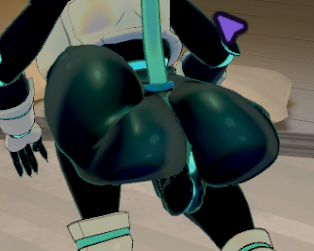
                                          3a88be2e-64e8-4b52-b1d7-f3824b189421-image.png

                                          1 Reply Last reply
                                          0

                                          Hello! It looks like you're interested in this conversation, but you don't have an account yet.

                                          Getting fed up of having to scroll through the same posts each visit? When you register for an account, you'll always come back to exactly where you were before, and choose to be notified of new replies (either via email, or push notification). You'll also be able to save bookmarks and upvote posts to show your appreciation to other community members.

                                          With your input, this post could be even better 💗

                                          Register Login
                                          Reply
                                          • Reply as topic
                                          Log in to reply
                                          • Oldest to Newest
                                          • Newest to Oldest
                                          • Most Votes


                                          • Login

                                          • Login or register to search.
                                          • First post
                                            Last post
                                          0
                                          • Categories
                                          • Recent
                                          • Tags
                                          • Popular