Skip to content
  • Categories
  • Recent
  • Tags
  • Popular
Skins
  • Light
  • Brite
  • Cerulean
  • Cosmo
  • Flatly
  • Journal
  • Litera
  • Lumen
  • Lux
  • Materia
  • Minty
  • Morph
  • Pulse
  • Sandstone
  • Simplex
  • Sketchy
  • Spacelab
  • United
  • Yeti
  • Zephyr
  • Dark
  • Cyborg
  • Darkly
  • Quartz
  • Slate
  • Solar
  • Superhero
  • Vapor

  • Default (Zephyr)
  • No Skin
Collapse
RipperStore Logo
  1. Home
  2. Assets
  3. Looking for...
  4. Scripts & Tools
  5. Found:どこどこテクスチャ (6963560)

Found:どこどこテクスチャ (6963560)

Scheduled Pinned Locked Moved Solved Scripts & Tools
texture toolunity toolsbooth
19 Posts 4 Posters 2.8k Views 12 Watching
  • Oldest to Newest
  • Newest to Oldest
  • Most Votes
Reply
  • Reply as topic
Log in to reply
This topic has been deleted. Only users with topic management privileges can see it.
  • nandorunner420N nandorunner420

    @Excaligator the first two words of my reply is a link to it

    ExcaligatorE
    ExcaligatorE
    Excaligator
    wrote on last edited by
    #7

    @nandorunner420 oh. Lol. I see now.

    Thank you!~♡

    1 Reply Last reply
    👍
    0
    • G gknps

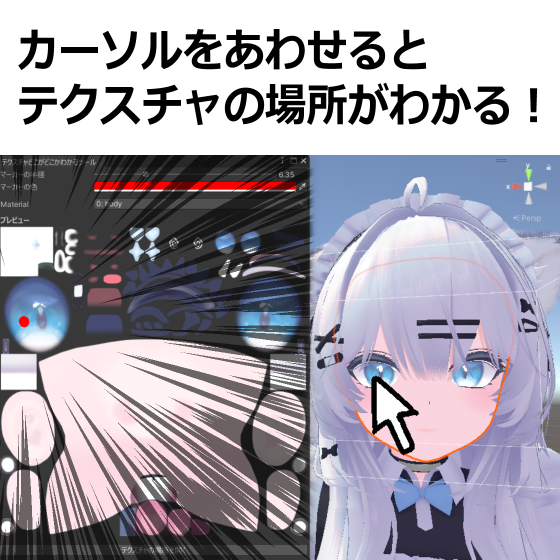
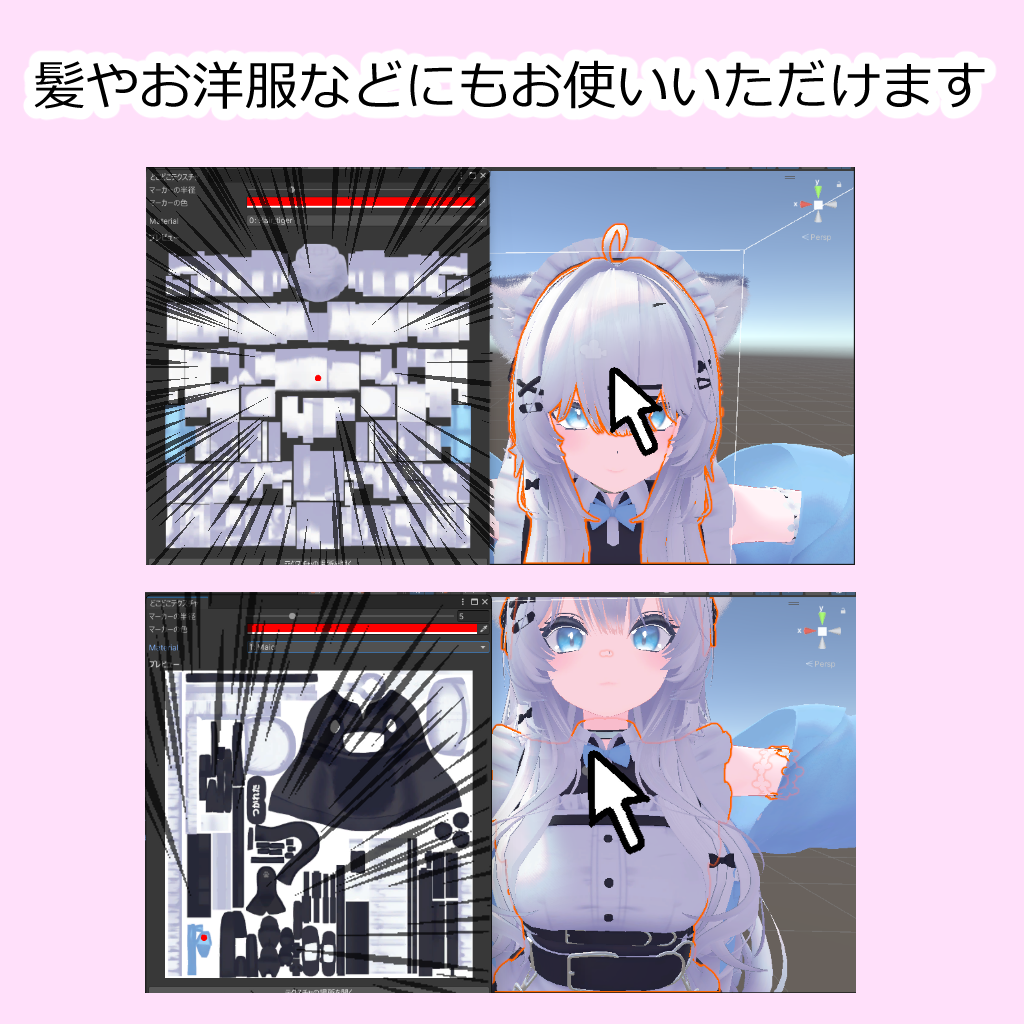
      https://booth.pm/ja/items/6963560
      f0e73e81-8780-400b-8553-227518754d03-image.png
      9a291e1a-2120-43f4-af3b-ecb4ae7cede2-image.png

      ExcaligatorE
      ExcaligatorE
      Excaligator
      wrote on last edited by
      #8

      @gknps
      @babuboo2017
      @bunkasan

      Go above and updoot and remember to say thank you!

      @gknps if you could, set the response either the link as the solution and edit your post to say Found.

      If you don't know how to do that, first go to the post with the link, click the three dots. Then click, 'Mark as correct'. As for the other part, go to your post and click the three dots and click edit. Then just change the title part from LF: to Found:

      G 2 Replies Last reply
      0
      • G gknps has marked this topic as solved on
      • ExcaligatorE Excaligator

        @gknps
        @babuboo2017
        @bunkasan

        Go above and updoot and remember to say thank you!

        @gknps if you could, set the response either the link as the solution and edit your post to say Found.

        If you don't know how to do that, first go to the post with the link, click the three dots. Then click, 'Mark as correct'. As for the other part, go to your post and click the three dots and click edit. Then just change the title part from LF: to Found:

        G
        G
        gknps
        wrote on last edited by
        #9
        This post is deleted!
        1 Reply Last reply
        0
        • ExcaligatorE Excaligator

          @gknps
          @babuboo2017
          @bunkasan

          Go above and updoot and remember to say thank you!

          @gknps if you could, set the response either the link as the solution and edit your post to say Found.

          If you don't know how to do that, first go to the post with the link, click the three dots. Then click, 'Mark as correct'. As for the other part, go to your post and click the three dots and click edit. Then just change the title part from LF: to Found:

          G
          G
          gknps
          wrote on last edited by
          #10

          @nandorunner420 Although I haven't tried this tool, thank you for sharing it. I have been troubled for a long time to modify the texture color!!
          @Excaligator Thanks for the reminder and help.
          But I'm still new to this forum, and I can never seem to edit a page...it always says "You are only allowed to edit posts for 3600 seconds after posting" or "Error: You need 2 reputations to upvote."

          ExcaligatorE 1 Reply Last reply
          👍
          0
          • G gknps

            @nandorunner420 Although I haven't tried this tool, thank you for sharing it. I have been troubled for a long time to modify the texture color!!
            @Excaligator Thanks for the reminder and help.
            But I'm still new to this forum, and I can never seem to edit a page...it always says "You are only allowed to edit posts for 3600 seconds after posting" or "Error: You need 2 reputations to upvote."

            ExcaligatorE
            ExcaligatorE
            Excaligator
            wrote on last edited by
            #11

            @gknps you can set me to be an editor for this post if ya would like me to try and edit it for ya. But its not the most important thing ever.

            G 1 Reply Last reply
            0
            • ExcaligatorE Excaligator

              @gknps you can set me to be an editor for this post if ya would like me to try and edit it for ya. But its not the most important thing ever.

              G
              G
              gknps
              wrote on last edited by
              #12

              @Excaligator Where do I go to set this up, because I can't find it😧

              ExcaligatorE 1 Reply Last reply
              0
              • G gknps

                @Excaligator Where do I go to set this up, because I can't find it😧

                ExcaligatorE
                ExcaligatorE
                Excaligator
                wrote on last edited by
                #13

                @gknps so click on the three dots on your first part of this post and there should be a button that says, "Manage Editors" click that and type my name in and you should be good.

                G 1 Reply Last reply
                0
                • ExcaligatorE Excaligator

                  @gknps so click on the three dots on your first part of this post and there should be a button that says, "Manage Editors" click that and type my name in and you should be good.

                  G
                  G
                  gknps
                  wrote on last edited by
                  #14

                  @Excaligator Thank you~!
                  I'll leave this post to you.
                  There are too many restrictions on the forum, so I’m not really sure how to proceed.

                  ExcaligatorE 1 Reply Last reply
                  0
                  • G gknps

                    @Excaligator Thank you~!
                    I'll leave this post to you.
                    There are too many restrictions on the forum, so I’m not really sure how to proceed.

                    ExcaligatorE
                    ExcaligatorE
                    Excaligator
                    wrote on last edited by Excaligator
                    #15

                    @gknps there ya go!~☆

                    Actually, 'm gonna add the booth number so those who search it can find it.

                    G 1 Reply Last reply
                    0
                    • ExcaligatorE Excaligator

                      @gknps there ya go!~☆

                      Actually, 'm gonna add the booth number so those who search it can find it.

                      G
                      G
                      gknps
                      wrote on last edited by
                      #16

                      @Excaligator Thanks again for your help😳 👍

                      ExcaligatorE 1 Reply Last reply
                      0
                      • G gknps

                        @Excaligator Thanks again for your help😳 👍

                        ExcaligatorE
                        ExcaligatorE
                        Excaligator
                        wrote on last edited by Excaligator
                        #17

                        @gknps np, happy to be of some help! ^~^

                        1 Reply Last reply
                        0
                        • ExcaligatorE
                          ExcaligatorE
                          Excaligator
                          wrote on last edited by Excaligator
                          #18

                          This asset needs a zoom-in function, cause I can't heckin' see the texture details with it so zoomed out D:<

                          1 Reply Last reply
                          0
                          • D
                            D
                            Damn
                            wrote last edited by
                            #19

                            new version?

                            1 Reply Last reply
                            0

                            Hello! It looks like you're interested in this conversation, but you don't have an account yet.

                            Getting fed up of having to scroll through the same posts each visit? When you register for an account, you'll always come back to exactly where you were before, and choose to be notified of new replies (either via email, or push notification). You'll also be able to save bookmarks and upvote posts to show your appreciation to other community members.

                            With your input, this post could be even better 💗

                            Register Login
                            Reply
                            • Reply as topic
                            Log in to reply
                            • Oldest to Newest
                            • Newest to Oldest
                            • Most Votes


                            • Login

                            • Login or register to search.
                            • First post
                              Last post
                            0
                            • Categories
                            • Recent
                            • Tags
                            • Popular