
GIFT: Mochi Fitter ( もちふぃった~ ) 70r
-
New MochiFitter version included with Beryl is now called Hyper MochiFitter and it includes a profile generator,
so if you can't find a profile for your favorite niche avatar, you can generate it with it.
Hopefully someone here can get their hands on it!@korofofo So let me make sure I got this right, Buying This Avatar (Beryl)/or Have bought the avatar in the past; the "Hyper Mochifitter" is included in her download files?
-
@korofofo So let me make sure I got this right, Buying This Avatar (Beryl)/or Have bought the avatar in the past; the "Hyper Mochifitter" is included in her download files?
-
@SailorMoon yes
@TokeiNeko Thanks!
-
This post is deleted!
-
-
 T terew referenced this topic on
-
updated @xi @yuizero @milkimayu
@minene-uryu thank you so muchh
-
Bump for 63!
-
@minene-uryu
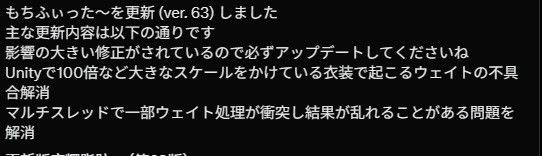 63r update bump
 -
@violetrose @sukjaz @en1gma @ran_fs updated to 63r
sorry i wasn't at home this weekend
-
Anyone have any experience creating a profile themselves?
I'm currently struggling to create a profile for a niche avatar using the semi-poor translations of the docs, but the results end up rather poorly. My issue seems to be that the mesh-deformation shape key I create in Blender seems to be outright ignored during the fitting, ending up with clothing that is merely fitted to the skeleton-changed but not shapekey-changed version of the body.
There are no error messages in Blender or Unity and the FAQ's don't seem to include my issue. -
Anyone have any experience creating a profile themselves?
I'm currently struggling to create a profile for a niche avatar using the semi-poor translations of the docs, but the results end up rather poorly. My issue seems to be that the mesh-deformation shape key I create in Blender seems to be outright ignored during the fitting, ending up with clothing that is merely fitted to the skeleton-changed but not shapekey-changed version of the body.
There are no error messages in Blender or Unity and the FAQ's don't seem to include my issue.@vagakZemenis
Need to add the Blender Shape blend shape in the avatar profile, and directly export the Blender Shape from the original niche avatar as a file named (deformation_/avatar name/shape/Blender Shape name/.npz). Remember to check Save Self Shape Key Transform. -
@vagakZemenis
Need to add the Blender Shape blend shape in the avatar profile, and directly export the Blender Shape from the original niche avatar as a file named (deformation_/avatar name/shape/Blender Shape name/.npz). Remember to check Save Self Shape Key Transform.@kuriko Thanks for the response - right after I struggled for a few hours trying to figure this out I finally figured out the issue translating various posts in the Discord: My Blender version was the wrong one. Despite the official guide mentioning Blender 5.x at multiple points, anything above Blender 4.5 is NOT supported by the add-on. It will seem as though everything is working, not throw a single error during the process or in the log files, but simply not work.
If anyone else is reading this the solution is as follows: Use a clean Blender 4.5 install as it can still open Blender 5.x files. -
@minene-uryu
 64r update bump








Hello! It looks like you're interested in this conversation, but you don't have an account yet.
Getting fed up of having to scroll through the same posts each visit? When you register for an account, you'll always come back to exactly where you were before, and choose to be notified of new replies (either via email, or push notification). You'll also be able to save bookmarks and upvote posts to show your appreciation to other community members.
With your input, this post could be even better 💗
Register Login