
GIFT: Mochi Fitter ( もちふぃった~ ) 70r
-
@mel1242 i'm going to check the file. The official Booth Page only lists 45r, so until it isn't updated there, i won't update my main post.
Similar reason as to why i list mirrors as mirrors and not the main download: i can only guarantee for my own uploads to be unaltered (or if altered, i notify about it)
noticeable is, that the one you linked has a last modified date of 4 minutes before 45r
and the size increase is the addition of a moe to Beryl config.
everything else (all other Config files and the script itself) is identical.
In this case, it wouldn't even be an update. -
 P PRAWCIN referenced this topic on
-
I hope there is a profile for https://avatar.booth.pm/items/2631549. If not, I hope someone makes one.
-
Thank youu!

-
@6675636b796f75 @erisviolet @nixas updated to 45r
@minene-uryu
update bumpIn Japan, users and creators tend to place strong importance on manners and community norms, and they often try to encourage people to legitimately purchase avatars, outfits, and other items on BOOTH. When they learn that assets are being shared illegally, they tend to form a common enemy and attempt to impose social sanctions.
Because of that, sites that distribute assets like the ones here are extremely valuable to me, and the idea of going out of my way to purchase them feels completely ridiculous.
Just like in Grand Theft Auto V, let’s steal the assets, throw them into a duffel bag, and share them with the people who want them.
In particular, when playing VRC, you should be careful about entering worlds that have a large number of Japanese users.
-
@minene-uryu
update bump -
thanks a million, mochi fitter is such a lifesaver
-
Finally trying out Mochifitter and this is making me feel stupid... I added the package to my unity project, and it just, isn't showing up under tools? Any recommendations?
-
Finally trying out Mochifitter and this is making me feel stupid... I added the package to my unity project, and it just, isn't showing up under tools? Any recommendations?
@YukiaMariaVRC Be sure that Blender is installed on your PC. Install the default mochifitter, then install it in the tools, once installed add the mochi fitter for your model. hope that helps.
-
@tokeineko Thank you! I did manage to figure it out sort of. Not sure exactly what, but something was conflicting with the project I had, creating an entire new project helped. Still not sure what was conflicting. No unity errors were thrown at me.
-
 S sei referenced this topic on
-
Hmm I see to have an issue with this tool now.... It will get to around 79-85% and it will just break? It will get stuck just show a REALLY REALLY long amount of time on the "Elapsed Time" area..? Not sure if I broke my unity project or what. Anyone else having this issue?
Edit: Yea ignore me. I just nuked the files and readded it to the project. Its working now
 Probably just my cursed PC now
 -
Hey so I'm using mochiffiter to convert some clothes for Kumaly, and for some reason, a particular top won't retarget? Every time I try it says it fails. I bought this top rigged for Manuka so I can put it into mochifitter and fit it for Kumaly, I've done the same for Milltina too but the results are the same. So please if anyone knows why this is happening, please reply! These are the errors I'm getting:
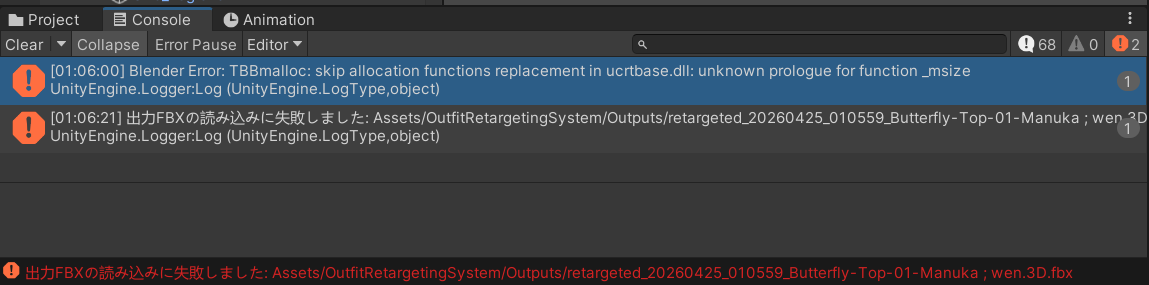
The top in question:
https://wen3d.com/b/e2WpDSide Note: I've also used other booth assets from this creator with mochifitter and the same thing happens. So i'm not sure if it's how they rigged or set up the meshes or whatever.
-
not all outfits will work with Mochifitter. I had that happen with a Shinano outfit not able to retarget for another model.
@TokeiNeko ugh that sucks, this top is so cute too

-
This post is deleted!
-
Anon / Muromu Mochifitter profile:
-
-
Not sure if anyone is also having this issue, or if this is just standard behaviour, but every time I add Mochifitter to a different project and open it, I'm prompted to download and install Blender all over again. Is this normal, or am I doing something wrong?
@advan I do believe it's attached to the project files
-
 F FishSticks referenced this topic on
-
@minene-uryu
new update to 47r as of 5/7@Cancerus Are you sure? when i check my purchases, it isn't there









Hello! It looks like you're interested in this conversation, but you don't have an account yet.
Getting fed up of having to scroll through the same posts each visit? When you register for an account, you'll always come back to exactly where you were before, and choose to be notified of new replies (either via email, or push notification). You'll also be able to save bookmarks and upvote posts to show your appreciation to other community members.
With your input, this post could be even better 💗
Register Login