
What base do You use, & Why? Balancing identity, obsecurity, and customization.
-
Honestly, Selestia's been my go-to simply because of the sheer amount of available outfits/extras for her, although I like Shinra's a bit more overall. Although I AM pretty new to all of this, still mostly experimenting so I've been avoiding anything that, for example, requires blender.
Dumb question though for anyone more "expert" than me, which base would you say has the breasts that end up looking "bigger"? Of course, cranking up the relative blendshape to maximum. Because I feel like it's still Shinra's, but it may just be me. Would like to hear what everyone else thinks.
-
Honestly, Selestia's been my go-to simply because of the sheer amount of available outfits/extras for her, although I like Shinra's a bit more overall. Although I AM pretty new to all of this, still mostly experimenting so I've been avoiding anything that, for example, requires blender.
Dumb question though for anyone more "expert" than me, which base would you say has the breasts that end up looking "bigger"? Of course, cranking up the relative blendshape to maximum. Because I feel like it's still Shinra's, but it may just be me. Would like to hear what everyone else thinks.
Whenever I happen to see a model with super exaggerated proportions it tends to be Selestia, though a great deal of them are further edited to make their proportions larger, I think compared to some of the more common models, her chest tends to look larger. When using Shinra for the brief amount that I have I never really made her chest any larger than what it was by default so I can't say too much on that front.
[Unity/Blender Support]
If you need help with anything, please ask. -
Whenever I happen to see a model with super exaggerated proportions it tends to be Selestia, though a great deal of them are further edited to make their proportions larger, I think compared to some of the more common models, her chest tends to look larger. When using Shinra for the brief amount that I have I never really made her chest any larger than what it was by default so I can't say too much on that front.
@boofbug Thanks for replying! Although I think for Selestia there's outright an asset that enlarges them waaay beyond their limit, so that's probably what you're talking about! No idea how well that plays with just about any outfit though ahahah. But thank you for the reply!~
-
@Forestaller
Are you asking about matching skin tones?
The way that I do this is by getting both models photoshop files because they normally have each layer separated and then selecting which color I want in particular with the dropper tool, and then coloring the base layer to match. (usually I decide to match the head to the body color since I find this to be way simpler)
You don't need the base of the face to be exact, but its important to make the 'shadow' part as close as possible so that the seem is less noticeable. You should also make sure both of the materials have the exact same properties so they look as close as possible.If this is something you need further help with I don't mind assisting to the best of my ability^
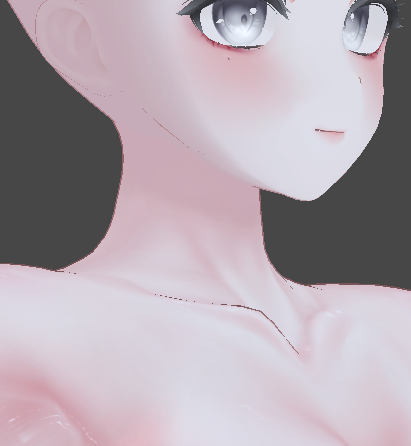
(You can see the gap if you're searching for it, but the hair will end up obscuring it anyways)@bdawg Hey, if you wouldn't mind would you kindly assist me in matching skin tones? The body has a psd file, the head does not, not sure how difficult that makes things, but on what to do next after putting both the psd and png into PS. I have an idea of what may be next with color picker, brush, but if you could suffer writing what you normally do I'd really appreciate it. Just tried midway typing this and had some issues. If either here or a direct message would be better going forward, if so, as well.


Hello! It looks like you're interested in this conversation, but you don't have an account yet.
Getting fed up of having to scroll through the same posts each visit? When you register for an account, you'll always come back to exactly where you were before, and choose to be notified of new replies (either via email, or push notification). You'll also be able to save bookmarks and upvote posts to show your appreciation to other community members.
With your input, this post could be even better 💗
Register Login