Skip to content
  • Categories
  • Recent
  • Tags
  • Popular
Skins
  • Light
  • Brite
  • Cerulean
  • Cosmo
  • Flatly
  • Journal
  • Litera
  • Lumen
  • Lux
  • Materia
  • Minty
  • Morph
  • Pulse
  • Sandstone
  • Simplex
  • Sketchy
  • Spacelab
  • United
  • Yeti
  • Zephyr
  • Dark
  • Cyborg
  • Darkly
  • Quartz
  • Slate
  • Solar
  • Superhero
  • Vapor

  • Default (Zephyr)
  • No Skin
Collapse
RipperStore Logo
  1. Home
  2. Assets
  3. Looking for...
  4. Uncategorized
  5. LF Kikyo Columbina

LF Kikyo Columbina

Scheduled Pinned Locked Moved Uncategorized
32 Posts 16 Posters 3.8k Views 11 Watching
  • Oldest to Newest
  • Newest to Oldest
  • Most Votes
Reply
  • Reply as topic
Log in to reply
This topic has been deleted. Only users with topic management privileges can see it.
  • SirinS Sirin

    Welp, i since looks like nobody gonna share it with us i did my best to Rip the Hairpiece, textures and Coat, Hope ya'll enjoy 🙂

    🔗 Download Link (drive.google.com)
    b97bc2c0-aa0a-48f9-8181-c7547a902273-image.png
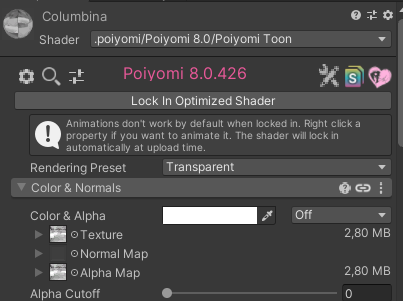
    to make the face mask transparent just do this above ^

    ikenaI
    ikenaI
    ikena
    wrote on last edited by
    #21

    @Sirin I was wondering if you would be able to reupload this? It's okay if not!!

    SirinS 1 Reply Last reply
    0
    • ikenaI ikena

      @Sirin I was wondering if you would be able to reupload this? It's okay if not!!

      SirinS
      SirinS
      Sirin
      wrote on last edited by
      #22

      @ikena i already lost the file, srry 😞

      ikenaI 1 Reply Last reply
      0
      • SirinS Sirin

        @ikena i already lost the file, srry 😞

        ikenaI
        ikenaI
        ikena
        wrote on last edited by
        #23

        @Sirin No worries!! Thanks for trying!

        1 Reply Last reply
        0
        • SirinS Sirin

          Welp, i since looks like nobody gonna share it with us i did my best to Rip the Hairpiece, textures and Coat, Hope ya'll enjoy 🙂

          🔗 Download Link (drive.google.com)
          b97bc2c0-aa0a-48f9-8181-c7547a902273-image.png
          to make the face mask transparent just do this above ^

          SukendoS
          SukendoS
          Sukendo
          wrote on last edited by
          #24

          @Sirin reupload? pls

          A

          1 Reply Last reply
          0
          • T
            T
            tinadi
            wrote on last edited by
            #25

            Please reupload!

            1 Reply Last reply
            0
            • System moved this topic from Looking for... on
            • SparxiConS
              SparxiConS
              SparxiCon
              wrote on last edited by
              #26

              please reupload

              1 Reply Last reply
              0
              • LinzeL
                LinzeL
                Linze
                wrote on last edited by Linze
                #27

                There's a way to obtain the accessory from GI assets by offered HoYoToon Assets
                https://assets.hoyotoon.com/s/assets?dir=/Genshin Impact/Characters/Columbina/Default

                and U need to prepare the Hoyo2VRC and process the model in Blender. It isn't difficult
                Delete the Mesh of the model part that u don't need in Edit Mode like base body and Face, only accessory
                Your process shouldn't affect any bone.

                export the processed model (make sure u choose the Unity platform in Hoyo2VRC's Export, and reset the "X,Y,Z" scale, smth)
                then modify it in Unity

                https://github.com/Hoyotoon/Hoyo2VRC
                image.png

                Free sharing is a costly charity.
                Once sharing becomes others' resale, that's a monopoly.

                I respect every creator and any takedown request. Please contact me using the forum function first before you decide to do anything that exposes me on social media. Thank you.

                SparxiConS 1 Reply Last reply
                0
                • LinzeL Linze

                  There's a way to obtain the accessory from GI assets by offered HoYoToon Assets
                  https://assets.hoyotoon.com/s/assets?dir=/Genshin Impact/Characters/Columbina/Default

                  and U need to prepare the Hoyo2VRC and process the model in Blender. It isn't difficult
                  Delete the Mesh of the model part that u don't need in Edit Mode like base body and Face, only accessory
                  Your process shouldn't affect any bone.

                  export the processed model (make sure u choose the Unity platform in Hoyo2VRC's Export, and reset the "X,Y,Z" scale, smth)
                  then modify it in Unity

                  https://github.com/Hoyotoon/Hoyo2VRC
                  image.png

                  SparxiConS
                  SparxiConS
                  SparxiCon
                  wrote on last edited by
                  #28

                  @Linze Does it also import the hair/clothes armature?

                  LinzeL 1 Reply Last reply
                  0
                  • SparxiConS SparxiCon

                    @Linze Does it also import the hair/clothes armature?

                    LinzeL
                    LinzeL
                    Linze
                    wrote on last edited by
                    #29

                    @SayaKoshaciy armature is included in the FBX, Blender/Unity will import them yep, but DO NOT select the "apply Transforms" before import in Blender

                    Free sharing is a costly charity.
                    Once sharing becomes others' resale, that's a monopoly.

                    I respect every creator and any takedown request. Please contact me using the forum function first before you decide to do anything that exposes me on social media. Thank you.

                    1 Reply Last reply
                    0
                    • P
                      P
                      pauln.123456
                      wrote on last edited by
                      #30

                      I want this exact one

                      1 Reply Last reply
                      0
                      • M
                        M
                        maple tree
                        wrote on last edited by
                        #31

                        bump

                        1 Reply Last reply
                        0
                        • StellashineS
                          StellashineS
                          Stellashine
                          wrote on last edited by
                          #32

                          bump

                          1 Reply Last reply
                          0

                          Hello! It looks like you're interested in this conversation, but you don't have an account yet.

                          Getting fed up of having to scroll through the same posts each visit? When you register for an account, you'll always come back to exactly where you were before, and choose to be notified of new replies (either via email, or push notification). You'll also be able to save bookmarks and upvote posts to show your appreciation to other community members.

                          With your input, this post could be even better 💗

                          Register Login
                          Reply
                          • Reply as topic
                          Log in to reply
                          • Oldest to Newest
                          • Newest to Oldest
                          • Most Votes


                          • Login

                          • Login or register to search.
                          • First post
                            Last post
                          0
                          • Categories
                          • Recent
                          • Tags
                          • Popular