
GIFT: Evrine by Asphyxiya {PC, QUEST, GREEN}
-
@Lunella_gremlin
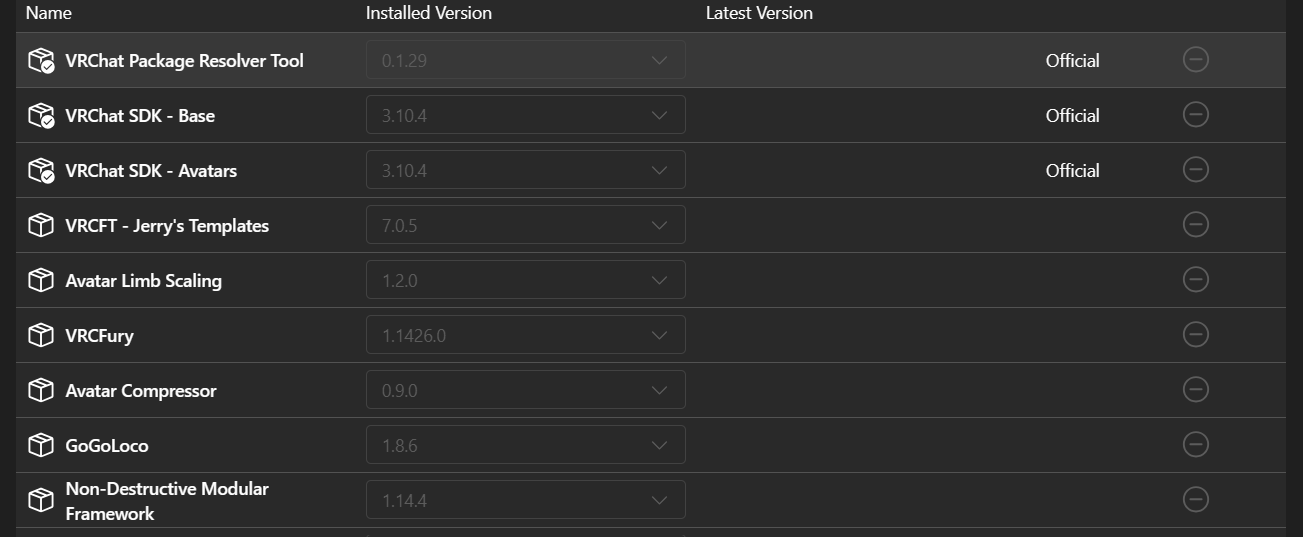 this is what i use
@Pinkcatgirl which version did you upload??? its not working for me i have the same versions for everything and all
-
@Lunella_gremlin
this is what i use@Pinkcatgirl also when i upload the green version it says none of the shaders are compatible with android
this is the mesage:You are currently building an avatar for Android/Quest/iOS and are using shaders that are not mobile compatible. You have likely switched build target by mistake and simply need to switch back to Windows mode using the VRChat SDK Control Panel. If you have not switched by mistake and want to build for mobile, you will need to change your materials to use shaders found in VRChat/Mobile.
Face 3 in Body
Norn 2 in Body
HAIR 9 in Body
Body 6 in Body
Eyes 1 in Body
Stocking 3 in Body
SoutBody 10 in Body -
@Pinkcatgirl also when i upload the green version it says none of the shaders are compatible with android
this is the mesage:You are currently building an avatar for Android/Quest/iOS and are using shaders that are not mobile compatible. You have likely switched build target by mistake and simply need to switch back to Windows mode using the VRChat SDK Control Panel. If you have not switched by mistake and want to build for mobile, you will need to change your materials to use shaders found in VRChat/Mobile.
Face 3 in Body
Norn 2 in Body
HAIR 9 in Body
Body 6 in Body
Eyes 1 in Body
Stocking 3 in Body
SoutBody 10 in BodyTurns out i could just not do the facetracking version

-
@Pinkcatgirl also when i upload the green version it says none of the shaders are compatible with android
this is the mesage:You are currently building an avatar for Android/Quest/iOS and are using shaders that are not mobile compatible. You have likely switched build target by mistake and simply need to switch back to Windows mode using the VRChat SDK Control Panel. If you have not switched by mistake and want to build for mobile, you will need to change your materials to use shaders found in VRChat/Mobile.
Face 3 in Body
Norn 2 in Body
HAIR 9 in Body
Body 6 in Body
Eyes 1 in Body
Stocking 3 in Body
SoutBody 10 in Body@Lunella_gremlin you dont need to import the shaders the PC side needs. you do not import any shaders at all with the quest and green.
Hello! It looks like you're interested in this conversation, but you don't have an account yet.
Getting fed up of having to scroll through the same posts each visit? When you register for an account, you'll always come back to exactly where you were before, and choose to be notified of new replies (either via email, or push notification). You'll also be able to save bookmarks and upvote posts to show your appreciation to other community members.
With your input, this post could be even better 💗
Register Login