
Skip to content
  • Categories
  • Recent
  • Tags
  • Popular
Skins
  • Light
  • Brite
  • Cerulean
  • Cosmo
  • Flatly
  • Journal
  • Litera
  • Lumen
  • Lux
  • Materia
  • Minty
  • Morph
  • Pulse
  • Sandstone
  • Simplex
  • Sketchy
  • Spacelab
  • United
  • Yeti
  • Zephyr
  • Dark
  • Cyborg
  • Darkly
  • Quartz
  • Slate
  • Solar
  • Superhero
  • Vapor

  • Default (Zephyr)
  • No Skin
Collapse
RipperStore Logo
  1. Home
  2. Assets
  3. Looking for...
  4. Furry Avatars
  5. FOUND KIRI by Subboki3D

FOUND KIRI by Subboki3D

Scheduled Pinned Locked Moved Solved Furry Avatars
nsfwmonkeyfurryfemalecute
44 Posts 20 Posters 1.8k Views 14 Watching
  • Oldest to Newest
  • Newest to Oldest
  • Most Votes
Reply
  • Reply as topic
Log in to reply
This topic has been deleted. Only users with topic management privileges can see it.
  • K
    K
    kettle
    wrote on last edited by
    #41

    was anyone able to upload theirs? mine is just giving script errors

    ImanipooI 1 Reply Last reply
    0
    • T
      T
      thatfag100
      wrote last edited by
      #42

      https://vrmodels.store/avatars/57038-kiri.html#pid=6

      1 Reply Last reply
      0
      • ImanipooI
        ImanipooI
        Imanipoo
        wrote last edited by
        #43
        This post is deleted!
        1 Reply Last reply
        0
        • K kettle

          was anyone able to upload theirs? mine is just giving script errors

          ImanipooI
          ImanipooI
          Imanipoo
          wrote last edited by Imanipoo
          #44

          @kettle
          I did some problem-solving on my own and found that this worked for me and might work for you or anyone else trying to upload this avatar:

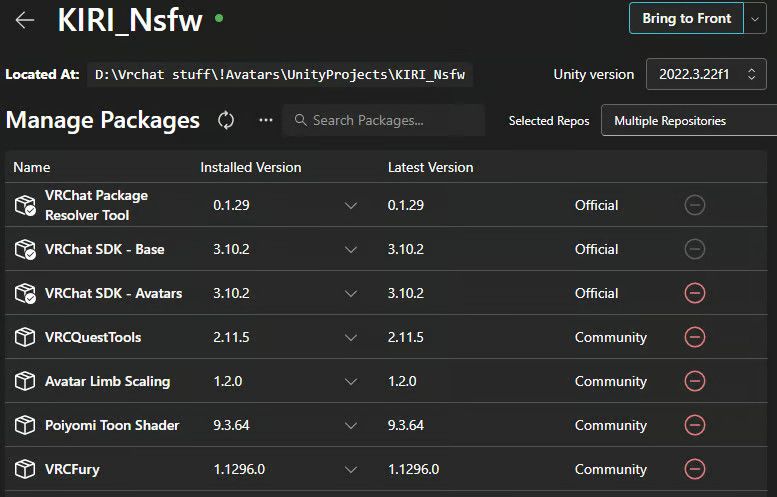
          Create a new project and add these VCC Packages one by one.
          VRChat Package Resolver Tool, VRCQuestTools, Poiyomi Toon Shader, VRCFury and Avatar Limb Scaling.
          MAKE SURE THE VERSIONS MATCH THE ONE IN THE PICTURE.
          301d257e-f014-4147-afe8-3d028a167203-image.jpeg

          After adding these packages, open the project, add the Avatar Unity Package, and make sure everything is correct and to your liking.
          Go through each material and turn the shader from "Hidden/Locked" to "Poiyomi Toon."
          Before uploading, review any alerts and auto-fix anything that needs auto-fixing.

          If all of that does not work, try reopening the project after doing all of these things.

          1 Reply Last reply
          0

          Hello! It looks like you're interested in this conversation, but you don't have an account yet.

          Getting fed up of having to scroll through the same posts each visit? When you register for an account, you'll always come back to exactly where you were before, and choose to be notified of new replies (either via email, or push notification). You'll also be able to save bookmarks and upvote posts to show your appreciation to other community members.

          With your input, this post could be even better 💗

          Register Login
          Reply
          • Reply as topic
          Log in to reply
          • Oldest to Newest
          • Newest to Oldest
          • Most Votes


          • Login

          • Login or register to search.
          • First post
            Last post
          0
          • Categories
          • Recent
          • Tags
          • Popular